11
02
03
04
05
06
07
08
Connect an Ethernet cable (not included) to the NETWORK connection
on your View21 box.
Connect the other end of the Ethernet cable to a free Ethernet socket
on the back of your router.
If you are unable to connect the View21 box to your router using either WiFi
or an Ethernet cable, alternative methods are available such as Home Plugs/
Ethernet over power adaptors.
01
Setting up
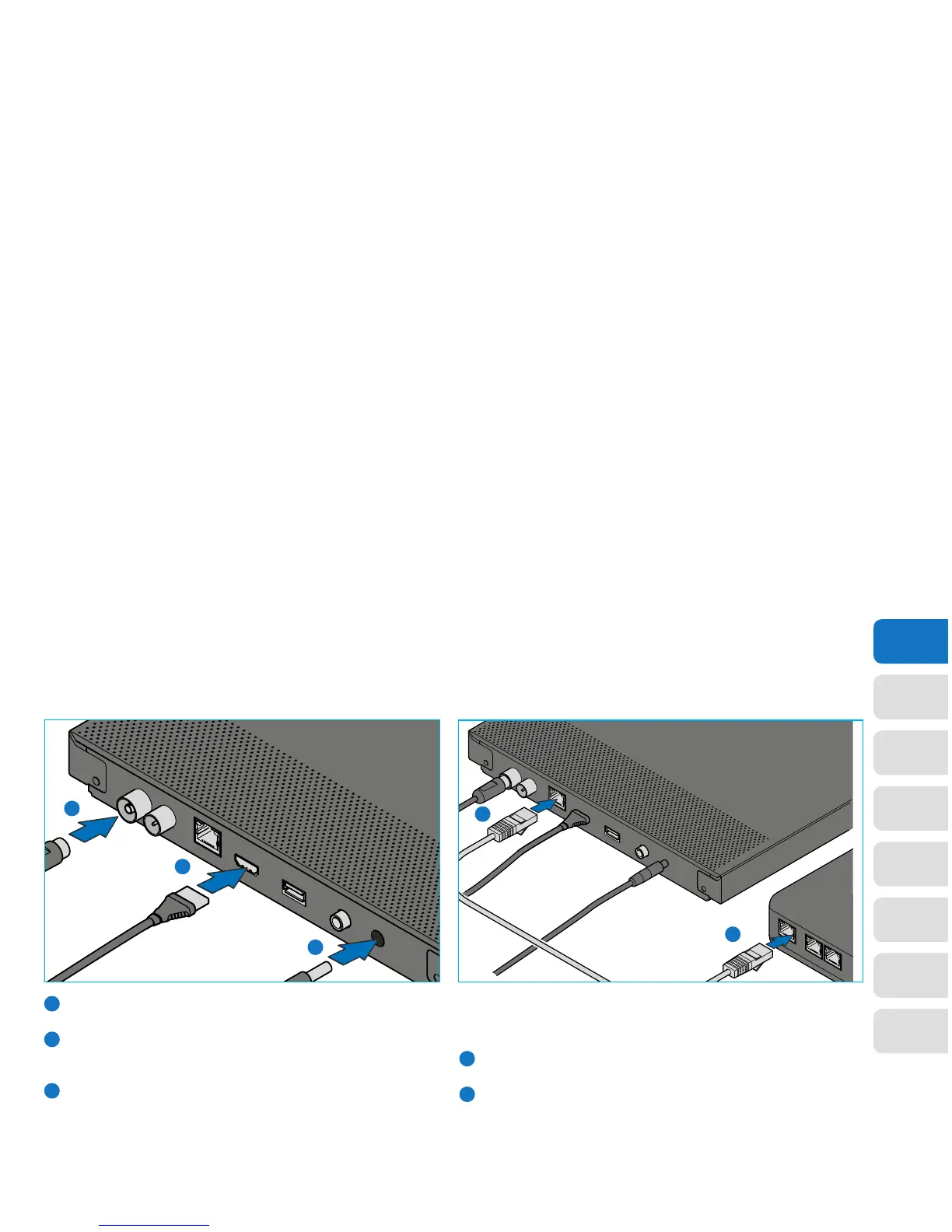
Connecting via HDMI Internet connection via Ethernet cable
1
1
2
1
2
2
Connect the aerial cable between the RF IN socket on
your View21 box and your external aerial wall socket.
Connect the HDMI cable between the HDMI socket
on the back of your View21 box and an HDMI socket
on your HD Ready TV.
Connect the power supply to the DC IN connection
on the back of your View21 box and connect the
3 Pin Plug to a power socket.
1
2
3
3
If you plan to connect to the internet via WiFi, skip this step and continue with
setting up your View21 box.
To connect to an internet router using an Ethernet cable:


 To Next Page