TELETEXT
- (Designed for Europe
PAL/SECAM/DVB-T systems
only)
TELETEXT
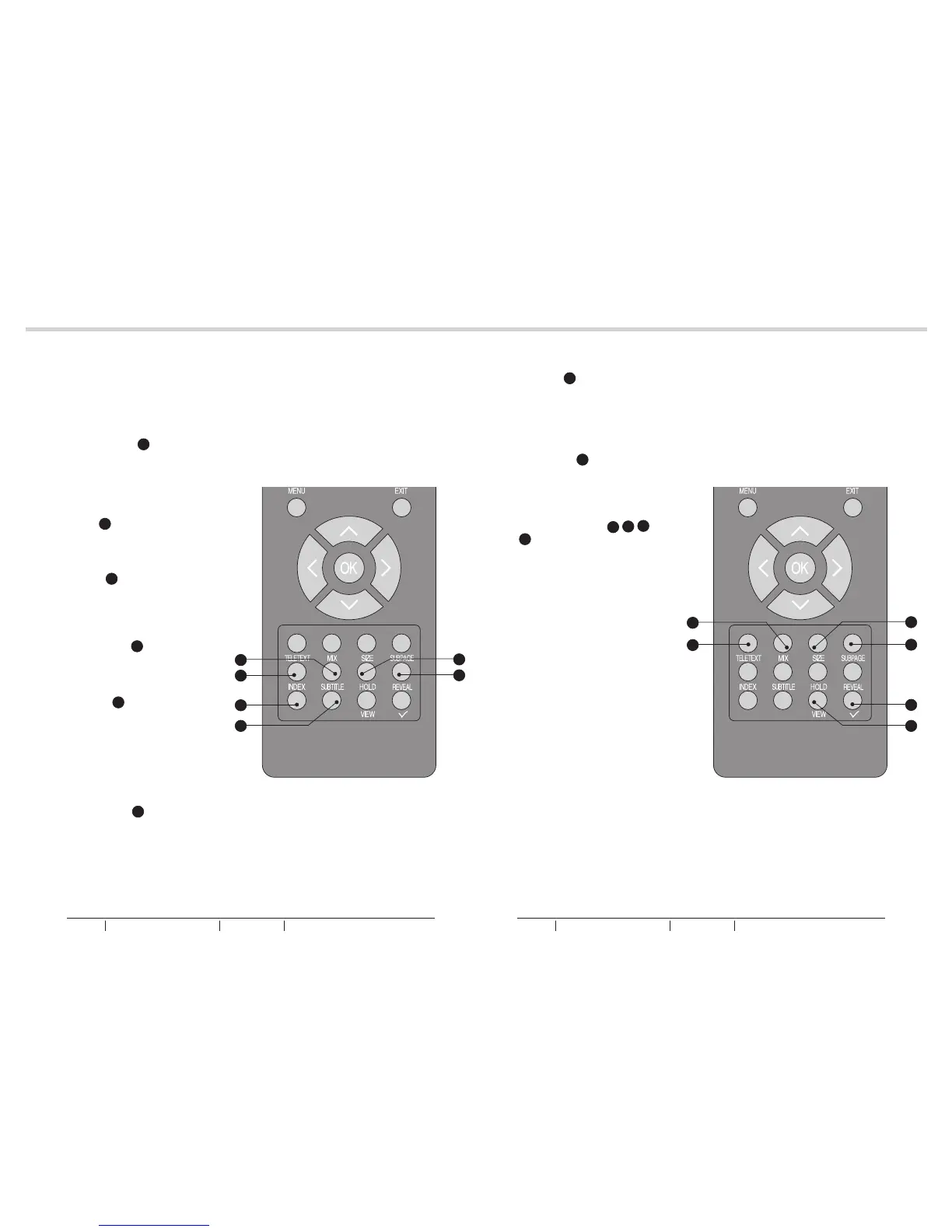
- Press TELETEXT g to activate
Teletext. Press again to turn off
Teletext.
See fig. 51.
MIX
- Press MIX f to activate Teletext
overlaying the TV picture.
SIZE
- Press SIZE h to change the
screen size: Full screen, Top half
and Bottom half.
SUBPAGE
- Press SUBPAGE k to display the
sub page (when available)
INDEX
- Press INDEX m to return to page
100 or the index page; and then
press 0 to 9. The teletext page
will be numbered and added to
the page you select or the
secondary item.
SUBTITLE
- Press SUBTITLE n to select the
next page marked as a subtitle
page.
HOLD
- Press HOLD q to stop the
scrolling of pages, press again to
continue.
See fig. 52.
REVEAL
- Press REVEAL p to display
hidden information such as
answers to a quiz.
R/G/Y/B (Colour button)
- Press Colour Buttons a, e, b,
and d to select from on screen
options, which have the same
coloured text.
32
33
TELETEXT TELETEXT
fig. 51 fig. 52
n
k
g
m
f
h
d
e
a
b
q
p
BUSH HD Ready Digital LCDTV User Manual Customer Helpline 0845 604 0105BUSH HD Ready Digital LCDTV User Manual Customer Helpline 0845 604 0105



 To Next Page