This document is an instruction manual for the BUSH Party Speaker, model PT-951. It provides comprehensive guidance on setting up, using, and maintaining the device, along with safety information and product support details.
Function Description:
The BUSH Party Speaker is a versatile audio device designed for playing music and audio, offering multiple input modes and sound customization options. It features Bluetooth connectivity for wireless audio streaming, a USB MP3 socket for playing music files from a USB stick, and an Aux-in mode for connecting external audio devices. The speaker also includes two microphone sockets, allowing for karaoke or public address functionality, with adjustable microphone volume and echo effects. For an enhanced audio experience, it offers an Equaliser (EQ) function with 10 preset options (Classic, Rock, Pop, Jazz, Live, Club, Dance, Hall, Soft, Flat) and a Mega Bass feature. The speaker is equipped with both front face lights (8 settings) and main speaker lights (9 settings) to add a visual element to the party atmosphere. It also includes a USB 5V/1A charge socket for charging mobile devices.
Important Technical Specifications:
- Audio output: 2 x 30W RMS at 10% THD
- RF output power: 0dB
- Power supply: Input 100-240V 50/60Hz
- Power consumption: 70W
- Auto standby time: 20 minutes
- Auto standby power consumption: 0.5W
- Aux in socket: 3.5mm
- USB charge socket: 5V/1A
- Bluetooth version: Version 4.2
- Pairing name: BUSH P-951
- Bluetooth profiles: A2DP, AVRCP
- Frequency range: 2.4GHz-2.480GHz
- Bluetooth range: Approximately 10 meters (33 feet) or less, line of sight.
Usage Features:
- Power On/Off: The speaker can be powered on using a switch at the back and put into standby mode or fully powered off using the Power/Mode button.
- Mode Selection: Easily switch between Bluetooth, Aux-in, and USB Play modes by short pressing the Power/Mode button. Plugging in a USB stick automatically overrides the current mode to USB Play.
- Bluetooth Connectivity: The speaker automatically searches for Bluetooth devices in Bluetooth mode. Users can connect their mobile devices (iPhone/iPad/Android/other phones/tablets/computers) by enabling Bluetooth and selecting "BUSH P-951" from available devices.
- USB Playback: Play MP3, WAV, and WMA music files directly from a USB stick inserted into the USB MP3 socket.
- Aux-in Mode: Connect external audio devices using a 3.5mm audio cable to the AUX IN socket.
- Volume Adjustment: A large central rotary control allows for increasing or decreasing the volume, with a maximum of 30 volume levels. Volume can also be adjusted via the remote control.
- Microphone Use: Two microphone sockets (MIC 1, MIC 2) are available. The "MIC FIRST" feature lowers music volume when a microphone is connected, ensuring the microphone can be heard. MIC VOL and MIC ECHO rotary controls on the top of the speaker allow for adjusting microphone volume and effect.
- Sound Customization:
- Equaliser (EQ): Cycle through 10 preset EQ options (Classic, Rock, Pop, Jazz, Live, Club, Dance, Hall, Soft, Flat) by repeatedly pressing the EQ button.
- Mega Bass: Toggle the Mega Bass feature on or off with a dedicated button.
- Tone Control: Adjust Bass ('b') and Treble ('t') settings (10 levels each) by short pressing the TONE button and using the volume control.
- Mute Function: Quickly mute or unmute the volume using the MUTE button on the speaker or remote control.
- Lighting Effects:
- Front Face Lights: Choose from 8 different light settings for the front face panels by repeatedly pressing the FACE button (or FACE LIGHT on the remote). Press and hold to turn them off.
- Main Speaker Lights: Select from 9 different light settings for the main speakers by repeatedly pressing the SPEAKER button (or SPK LIGHT on the remote). Press and hold to turn them off.
- USB Charging: Charge mobile devices using the USB 5V/1A charge socket with a compatible USB charging cable (not supplied).
- Playback Controls (Bluetooth/USB): Play/Pause, Skip forward, and Skip back using dedicated buttons on the speaker or remote. The REPEAT function allows repeating the current track or all tracks when playing from a USB stick.
- Trolley Wheels: The speaker is equipped with trolley wheels for easy portability.
Maintenance Features:
- General Safety: The manual emphasizes disconnecting the speaker from the mains during thunderstorms or if not used for a long period. It advises against blocking ventilation, exposing the product to moisture, water, high temperatures, or naked flame sources.
- Disposal: The product is designed with high-quality recyclable materials. Users are instructed to dispose of the old product according to local rules and the European Directive 2012/19/EC, not with normal household waste, to prevent negative environmental and health consequences.
- Troubleshooting: A dedicated troubleshooting section provides solutions for common issues such as being unable to pair with a Bluetooth device (checking mode, range, A2DP support, interference) and no sound/sound distortion (adjusting volume on both speaker and connected device).
- Help and Assistance: Users can find further guidance online at www.bush-support.com or contact customer service experts at 0345 600 3021. When calling, it's helpful to have the Model Ref., Serial number, and Date of purchase ready.
- Guarantee: The product comes with a 12-month guarantee against faults and breakdowns, subject to proper installation, operation, and domestic use. Registration is available at www.bushregistration.co.uk.

 Need help?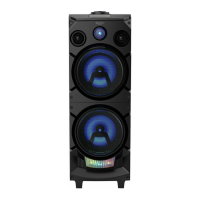

 To Next Page
 General










