Maintenance
Switch o and disconnect from the mains supply before carrying out
cleaning and maintenance.
To ensure your vacuum cleaner works at optimum eciency, keep the
ventilation holes and vacuum cleaner surface free from dirt.
Ensure that the dust container is emptied and the air filters are washed
regularly.
1. Wipe the outside of the vacuum cleaner and accessories with a damp
(not wet) cloth and then wipe dry. Do not use detergents, solvents or
abrasives as these may scratch or damage the surface.
2. Never immerse the vacuum cleaner, cable or plug in water.
3. When not in use, store in a cool, dry place.
Emptying the dust container
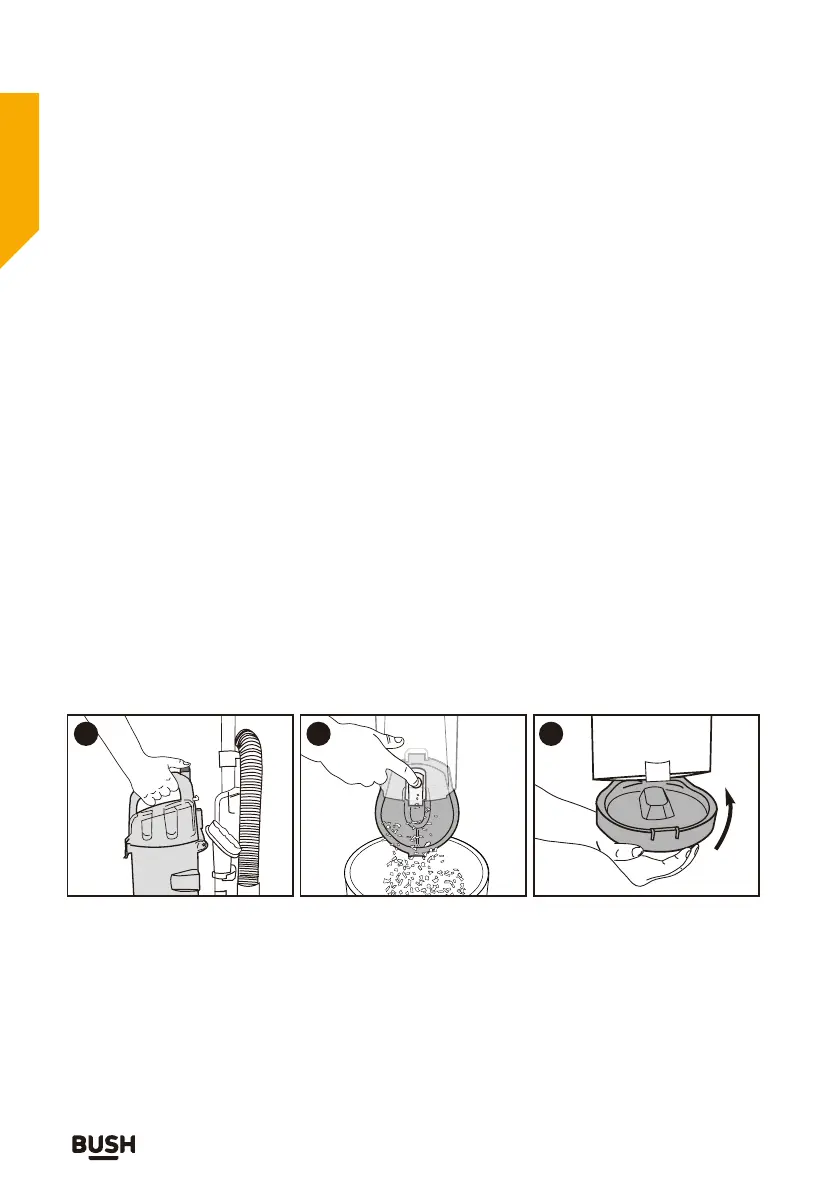
1. When the dust container reaches the MAX line marked on the dust
container or when the suction power is reduced, it is time to empty
the dust container.
2. Switch o and disconnect from the mains supply.
3. To keep your vacuum cleaner running eciently and eectively, it is
recommended to empty the dust container after each use
Care and maintenance
Looking after your appliance
If you require any technical guidance or find that your product is not operating as intended, a simple solution can often be found in the
Troubleshooting section of these instructions
22
Click!
Press release button
and lift o dust
container.
Hold dust container
over wastebasket and
press lever to release
bottom lid.
Close bottom lid until it
clicks.
1 2 3


 To Next Page