33 2022/03 - Indice de révision : A -
If from time to time, it is necessary to carry out a shock treatment of the water to treat the degraded water or
remove stains on the pool’s waterproofing membrane, take care to first hydraulically isolate the heat pump to
make sure that water is not flowing through it. Wait until the concentration of disinfectant returns to its usual
level before opening the bypass loop.
Limiting heat loss
During the initial heating phase at the beginning of the season, the pool must be covered with an
insulating cover in order to limit heat loss through evaporation and heat transfer on contact with the air.
To shorten this phase as much as possible, the heat pump, and so the filtration pump, should be left
running 24 hours a day.
After the initial heating phase, the pool should be covered with an insulating cover while it is not in use,
particularly if the ambient temperature drops significantly during the night.
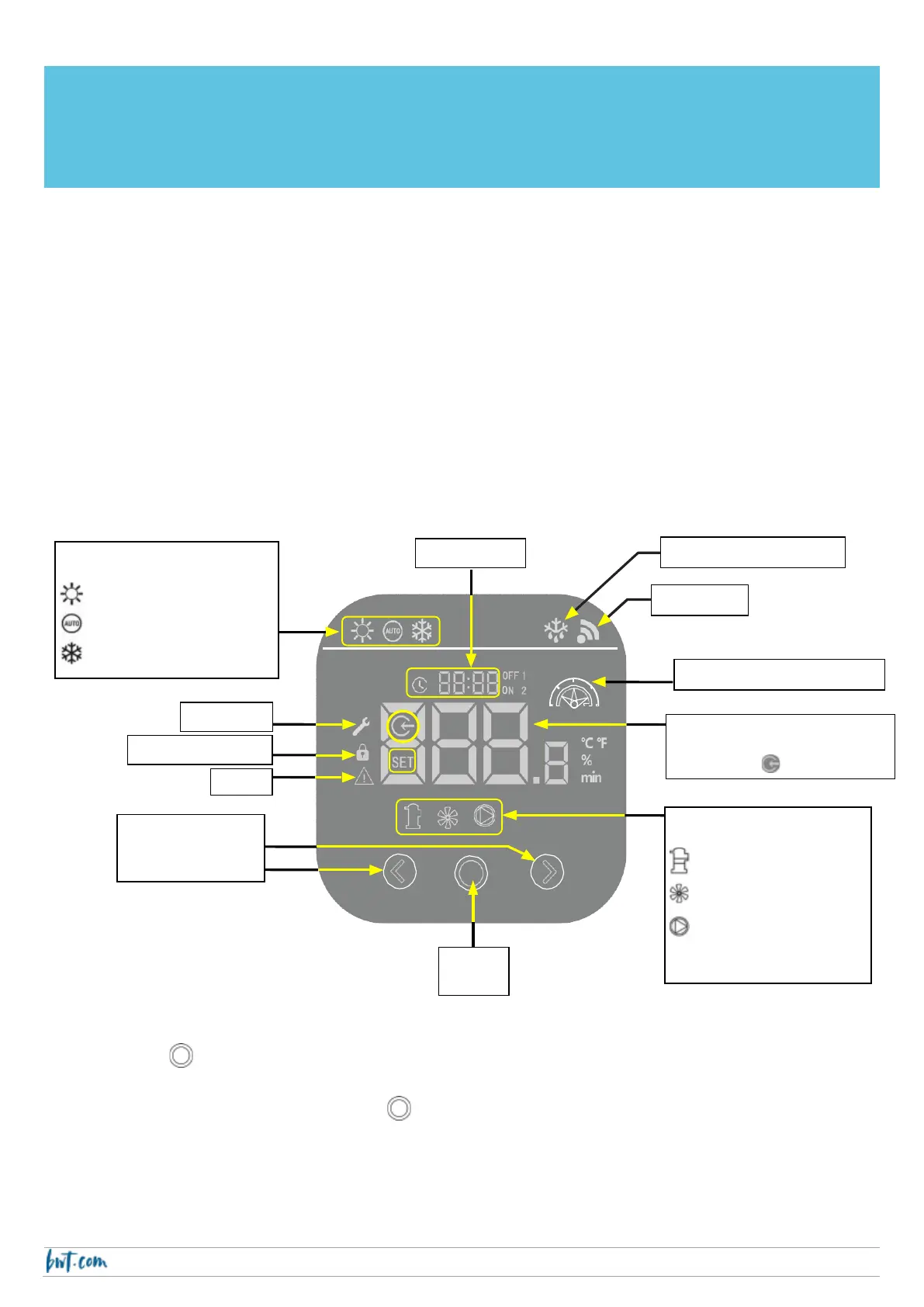
Using the control panel
Press the key down for 2 seconds to unlock the screen.
Once the screen is unlocked, press the key pressed down for 2 seconds to start, and also to
stop, the heat pump.
Compresser
Fan
Internal circulation
pump (option)
Heating
Automatic
Cooling
ON/OFF
(setpoint T°C, Time,
etc.)
Setpoint if SET is lit up



 To Next Page