- 102 -
F3DM Owner’s Manual
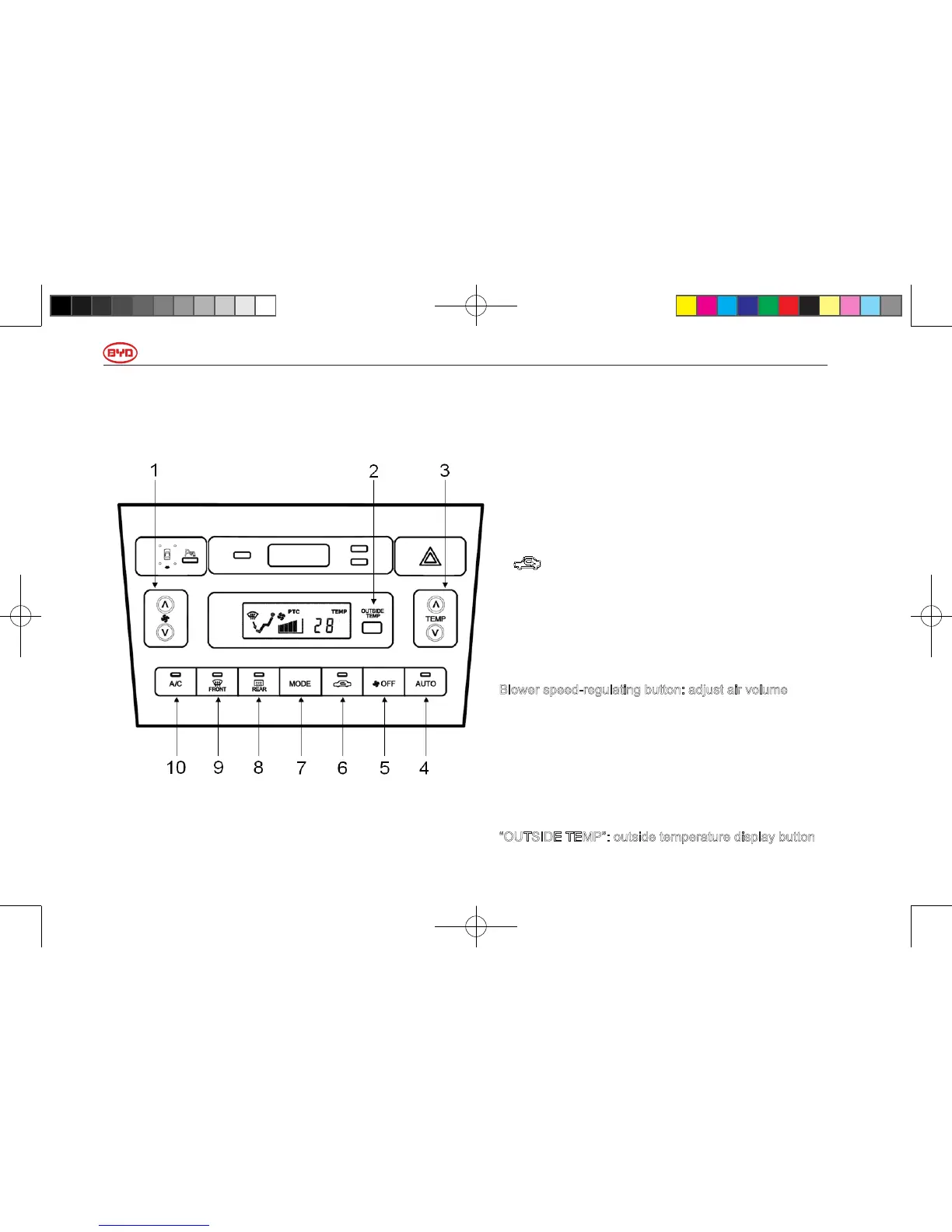
Auto Air-conditioning System – Control Panel
1. Blower speed-regulating button: adjusting air flow
button
2. “OUTSIDE TEMP”: outside temperature display
button
3. “TEMP”: air-conditioner temperature regulating button
4. “AUTO”: auto mode button
5. “OFF”: air-conditioner OFF button
6. :Internal-external recycling mode selecting button
7. “MODE”: air outlet mode selecting button
8. “REAR”: rear defrost switch
9. “FRONT”: front defrost switch
10. “A/C”: compressor on/off button
Blower speed-regulating button: adjust air volume
Press “
∧
” (increase) or “
∨
” (decrease) button to adjust
the rotating speed of blower, that is, to adjust air flow
volume.
In auto operation, the rotating speed of blower is not
required to be adjusted, unless other speed is required.
“OUTSIDE TEMP”: outside temperature display button
使用手册小330.indd102 2011-4-1318:36:48



 To Next Page