CC Skywave Page 12
Radio Operation
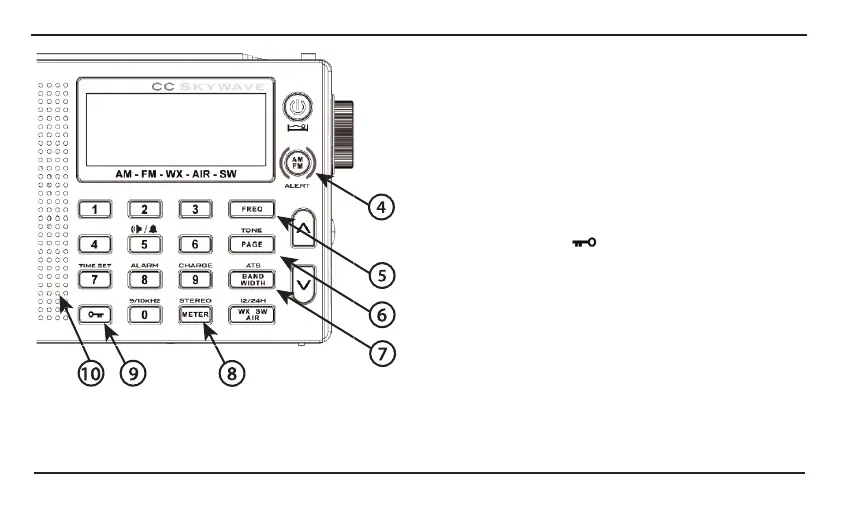
FM Mono will have better reception than FM Stereo.
Note: If a station does not broadcast in stereo, or the
radio cannot lock on to the stereo signal the radio will
only receive FM mono and the stereo symbol will not
be displayed.
9. Lock Button
The lock button will disable all buttons and controls,
except the volume control. A Key icon will display on
the screen when the radio is locked. To enable lock
press the lock button
for two seconds. To disable
press and hold again for two seconds.
10. Speaker
The speaker will be disabled when headphones are
plugged into the headphone jack.
11. WX/SW/AIR
Quickly press the “WX/SW/AIR” button to cycle
between Weather, Shortwave, and AIR bands.
Weather, Shortwave, and Air bands (See next page).
0000
cc
0000
I@)
0000
I
0000
0000
0000
0000
¢ID)
0000
0000
0000
0000
0 () (')(")
AM-FM
-WX-AIR-SW
0
-ti
00
II
0000
'©
0000
CD m
OJ
DODO
0000
0
ti
00
<
•
►
/
.&
0000
m
r~
s~
]I
OJ)
0000
0000
I
0000
'®
I
'@
'0




 To Next Page