CC Skywave Page 9
Radio Operation
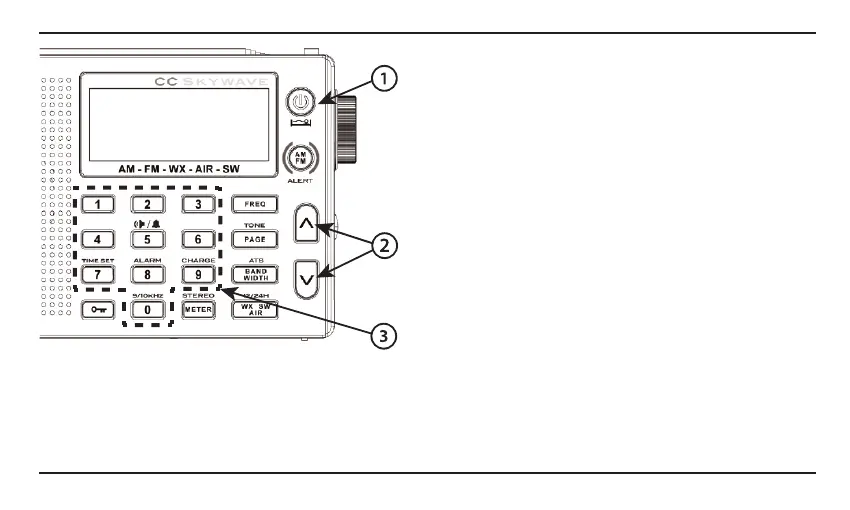
1. Power Button - Setting the Sleep Timer
To turn the radio “ON” just press the red power button. To
set the Sleep Timer, press and hold the red power button.
The Sleep Timer will automatically shut o the radio after
the set amount of time expires.The display will cycle
through minutes 120, 90, 60, 45, 30, 15, and OFF.
Release the power button to activate the sleep setting
you desire. The radio will remember your last Sleep Timer
setting for the next time you activate it.
2. Tuning Up/Down Buttons
Press once quickly to tune to the next frequency increment.
Press and hold for 2 seconds to automatically tune to the
next strong station. Hold continuously to cycle through the
whole band.
3. Memory Preset Buttons 0-9
To save your favorite stations to memory buttons press and
hold any memory button for 2 seconds while the station
is playing. To play a saved station, press the same button
once quickly. Note: The CC Skywave is a ”smart” radio and
will remember current settings when a station is preset into
0000
0000
000
0
0000
0000
000
0
0000
0000
0000
000
0
~~
g~
AM-FM-WX-AIR-SW
0
'1
00
0000
• • • • • • • • • -
0000
r"""':"""i
rr-::-,i
r-;-,
oooo
l ~
~
~ I
g~g~
I
O•
/& I
o o o o
r7"l
(I]
s-
f'7"'II
~~~~
·
~
~·
0 0 0 01
CHARGE
I
ggg
g,f
M;
H1
1
[I]
m•
0000
·--- ·--
0 Q Q Q
•IIOKHZ
S
TEREO
gggg
a •m •1
s1
I••
I'




 To Next Page