EasyManua.ls Logo

C.E.C. 530CD - Page 32

C.E.C. 530CD
62 pages
Print Icon
To Next Page IconTo Next Page
To Previous Page IconTo Previous Page
Loading...
ENGLISH
LG
Rg
LINE
OUT
Notes
for
U.K.
Customers
The
wires
in
this
mains
lead
are
coloured
in
accordance
with
the
following
code:
BLUE:
NEUTRAL
BROWN:
LIVE
As
the
colours
of
the
wires
in
the
mains
lead
of
this
apparatus
may
not
correspond
with
the
coloured
markings
identifying
the
terminals
in
your
plug
proceed
as
follows:
The
wire
which
is
coloured
BLUE
must
be
connected
to
the
terminal
which
is
marked
with
the
letter
N
or
coloured
BLACK.
The
wire
which
is
coloured
BROWN
must
be
connected
to
the
terminal
which
is
marked
with
the
letter
L
or
coloured
RED.
QOQUQ00000000
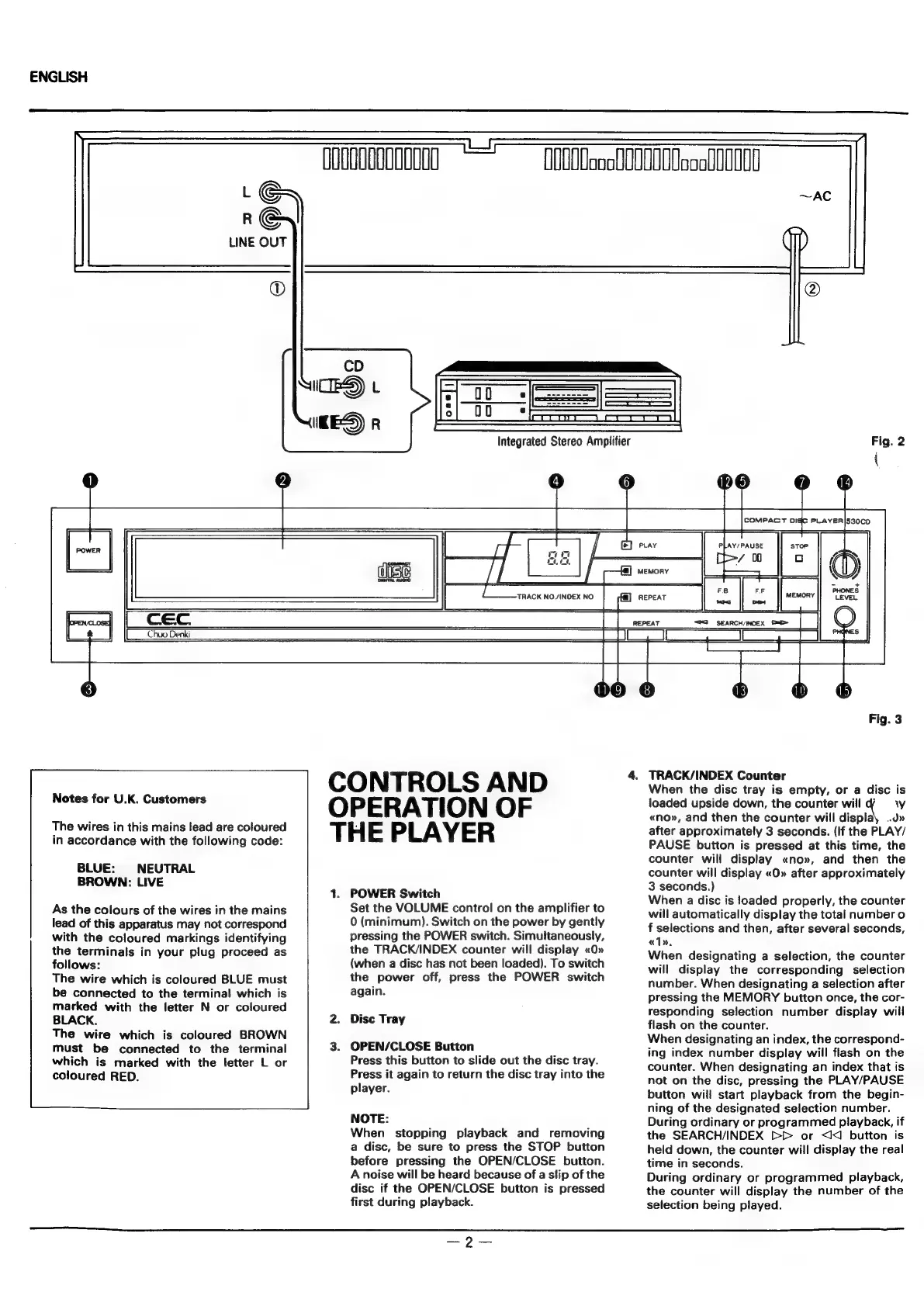
CONTROLS
AND
OPERATION
OF
THE
PLAYER
1.
POWER
Switch
Set the
VOLUME
control
on
the
amplifier
to
0
(minimum).
Switch
on
the
power
by
gently
pressing
the
POWER
switch.
Simultaneously,
the
TRACK/INDEX
counter
will
display
«0»
(when
a
disc
has
not
been
loaded).
To
switch
the
power
off,
press
the
POWER
switch
again.
Disc
Tray
OPEN/CLOSE
Button
Press
this
button
to
slide
out
the
disc
tray.
Press
it
again
to
return
the
disc
tray
into
the
player.
NOTE:
When
stopping
playback
and
removing
a
disc,
be
sure
to
press
the
STOP
button
before
pressing
the
OPEN/CLOSE
button.
A
noise
will
be
heard
because
of
a
slip
of
the
disc
if
the
OPEN/CLOSE
button
is
pressed
first
during
playback.
(O00oooU00U000ooof
00000
Fig.
3
4.
TRACK/INDEX
Counter
When
the
disc
tray
is
empty,
or
a
disc
is
loaded
upside
down,
the
counter
will
di
ow
«no»,
and
then
the
counter
will
displa
after
approximately
3
seconds.
(If
the
PLAY/
PAUSE
button
is
pressed
at
this
time,
the
counter
will
display
«no»,
and
then
the
counter
will
display
«O»
after
approximately
3
seconds.)
When
a
disc
is
loaded
properly,
the
counter
will
automatically
display
the
total
number
o
f
selections
and
then,
after
several
seconds,
«1»,
When
designating
a
selection,
the
counter
will
display
the
corresponding
selection
number.
When
designating
a
selection
after
pressing
the
MEMORY
button
once,
the
cor-
responding
selection
number
display
will
flash
on
the
counter.
When
designating
an
index,
the
correspond-
ing
index
number
display
will
flash
on
the
counter.
When
designating
an
index
that
is
not
on
the
disc,
pressing
the
PLAY/PAUSE
button
will
start
playback
from
the
begin-
ning
of
the
designated
selection
number.
During
ordinary
or
programmed
playback,
if
the
SEARCH/INDEX
>>
or
<<
button
is
held
down,
the
counter
will
display
the
real
time
in
seconds.
During
ordinary
or
programmed
playback,
the
counter
will
display
the
number
of
the
selection
being
played.
SD
—2—