EasyManua.ls Logo

C.E.C. 530CD - Page 34

C.E.C. 530CD
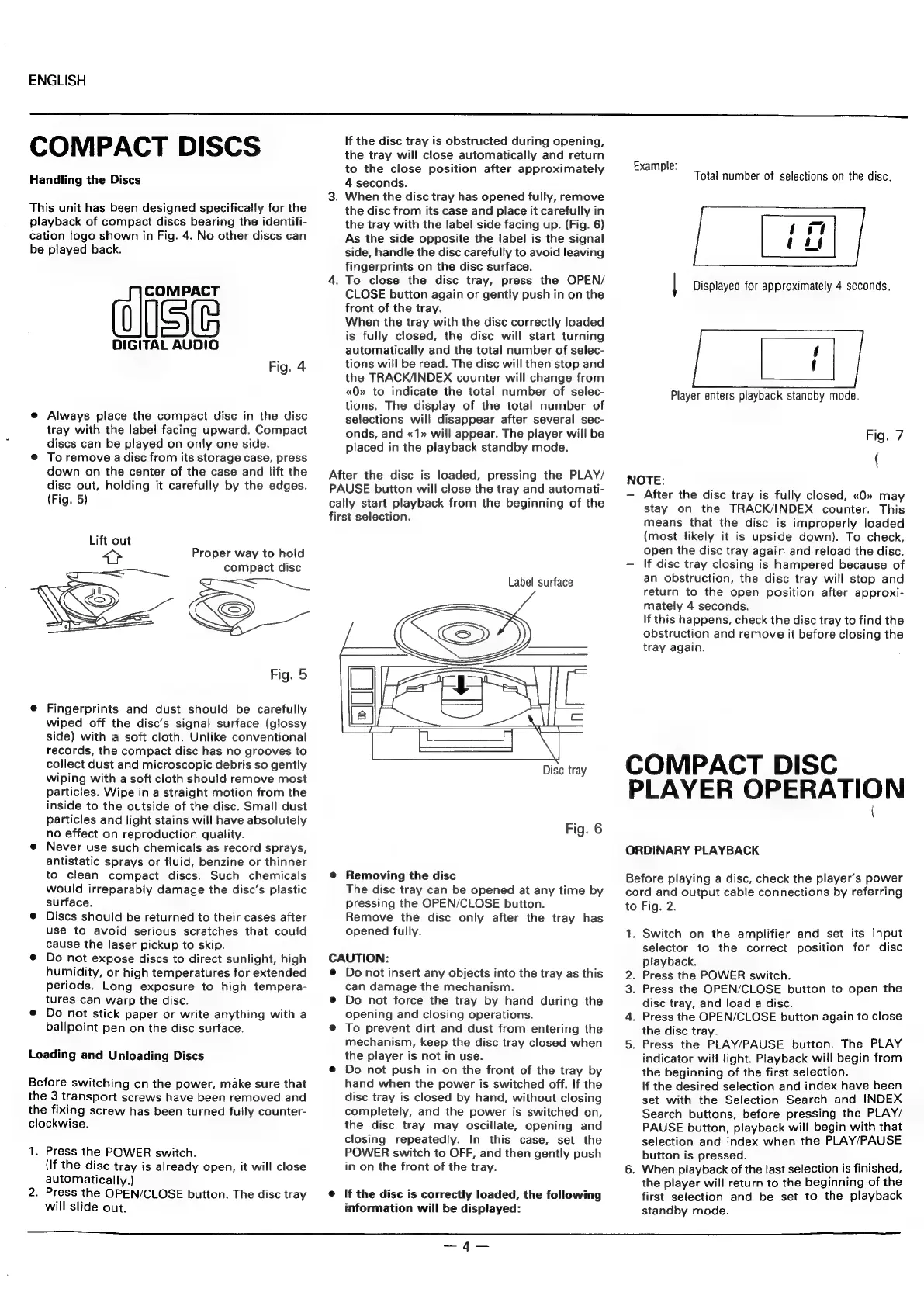
62 pages
Print Icon
To Next Page IconTo Next Page
To Previous Page IconTo Previous Page
Loading...
ENGLISH
COMPACT
DISCS
Handling
the
Discs
This
unit
has
been
designed
specifically
for
the
playback
of
compact
discs
bearing
the
identifi-
cation
logo
shown
in
Fig.
4.
No
other
discs
can
be
played
back.
COMPACT
aISe
DIGITAL
AUDIO
Fig.
4
e
Always
place
the
compact
disc
in
the
disc
tray
with
the
label
facing
upward.
Compact
discs
can
be
played
on
only
one
side.
e
To
remove
a
disc
from
its
storage
case,
press
down
on
the
center
of
the
case
and
tift
the
disc
out,
holding
it
carefully
by
the
edges.
(Fig.
5)
Proper
way
to
hold
compact
disc
SS
Fig.
5
e
Fingerprints
and
dust
should
be
carefully
wiped
off
the
disc’s
signal
surface
(glossy
side)
with
a
soft
cloth.
Unlike
conventional
records,
the
compact
disc
has
no
grooves
to
collect
dust
and
microscopic
debris
so
gently
wiping
with
a
soft
cloth
should
remove
most
particles.
Wipe
in
a
straight
motion
from
the
inside
to
the
outside
of
the
disc.
Small
dust
particles
and
light
stains
will
have
absolutely
no
effect
on
reproduction
quality.
@
Never
use
such
chemicals
as
record
sprays,
antistatic
sprays
or
fluid,
benzine
or
thinner
to
clean
compact
discs.
Such
chemicals
would
irreparably
damage
the
disc’s
plastic
surface.
®
Discs
should
be
returned
to
their
cases
after
use
to
avoid
serious
scratches
that
could
cause
the
laser
pickup
to
skip.
@
Do
not
expose
discs
to
direct
sunlight,
high
humidity,
or
high
temperatures
for
extended
periods.
Long
exposure
to
high
tempera-
tures
can
warp
the
disc.
e
Do
not
stick
paper
or
write
anything
with
a
ballpoint
pen
on
the
disc
surface.
Loading
and
Unloading
Discs
Before
switching
on
the
power,
make
sure
that
the
3
transport
screws
have been
removed
and
the
fixing
screw
has
been
turned
fully
counter-
clockwise.
1.
Press
the
POWER
switch.
(If
the
disc
tray
is
already
open,
it
will
close
automatically.)
.
Press
the
OPEN/CLOSE
button.
The
disc
tray
will
slide
out.
If
the
disc
tray
is
obstructed
during
opening,
the
tray
will
close
automatically
and
return
to
the
close
position
after
approximately
4
seconds.
3.
When
the
disc
tray
has
opened
fully,
remove
the
disc
from
its
case
and
place
it
carefully
in
the
tray
with
the
label
side
facing
up.
(Fig.
6)
As
the
side
opposite
the
label
is
the
signal
side,
handle
the
disc
carefully
to
avoid
leaving
fingerprints
on
the
disc
surface.
4.
To
close
the
disc
tray,
press
the
OPEN/
CLOSE
button
again
or
gently
push
in
on
the
front
of
the
tray.
When
the
tray
with
the
disc
correctly
loaded
is
fully
closed,
the
disc
will
start
turning
automatically
and
the
total
number
of
selec-
tions
will
be
read.
The
disc
will
then
stop
and
the
TRACK/INDEX
counter
will
change
from
«QO»
to
indicate
the
total
number
of
selec-
tions.
The
display
of
the
total
number
of
selections
will
disappear
after
several
sec-
onds,
and
«1»
will
appear.
The
player
will
be
placed
in
the
playback
standby
mode.
After
the
disc
is
loaded,
pressing
the
PLAY/
PAUSE
button
will
close
the
tray
and
automati-
cally
start
playback
from
the
beginning
of
the
first
selection.
Label
surface
2
Disc
tray
Dim
Cea
ss
Fig.
6
@
Removing
the
disc
The
disc
tray
can
be
opened
at
any
time
by
pressing
the
OPEN/CLOSE
button.
Remove
the
disc
only
after
the
tray
has
opened
fully.
CAUTION:
@
Do
not
insert
any
objects
into
the
tray
as
this
can
damage
the
mechanism.
®
Do
not
force
the
tray
by
hand
during
the
opening
and
closing
operations.
e
To
prevent
dirt
and
dust
from
entering
the
mechanism,
keep
the
disc
tray
closed
when
the
player
is
not
in
use.
@
Do
not
push
in
on
the
front
of
the
tray
by
hand
when
the
power
is
switched
off.
If
the
disc
tray
is
closed
by
hand,
without
closing
completely,
and
the
power
is
switched
on,
the
disc
tray
may
oscillate,
opening
and
closing
repeatedly.
In
this
case,
set
the
POWER
switch
to
OFF,
and
then
gently
push
in
on
the
front
of
the
tray.
@
If
the
disc
is
correctly
loaded,
the
following
information
will
be
displayed:
Example:
.
:
Total
number
of
selections
on
the
disc.
|
Displayed
for
approximately
4
seconds.
|
Player
enters
playback
standby
mode.
Fig.
7
{
NOTE:
After
the
disc
tray
is
fully
closed,
«O»
may
stay
on the
TRACK/INDEX
counter.
This
means
that
the
disc
is
improperly
loaded
(most
likely
it
is
upside
down).
To
check,
open
the
disc
tray
again
and
reload
the
disc.
If
disc
tray
closing
is
hampered
because
of
an
obstruction,
the
disc
tray
will
stop
and
return
to
the
open
position
after
approxi-
mately
4
seconds.
If
this
happens,
check
the
disc
tray
to
find
the
obstruction
and
remove
it
before
closing
the
tray
again.
COMPACT
DISC
PLAYER
OPERATION
ORDINARY
PLAYBACK
Before
playing
a
disc,
check
the
player’s
power
cord
and
output
cable
connections
by
referring
to
Fig.
2.
1.
Switch
on
the
amplifier
and
set
its
input
selector
to
the
correct
position
for
disc
playback.
2.
Press
the
POWER
switch.
3.
Press
the
OPEN/CLOSE
button
to
open
the
disc
tray,
and
load
a
disc.
4.
Press
the
OPEN/CLOSE
button
again
to
close
the
disc
tray.
5.
Press
the
PLAY/PAUSE
button.
The
PLAY
indicator
will
light.
Playback
will
begin
from
the
beginning
of
the
first
selection.
If
the
desired
selection
and
index
have
been
set
with
the
Selection
Search
and
INDEX
Search
buttons,
before
pressing
the
PLAY/
PAUSE
button,
playback
will
begin
with
that
selection
and
index
when
the
PLAY/PAUSE
button
is
pressed.
6.
When
playback
of
the
last
selection
is
finished,
the
player
will
return
to
the
beginning
of
the
first
selection
and
be
set
to
the
playback
standby
mode.
a
_eammemennamend
—4q—