EasyManua.ls Logo

C.E.C. 530CD - Page 36

C.E.C. 530CD
62 pages
Print Icon
To Next Page IconTo Next Page
To Previous Page IconTo Previous Page
Loading...
ENGLISH
PROGRAMMED
PLAYBACK
The
MEMORY,
F.F
and
F.B
buttons
allow
you
to
easily
program
the
player
to
play
only
the
selec-
tions
on
the
disc
that
you
want.
Up
to
16
selec-
tions
can
be
programmed
for
playback
in
any
desired
order.
Using
the
memory...
Use
the
MEMORY
button
only
when
the
player
is
in
the
stop
mode.
1.
Press
the
STOP
button.
2.
Select
the
playback
selections
using
the
F.F
or
F.B
button.
The
selection
number
is
dis-
played
on
the
TRACK/INDEX
counter.
.
When
the
number
of
the
desired
selection
is
displayed,
press
the
MEMORY
button.
The
MEMORY
indicator
will
light.
The
first
programmed
selection
is
now
pro-
grammed
in
the
player.
.
Select
the
next
selection
using
the
F.F
or
F.B
button.
The
selection
number
display
will
flash
on
the
TRACK/INDEX
counter.
.
Press
the
MEMORY
button.
The
selection
number
displayed
on
the
TRACK/INDEX
counter
will
stay
lit.
The
second
programmed
selection
is
now
programmed
in
the
player.
.
Continue
entering
selection
numbers
until
all
the
desired
selections
are
programmed
for.
playback
(up
to
a
total
of
16).
If
the
F.F
or
F.B
button
is
pressed
after
16
selections
have
been
designated,
the
displayed
number
on
the
TRACK/INDEX
counter
will
not
change,
remaining
at
the
selection
number
entered
last.
.
If
you
wish
to
add
a
selection
to
the
program
during
the
programmed
playback
standby
mode
(when
less
than
16
selections
have
been
entered),
press
the
MEMORY
button.
The
last
programmed
selection
will
be
dis-
played
on
the
TRACK/INDEX
counter.
Press
the
F.F
or
F.B
button
until
the
number
of
the
desired
selection
is
displayed
(flashing)
on
the
TRACK/INDEX
counter,
and
then
press
the
MEMORY
button.
The
added
selection
will
be
entered
as
the
last
programmed
selection.
NOTE:
While
the
TRACK/INDEX
counter
is
flashing,
if
the
PLAY/PAUSE
button
is
pressed,
the
flashing
number
will
not
be
programmed,
and
playback
will
begin
from
the
first
pro-
grammed
selection.
When
pressing
the
MEMORY
button
in
the
stop
mode,
without
pressing
the
F.F
button
first,
the
first
selection
on
the
disc
will
be
entered
as
program
number
1.
When
programming
with
the
disc
tray
open,
you
can
include
selection
numbers
not
pre-
sent
in
the
disc.
During
programmed
play-
back,
the
TRACK/INDEX
counter
will
display
those
selection
numbers,
then
change
auto-
maticaily
to
display
the
next
programmed
selection
number
present
in
the
disc.
Play-
back
will
begin
from
that
selection.
@
When
programming
is
finished...
1.
Press
the
PLAY/PAUSE
button.
The
PLAY
indicator
will
light.
2.
Playback
will
begin
from
the
first
programmed
selection.
3.
When
programmed
playback
is
finished,
the
selection
number
entered
last
(i.e.
the
one
displayed
on
the
TRACK/INDEX
counter)
will
remain
lit,
and
the
player
will
be
set
to
the
programmed
playback
standby
mode.
©
To
Review
Program
Contents...
1.
Press
the
STOP
button
once
to
set
the
player
to
the
programmed
playback
standby
mode
during
programmed
playback.
2.
Press
the
MEMORY
button.
The
program
contents
will
be
automatically
shown
on
the
TRACK/INDEX
counter
in
the
same
order
in
which
they
have
been
programmed.
The
selection
number
entered
last
will
be
dis-
played
on
the
TRACK/INDEX
counter,
and
then
the
player
will
be
set
to
the
programmed
playback
standby
mode.
@
To
cancel
all
the
programmed
selections...
1.
During
programmed
playback,
press
the
STOP
button
once
to
set
the
player
to
the
programmed
playback
standby
mode.
2.
Press
the
STOP
button
once
more.
The
TRACK/INDEX
counter
will
display
«1»
and
the
player
will
remain
in
the
stop
mode.
NOTE:
The
programmed
selections
will
also
be
cancel-
led
when
the
disc
tray
is
opened
or
if
the
player’s
power
is
switched
off.
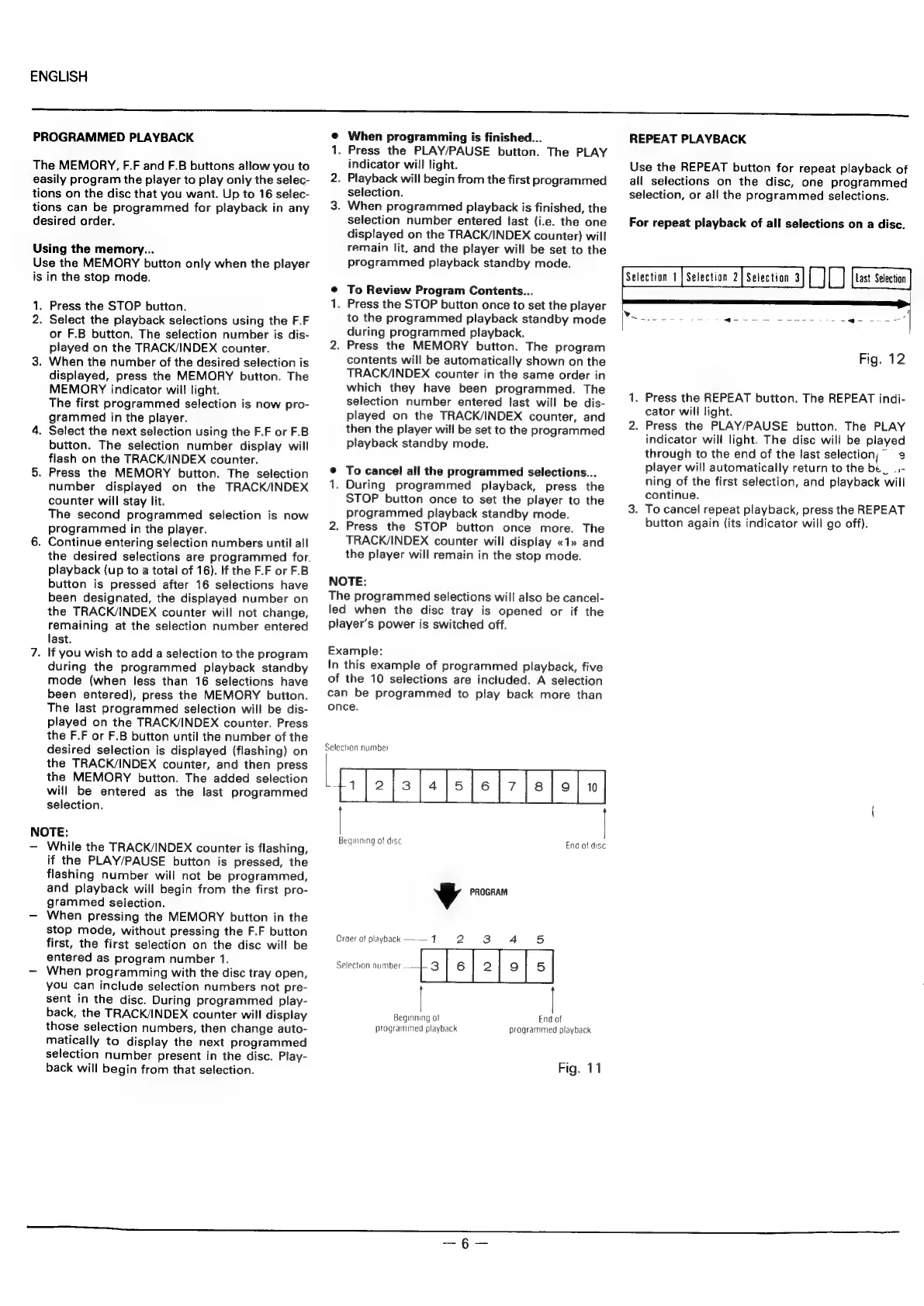
Example:
In
this
example
of
programmed
playback,
five
of
the
10
selections
are
included.
A
selection
can
be
programmed
to
play
back
more
than
once.
Selection
number
Beginning
of
disc
End
of
disc
4
PROGRAM
Craer
of
playback
—-—
17
2
3
4
5
Selection
number
Hs}
e|
2}
eo]
s|
End
of
programmed
playback
Beginning
of
programmed
playback
Fig.
11
REPEAT
PLAYBACK
Use
the
REPEAT
button
for
repeat
playback
of
all
selections
on
the
disc,
one
programmed
selection,
or
all
the
programmed
selections.
For
repeat
playback
of
all
selections
on
a
disc.
econ
1
[oaeton
t[Semctn
3]
JD]
1.
2.
Fig.
12
Press
the
REPEAT
button.
The
REPEAT
indi-
cator
will
light.
Press
the
PLAY/PAUSE
button.
The
PLAY
indicator
will
light.
The
disc
will
be
played
through
to
the
end
of
the
last
selection,”
2
player
will
automatically
return
to
the
be_
..-
ning
of
the
first
selection,
and
playback
will
continue.
.
To
cancel
repeat
playback,
press
the
REPEAT
button
again
(its
indicator
will
go
off).