EasyManua.ls Logo

C.E.C. 530CD - Page 38

C.E.C. 530CD
62 pages
Print Icon
To Next Page IconTo Next Page
To Previous Page IconTo Previous Page
Loading...
ENGLISH
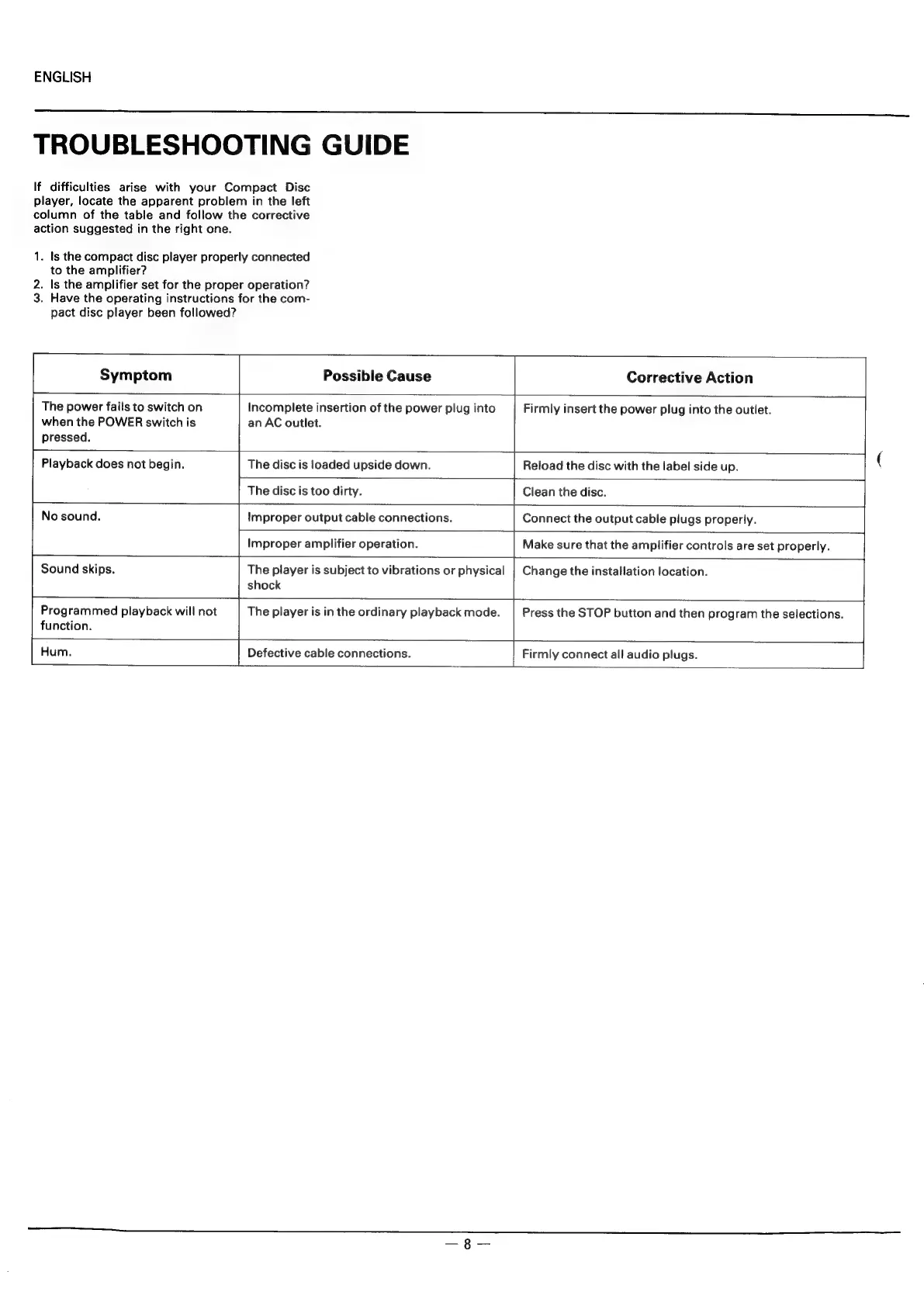
TROUBLESHOOTING
GUIDE
If
difficulties
arise
with
your
Compact
Disc
player,
locate
the
apparent
problem
in
the
left
column
of
the
table
and
follow
the
corrective
action
suggested
in
the
right
one.
1.
Is
the
compact
disc
player
properly
connected
to
the
amplifier?
2.
Is
the
amplifier
set
for
the
proper
operation?
3.
Have
the
operating
instructions
for
the
com-
pact
disc
player
been
followed?
Symptom
Possible
Cause
Corrective
Action
The
power
fails
to
switch
on
Incomplete
insertion
of
the
power
plug
into
Firmly
insert
the
power
plug
into
the
outlet.
when
the
POWER
switch
is
an
AC
outlet.
pressed.
Playback
does
not
begin.
The
disc
is
loaded
upside
down.
Reload
the
disc
with
the
label
side
up.
The
disc
is
too
dirty.
Clean
the
disc.
No
sound.
Improper
output
cable
connections.
Connect
the
output
cable
plugs
properly.
Improper
amplifier
operation.
Make
sure
that
the
amplifier
controls
are
set
properly.
Sound
skips.
The
player
is
subject
to
vibrations
or
physical
|
Change
the
installation
location.
shock
Programmed
playback
will
not
The
player
is
in
the
ordinary
playback
mode.
|
Press
the
STOP
button
and
then
program
the
selections.
function.
fHum
Defective
cable
connections.
Firmly
connect
all
audio
plugs.