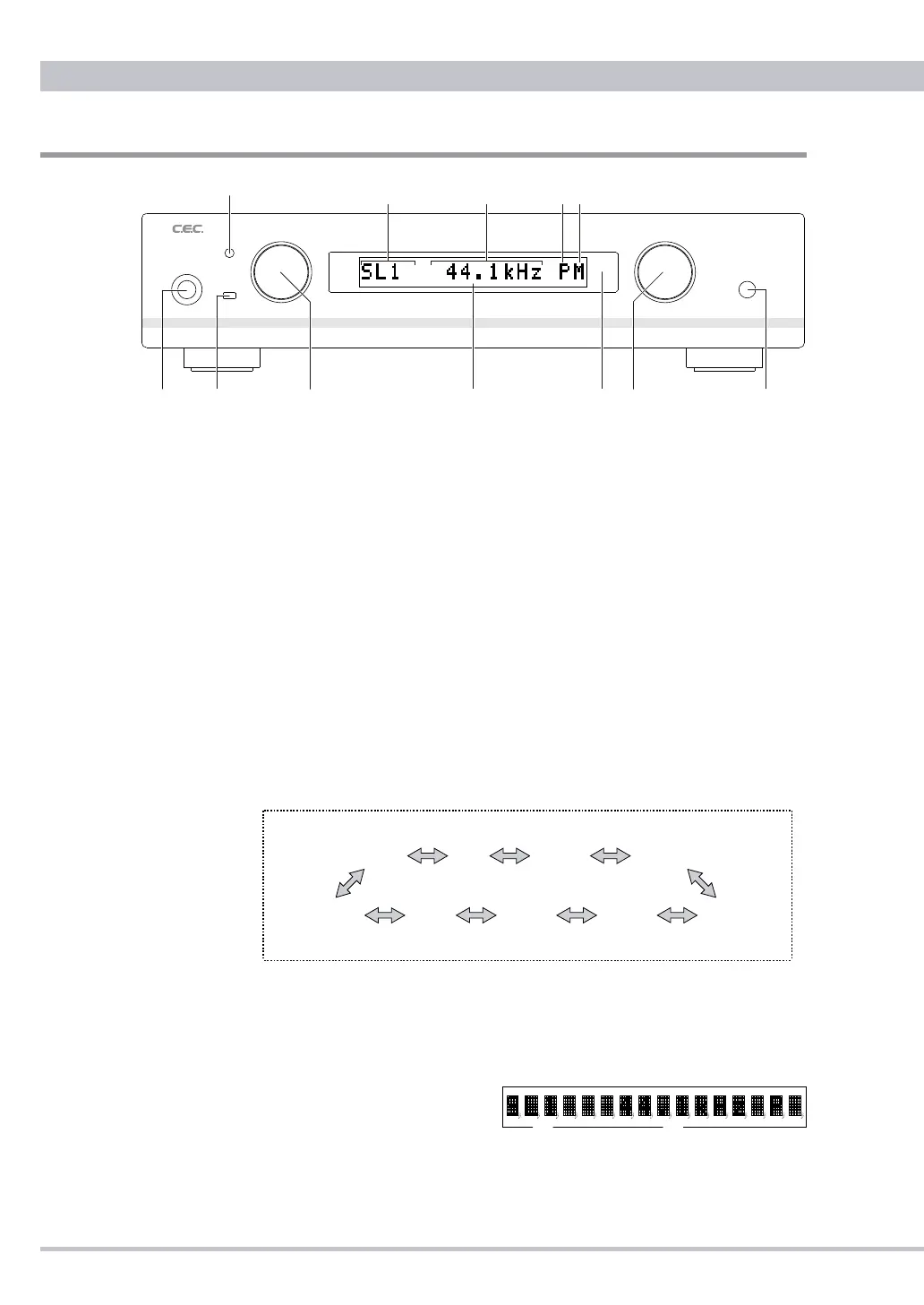
Front Panel Functions
❶
POWER Button
Press the POWER button to turn the power ON or OFF. The switch
will light up in blue color when power is ON and "WAIT" is displayed.
Approximately 6 seconds later the display will change to indicate the
selected input, sampling frequency and options.
❷
OPT1 Input
Connect to any digital audio device using an optical fiber cable with a
mini round plug. This input supports sampling frequencies from 32kHz to
96kHz.
❸
USB1 Input
Connect to a computer using a USB cable with a mini B plug. This input
supports sampling frequencies from 32kHz to 96kHz but not 88.2kHz
which is automatically upsampled to 96kHz.
❹
INPUT Selector Knob
Turn the INPUT knob clockwise or counterclockwise to select a digital
input SL1(SUPERLINK / BNC), SL2(SUPERLINK / D-SUB), USB1(mini
B type on front), USB2(B type), OPT1(optical mini round connector),
OPT2
(
TOSLINK
),
OPT3(TOSLINK)
,
AES(AES/EBU)
or
COAX(COAXIAL).
The selected input is displayed
at
Ⓐ
and the display shows the
sampling frequency at
Ⓑ
once
DA3N detects the digital input signal.
Note: Whenever changing the input "Unlock" is displayed in a flash before
SL1 SL2 USB1 USB2
(Inputchangesperoneclickturn)
OPT1
OPT2
OPT3AES
COAX
POWER INPUT HEADPHONE
DIGITAL TO ANALOG CONVERTER DA3N
OPT1
USB1
VOLUME
USB SOUND SYSTEM
❶
❷
❹
❸
❼
❻❺
❽
Ⓑ
Ⓐ
ⒹⒸ



 To Next Page