The GreenFeed system is a device designed to monitor the metabolic gas composition of animals, particularly ruminants, in a cost-effective and non-intrusive manner. It is optimized to quantitatively capture the breath of cattle and analyze emitted gases such as methane (CH₄), carbon dioxide (CO₂), and water vapor. This system provides high time-resolution data in near real-time, remotely, from a large number of individual animals.
Function Description:
The primary function of GreenFeed is to attract animals to a specific location periodically throughout the day for at least five minutes to measure emitted gases without interfering with their normal routine. An automated feeder is used for this purpose. While an animal is at the station, air is drawn past its nose and into a collection pipe. The concentrations of gases in the pipe are analyzed second-by-second using a non-dispersive infrared analyzer. A flow meter measures the pipe flow. The system employs strategies to ensure uniform flow measurement and mixed sampling. Once methane concentrations and air flow rates are known, the system calculates a mass emissions rate from the animal. The mass flux of CH₄ and CO₂ is calculated by multiplying the measured increase in concentrations from ambient levels by the measured airflow rate, applying ideal gas laws, and a "capture" rate adjustment factor. The number of CH₄ molecules and mass of CH₄ emitted per unit time are then calculated using the ideal gas law and the molecular weight of CH₄.
To account for changing wind currents and animal head movement, the system incorporates a "head" position sensor, monitors wind speed and direction to ensure 100% capture of emissions, and includes wind-shielding "wings" to block wind currents. The aerodynamics of the feeder are designed to capture as much emitted gas as possible under various environmental conditions, with C-Lock reporting approximately 70% capture even in 55 km/hour head-on winds.
The system automatically processes collected data and calculates results for each animal. A daily report for herd average and animal-specific emissions is emailed to the user. Users can access feeder controls through a secure, web-based interface. The GreenFeed system is also designed to allow specific amounts of food supplement to be fed at specific times, making it adaptable for research programs.
Important Technical Specifications:
- Power Requirements:
- Power Input: 100 ~ 240VAC / 2.8A
- Maximum Power Rating: 300 W
- 10.5 ~ 15VDC / 10A
- Flow Meter (Velocity):
- Accuracy at 20°C, 45%RH, 1013 hPa: 0.2 m/s + 3% of m.v.
- Range: 0.2-10 m/s
- CO₂ Concentration Measurement:
- Linearity error: < +/- 1% FS
- Accuracy: 0.5% FS
- Range: 0-1%
- Warm-up Period: 30 minutes
- CH₄ Concentration Measurement:
- Linearity error: < +/- 1% FS
- Accuracy: 0.5% FS
- Range: 0-1%
- Warm-up Period: 5 minutes
- Temperature Measurement:
- Accuracy: +/- 0.75°C
- Range: -30°C to +80°C
- Dimensions (mounted on free-stall cart):
- Max Height: 2.75 meters
- Adjustable Height: 1.48 to 1.78 meters
- Length: 1.21 meters
- Width: 0.78 meters
- Max Width: 1.13 meters
- Depth: 0.38 meters
- Network Connections (for data upload):
- 22 TCP Outgoing (SSH connection) to greenfeed.c-lockinc.com
- 80 TCP Outgoing (HTTP connection) to greenfeed.c-lockinc.com
- 1883 TCP Outgoing (MQTT connection) to mqtt.c-lockinc.com
- 123 UDP Incoming/Outgoing (NTP connection) to ntp.c-lockinc.com
Usage Features:
- Assembly: Instructions for assembling GreenFeed are available through video playlists on the C-Lock website.
- Location Selection: Crucial for valid measurements. Requires ensuring enough airflow, preventing animals from gathering around the system, connecting GreenFeed to a WiFi network, allowing only one animal to visit at a time, protecting the back of GreenFeed for calibration and electrical equipment, allowing enough space for a 2-meter alleyway, ensuring space behind GreenFeed for personnel, and using sturdy structures to anchor it. Freestall setups require a standard AC power outlet.
- Anchoring: GreenFeed must be anchored. Techniques include using rebar or lead-anchors, or using alleyways, fencing, or walls with chains/cables. In a Pasture Trailer, the trailer's weight secures the unit.
- Alleyway Setup: Crucial to ensure only one animal can access the system at a time and to separate emissions from other animals. Solid walls are used to ensure other animals cannot breathe into the system during a visit.
- Protection: The front of the system is built to withstand animal use. A sturdy barrier around the back protects equipment from animals.
- Powering On: For freestall and tie-stall systems, plug into a standard AC outlet. For pasture trailer systems, the power switch is in the battery box. Allow at least 30 minutes for concentrations to "warm up" and equilibrate before measurements are valid.
- Control Feed Mobile App: An online measurement system controlled via a mobile app (available on Google Play Store and Apple App Store). The app allows scanning for nearby devices, connecting to a system, and controlling it.
- Control Features via App:
- View real-time sensor values.
- Turn on/off the fan and sample pump.
- Dispense feed from the hopper.
- Trigger an auto-calibration.
- View the status of a CO₂ Recovery in progress.
- Perform actions like putting the system to sleep/waking it up, powering off, turning on/off the dome light, and sounding the chime.
- WiFi Configuration: The app allows connecting GreenFeed to a WiFi network by selecting the network, entering the password, and adding it.
- Powering Down: To power off, put GreenFeed to sleep, then select "Turn Off The System," wait 30 seconds, and unplug the power. For solar trailers, turn the power switch to OFF in the main electrical box.
- Solar Charging System (Appendix A): Includes an AC Battery Charger, Power Switch, Battery Protector, Solar Charge Controller, Charger/Solar Relay, Battery Disconnect Switch, and AC Plug Port. The unit power switch and battery charge switch control the system. For long-term storage or storage without a power source for more than three days, both switches should be OFF to prevent battery drain and voiding the warranty. When in use, the battery charge switch should always be ON.
Maintenance Features:
- Standard Calibrations: Used to ensure gas sensor accuracy. Involves running two known gas concentrations ("Zero" gas and "Span" gas) into the system.
- Zero Gas: Typically ~20% Oxygen (O₂) and Nitrogen (N₂) Balanced.
- Span Gas: Typically ~20.5% Oxygen (O₂), ~500ppm Methane (CH₄), ~5000ppm Carbon Dioxide (CO₂), ~10ppm Hydrogen (H₂), and Nitrogen (N₂) Balanced.
- Calibrations are automatic, but correct gas tank installation without leaks is crucial.
- CO₂ Recovery: Verifies system functionality and calibrates the air flow meter.
- Cleaning the Head Position Sensor: Located above the feed dish. Clean weekly with a dry cotton swab, or lightly wetted if necessary, to remove debris from the lenses.
- Replacing and Cleaning the Air Filter: The primary air filter should be regularly swapped (weekly) with a clean air filter. GreenFeed uses two (2) air filters, allowing one to be cleaned while the other is in use.
- Replacement Steps: Turn off the fan, issue "Fan Off" command, undo latches, remove back cover, lift door, unlatch clamp, remove old filter, place new filter, clamp, close door, tighten latches, shut top door, turn fan back on.
- Cleaning Dirty Air Filters: Run hot water into the inside of the filter, rinse several times, ensure water is thoroughly rinsing all areas inside the filter. Finish rinsing in a dry location overnight. Pressurized air (~50psi or 3500 mbar) can be used to clean out dirty filters.
- Filling the Hopper Bin: Remove two latches on either side of the bin, then remove the lid. Fill the bin, replace the lid, and tighten latches. Do not leave the lid off during normal operation to prevent feed from becoming wet and clogging. The hopper handles 7mm or smaller pelletized feed. Larger feed types may not dispense properly. Powered feed, large pellets, and straw type feed should not be used. "Dusty" feed may require more frequent air filter changes.
- Storing GreenFeed:
- Remove the feed dish and plug the feed spout and air intake spout with a temporary rodent barrier (steel wool or copper mesh recommended).
- Securely install a cover on the fan exhaust to prevent birds from nesting.
- Fully close the calibration gas tank.
- Use a vacuum cleaner to remove all feed out of the hopper.
- Clean the feed dish, removing any debris from the intake manifold holes.
- Vacuum all feed out of the back of the GreenFeed, underneath the air filter box.
- For Pasture Trailer Only: Turn off both the red battery switch and the main power switch. Connect a trickle charger once per month to maintain battery condition.
- Secondary Sample Filter: This filter protects electronic components from debris. Replace annually.

 Need help?
 General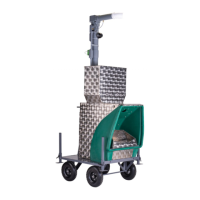

 To Next Page