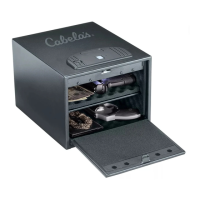
This document is an instruction manual for the Cabela's Home Defense Safe with Biometric Lock, model 4BGGBP. It provides essential information for the safe's installation, operation, maintenance, and warranty.
Function Description:
The Cabela's Home Defense Safe is designed to secure valuable items, particularly firearms, within a home environment. Its primary function is to provide a secure storage solution, accessible via a biometric fingerprint lock or a backup key. The biometric lock allows for quick and convenient access for authorized users, while the robust construction aims to deter unauthorized entry. The safe is intended for home defense purposes, implying a focus on rapid access to contents when needed, alongside secure storage.
Usage Features:
- Biometric Fingerprint Lock: The safe features a biometric lock that allows users to open it using their fingerprints. This provides a keyless and potentially faster access method compared to traditional locks.
- Fingerprint Recording: Users can record up to 20 different fingerprints to open the safe. The recording process involves pressing a red reset button inside the safe, then placing the desired finger on the scanner three separate times, following audio and visual cues (beeps and green light flashes).
- Opening the Safe: To open the safe with a recorded fingerprint, the user places a finger on the scanner. A green light flash and a beep indicate a successful scan, followed by a white light for the scan process. If accepted, the green light flashes twice with two beeps, and the user has 5 seconds to turn the handle clockwise to open the door.
- Backup Key Access: In case of biometric system issues or dead batteries, the safe can be opened using a backup key. This involves removing a cover under the battery installation area, inserting the key into the keyhole, turning it a quarter turn, and then rotating the handle to open the door.
- Locking the Safe: To lock the safe, the user simply closes the door and turns the handle to the lock position. A brief delay (3 to 6 seconds) after a fingerprint is entered ensures the locking mechanism is reactivated before the safe can be secured.
- Low Battery Indication: The safe's scanner provides a low battery warning. If the green and red indicator lights flash together when the scanner is pressed with a recorded fingerprint, it signifies that the batteries are low and need replacement.
- Sound Control: The safe's beep sound can be turned on or off. To turn the sound off, press the scanner with a recorded fingerprint for 10 seconds until the green light flashes twice. To turn it back on, press the scanner with a recorded fingerprint until two beeps and two green light flashes are heard.
- Lockout Mechanism: The biometric system incorporates a lockout feature to prevent unauthorized access after multiple failed attempts. If three invalid fingerprint attempts are made consecutively, the red light will flash 5 times with 5 beeps, and the safe will enter an automatic lockout for 60 seconds. An additional invalid attempt will result in a 5-minute lockout. A single beep with a green light flash indicates the lockout period is over.
Maintenance Features:
- Battery Installation and Replacement: The safe requires 4 AAA batteries, which are initially located in the front protective styrofoam. To install or replace batteries, the cover is removed by pressing a tab and turning counter-clockwise. New batteries are then installed, and the cover is aligned and reinstalled by turning clockwise.
- Clearing Fingerprint Memory: The memory of all recorded fingerprints can be cleared. This is done by pressing and holding the reset button for approximately 5 seconds until the green light flashes 10 times with 10 beeps, indicating that all stored fingerprints have been erased.
- Securing the Safe: For optimal safety, security, and to maintain the warranty, the safe must be mounted to the floor. The manual provides a list of hardware included for this purpose (M10x70 Lag screws, gasket washers, plastic anchors) and tools required (drill, various drill bits, socket wrench, Phillips screwdriver). It is recommended to contact a local Hardware Professional for additional installation recommendations, as installations may vary.
- Placement Recommendations: The safe should be placed in a cool and dry location to ensure its longevity and proper functioning.
- Serial Number Record: Users are advised to record the serial number of their safe, found on a tag on the back. This serial number is crucial for all warranty and customer service inquiries.
- Important Safety Notices: The manual emphasizes several safety precautions: never leave the safe unattended while open, keep children away from the safe, and always keep it locked when not in use to prevent accidental lock-ins. A warning highlights the risk of the safe tipping over if not secured, potentially causing serious injury or death.
- Media Storage Warning: Electronic, photographic, and audio-visual media should not be stored in the safe for fire protection, as these materials may not survive the safe's rated internal temperature and could be damaged or destroyed.
The Cabela's safe comes with a Limited Lifetime Warranty from Heritage Security Products, covering defects in material and workmanship. This warranty also extends to damage from fire (water level not exceeding 24 inches for 72 hours), water (where applicable), break-in, or attempted break-in, provided the homeowner's insurance policy does not cover the damage. However, it explicitly excludes water damage in conjunction with a fire, and the lock or painted surface are not covered under the lifetime warranty. Locks and painted surfaces have a separate two-year warranty for defects. Claims require proof of purchase, homeowner insurance statements, photos, and police/fire marshal reports, and must be made within three months of a break-in. The warranty is contingent on proper installation and care as per the manual, and misuse or modification will void it. The warranty can be transferred to subsequent owners for a fee with prior written consent. The warranty is limited to the safe itself and does not cover the contents.

 Need help?
 General

 To Next Page