You must rst install the batteries which are located in the front protective styrofoam.
Batteries included: 4 AAA batteries
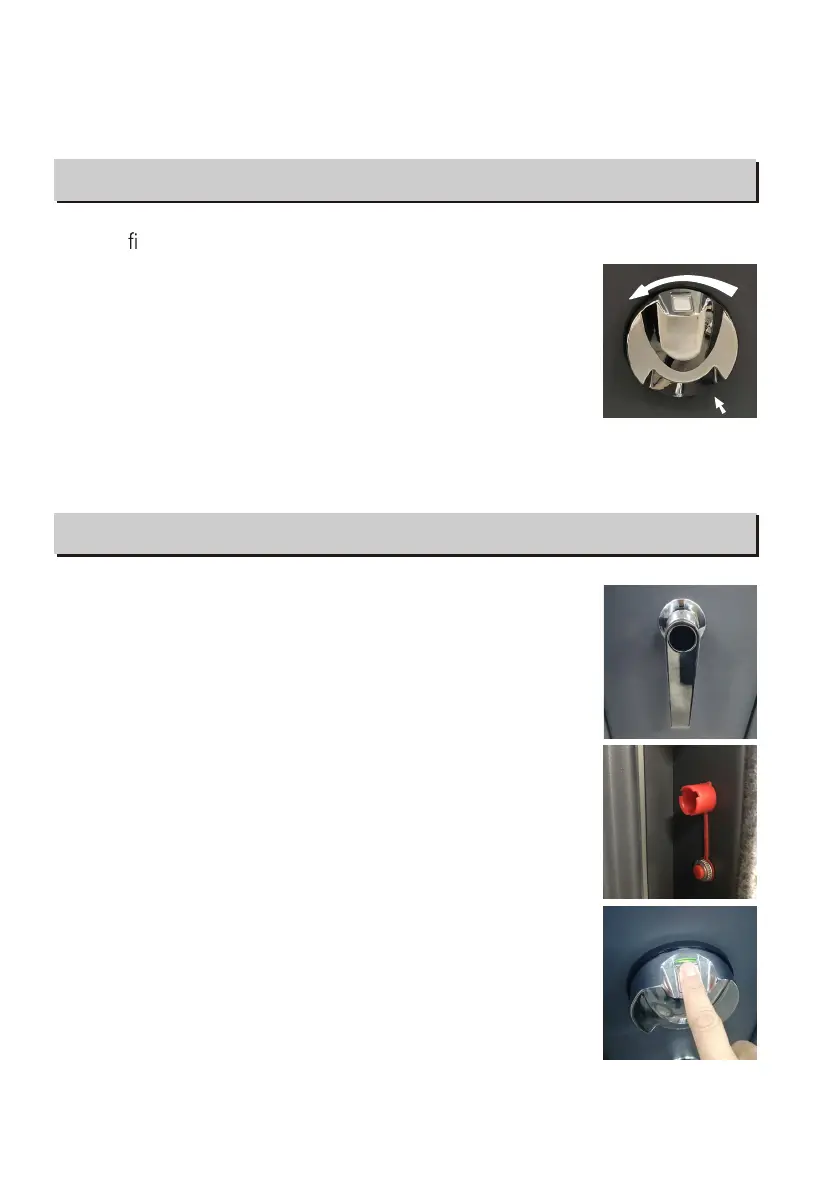
To replace the batteries,remove the cover by pressing the tab
and turning as shown in the illustration (counter clockwise).
Install new battery and align cover and install cover
(clockwise).
NOTE: Press the scanner with a recorded ngerprint. If the green and red indicator lights
ash together, it indicates low battery. Please replace with 4 new AAA alkaline batteries.
BATTERY INSTALLATION AND REPLACEMENT BATTERY INSTALLATION AND REPLACEMENT
OPENING THE SAFE
Place any nger on the scanner and turn the handle clockwise.
RECORDING YOUR FINGERPRINTS
NOTE: When you rst receive your safe there are no recorded
ngerprints. Any ngerprint will open the safe until a ngerprint is
recorded. You can record up to 20 different ngerprints for opening
the safe. If you enter more than 20 ngerprints, the red light will
ash 5 times with 5 beeps, which indicates you cannot record a
new ngerprint.
1. Press the red reset button located inside the safe under scanner
light off, then release it, the scanner will turn white with 2 beeps
and the green light ashes twice. You will need to record your
nger 3 separate times for it to record.
2. Place your nger on the scanner until there is 1 beep and the
green light ashes once. Lift your nger off the scanner.
OPENING THE SAFE
2
B-LOCK
TAB


 To Next Page