EasyManua.ls Logo

Cabletech URZ0328 - Page 19

Cabletech URZ0328
Print Icon
To Next Page IconTo Next Page
To Previous Page IconTo Previous Page
Loading...
EN
19
Owner’s manual

 Crypted: select mode of channel searching (All channels/ FTA
channels).

 
 
             
[Manual].
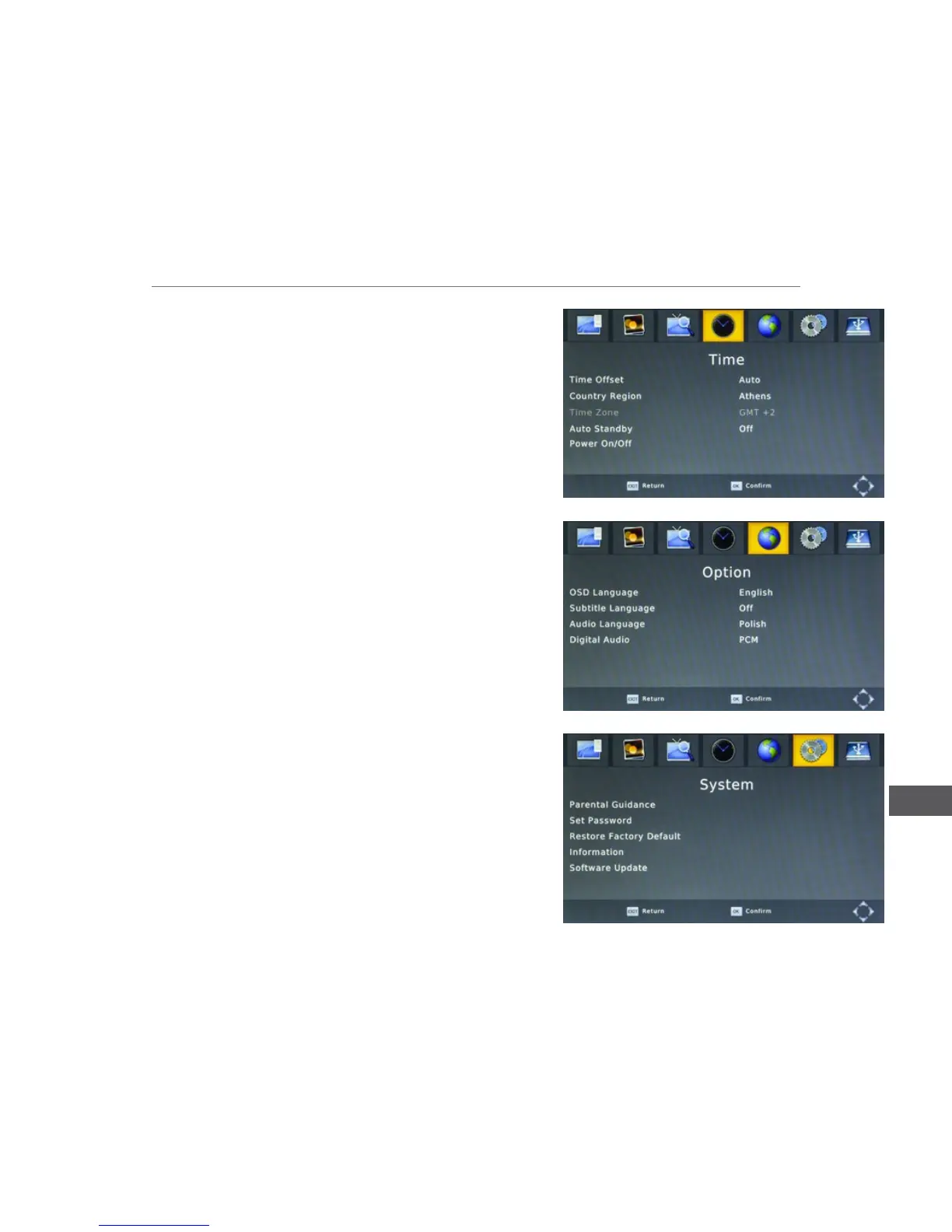
 Auto Standby: select time period after which the unit will automatically
switch to standby mode.
 
 
 
 
 
Option
 
 Subtitle language: select the subtitle language.
 Audio Language: select the audio language.
 Digital Audio: select the digital output type (PCM/RAW).
System
 Parental Guidance: lock viewing the selected channel. To enter this
function, input password 000000, 888888 or your own.
 

 Restore Factory Default: reset all settings to factory settings.
 Information: display information about the model and software version.
 Software Update.

Related product manuals