06
45
POWERDRIVE CS
In order to replace your Powerdrive control system’s Frontline, you must first remove the existing Frontline from the control sys-
tem. You may then attach a new frontline to the controlsystem.
Connect Your New Frontline
• Lay your Control System face up on the ground ap-
proximately 30 meters away from a post or tree to which
you will be attaching your lines in order to check that the
lengths are even (see Step 1.2).
• Unwind and lay out the new Fontline between the post and
the control bar.
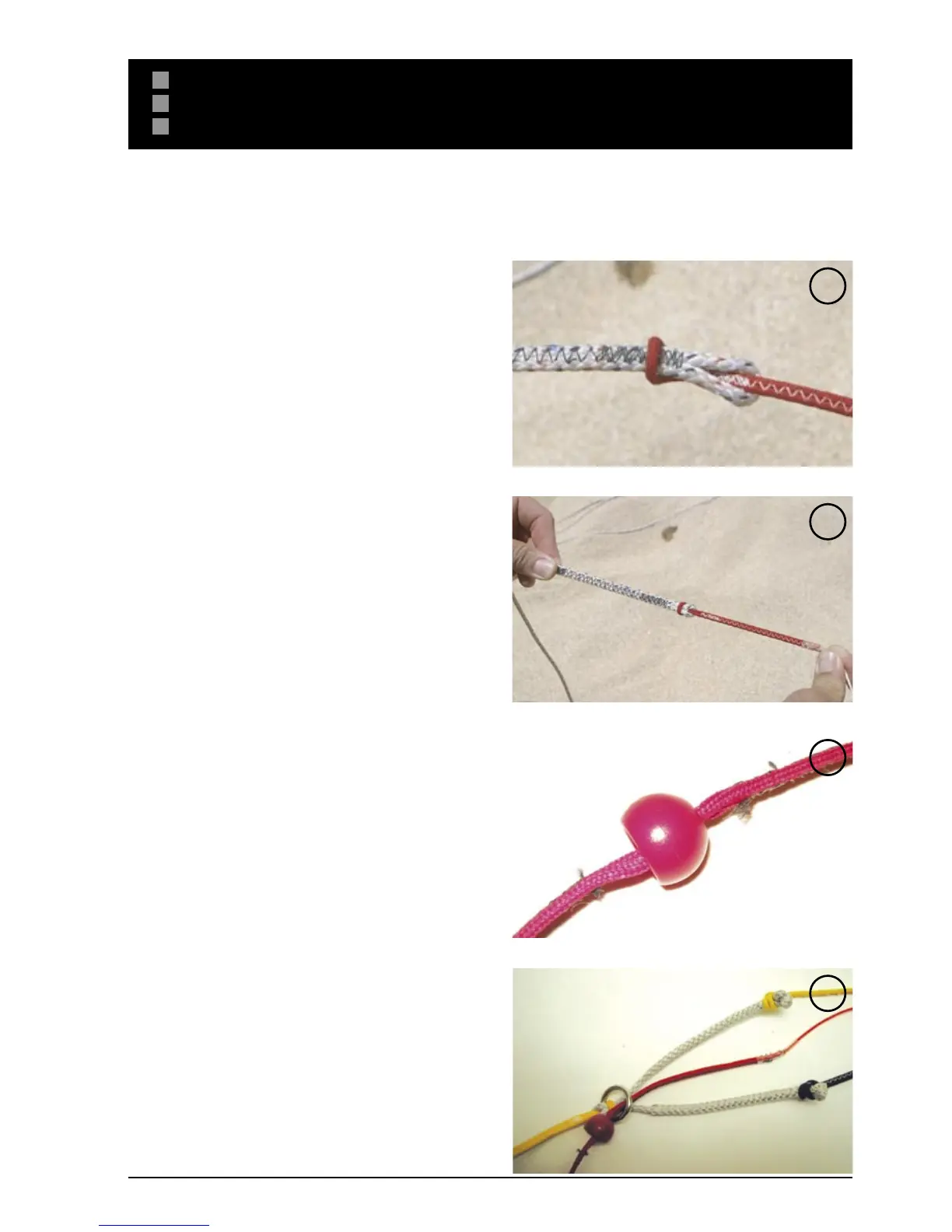
• You will connect the upper frontline to the lower frontline
with a “larks head to larks head” connection. Pusf the
lower frontline loop through the upper frontline loop (Fig.1)
• Thread the kite end of the upper frontline through the lower
frontline loop
• Pull the entire upper frontline through the loop
• Pull the connection tight for a secure connection (Fig. 2).
• Slide the 16mm tie ball down the upper frontline (Fig. 3)
• Thread the upper frontline through the ring at the base of
the “V” (Fig. 4)
• Your frontline line is now connected to your control system,
and you are ready to make sure that all of your lines are
even.
S ET UP
REPLACING YOUR FLYING LINES - POWER DRIVE CS
1
2
3
4


 To Next Page