Call Us Toll-Free Today!
1.833.203.2473
WWW.CAIREMEDICAL.COM
PLEASE CONSULT THE APPLICABLE PRODUCT INSTRUCTIONS FOR
USE FOR PRODUCT INDICATIONS, CONTRAINDICATIONS, WARNINGS,
PRECAUTIONS, AND DETAILED SAFETY INFORMATION.
© Copyright 2017 Chart Industries ML-CONC0062 F
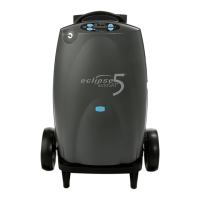
QUICK START GUIDE ECLIPSE 5
®
Connect the oxygen supply
tubing to the oxygen outlet and
connect the oxygen cannula per
the instructions provided with the
cannula, or per the instructions
from your home care provider.
Align the locater holes on the bottom of the device to the
tabs on the Universal Cart. Align the large threaded screw
to the insert at the back of the Eclipse 5. Then hand-
tighten the knob on the cart until the Universal Cart is
tightly secured to the device. Depress the push-button on
the telescoping Universal Cart handle to adjust the height
of the handle.
Your unit is equipped with an Air Inlet Filter. Check daily
and clean once a week. Breathe normally through the nasal
cannula.
Air Inlet Filter
6
Begin Using the Eclipse 5
7
Universal Cart Operation
Increase or Decrease Flow Setting
Button
Using the + or - buttons, adjust the setting to the
prescription supplied by your physician.
Continuous Flow Mode Display
Pulse Dose Mode Display
5
Adjust Flow Setting to Prescribed
Level
WARNING: IT IS VERY IMPORTANT TO SELECT ONLY THE
PRESCRIBED LEVEL OF OXYGEN. DO NOT CHANGE THE FLOW
SELECTION UNLESS YOU HAVE BEEN DIRECTED TO DO SO BY
A LICENSED CLINICIAN. THE PORTABLE OXYGEN CONCENTRA-
TOR MAY BE USED DURING SLEEP UNDER THE RECOMMENDATION OF A
QUALIFIED CLINICIAN.
THIS QUICK START GUIDE IS NOT INTENDED TO REPLACE THE
DETAILED INFORMATION AVAILABLE IN YOUR USER MANUAL, SO
PLEASE REFER TO THE USER MANUAL FOR IMPORTANT CRITICAL
INFORMATION REGARDING USE AND OPERATION OF THE PRODUCT.


 To Previous Page