6605 Flotilla St., Commerce, CA 90040
Tel (323) 888-6601 Fax (323) 888-6699
www.cal-royal.com
7
To Change Access Code
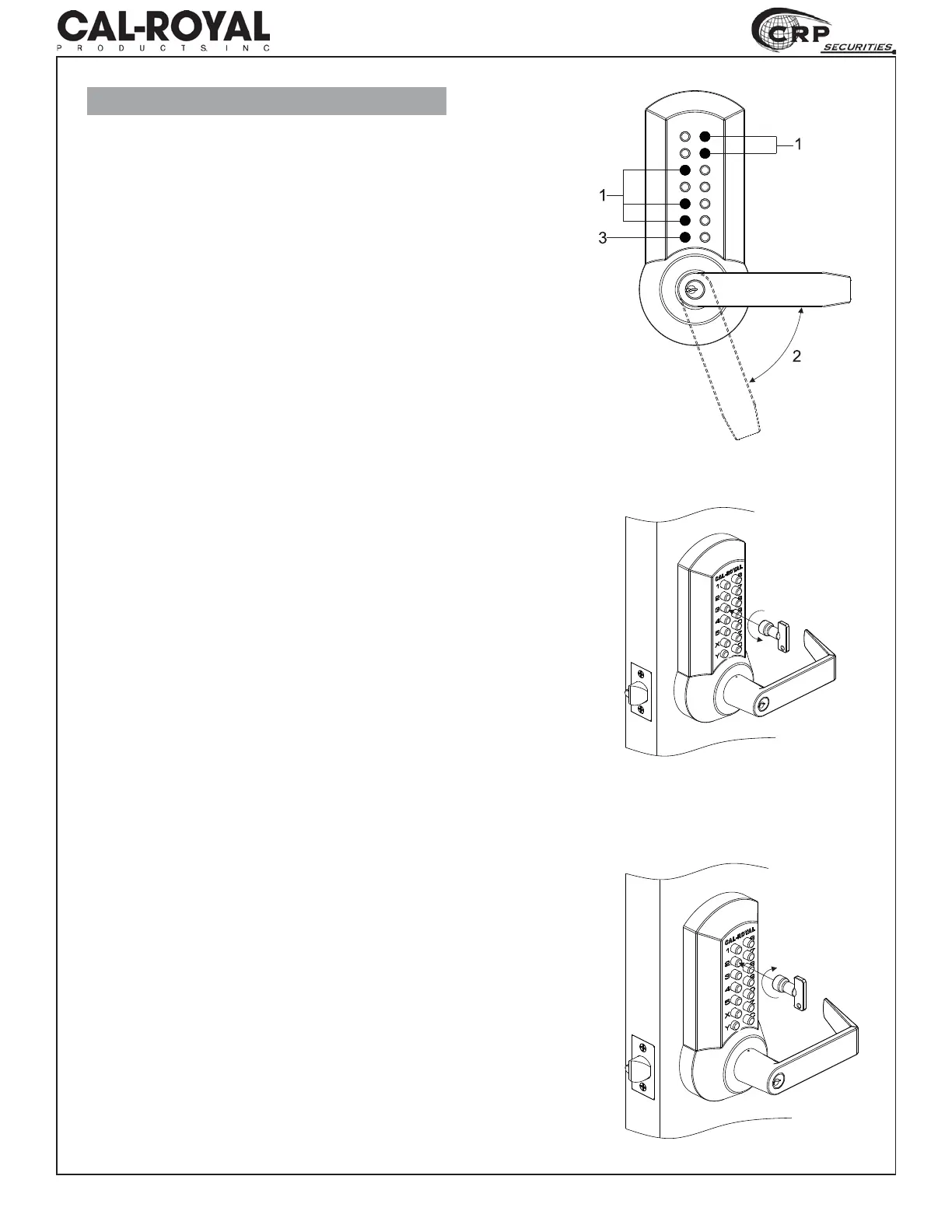
1. Press current access code.
2. Turn lever 70° and hold.
3. Press the Y button.
5HOHDVHWKHOHYHU¿UVWDQGWKHQWKH<EXWWRQ
(Y button will stay pressed until code is changed)
5. Push the code change tool onto each button in
turn, pushing in the buttons approximately 2mm
turn counter-clockwise 180°. All buttons should
now be in non-code position or Passage Mode.
6.1 Test that all the buttons are in non-code
pressing the “C” button and turning the lever
handle which should retract the latch and pop
the “Y” button up.
If the latch can not be retracted, repeat step 5.
6.2 Otherwise, turn lever 70° and hold. Press the
³<´EXWWRQ5HOHDVHWKHOHYHU¿UVWDQGWKHQ
the “Y” button. (“Y” button will stay pressed
until code is changed)
7. To select button as a code button, push code
tool over button. Press button in with tool
approximately 2mm and turn clockwise 180°.
CAL-ROYAL
1
2
3
4
5
X
Y
6
7
8
9
0
Z
C


 To Next Page