BALBOA WATER GROUP
BWA APP FOR IOS & ANDROID DEVICES
ANYWHERE. ANYPLACE.
Access your spa via
1. a direct connection anywhere in the local proximity of
your tub = (INITIAL SETUP)
2. anywhere in your house that you can connect to your
local WiFi network = (LOCAL CONNECT)
3. anywhere in the World you have an internet connection to
your smart device via 3G, 4G or WiFi hot spots =
(CLOUD CONNECT)
BALBOA WATER GROUP BWA APP FOR IOS & ANDROID DEVICES
STARTUP
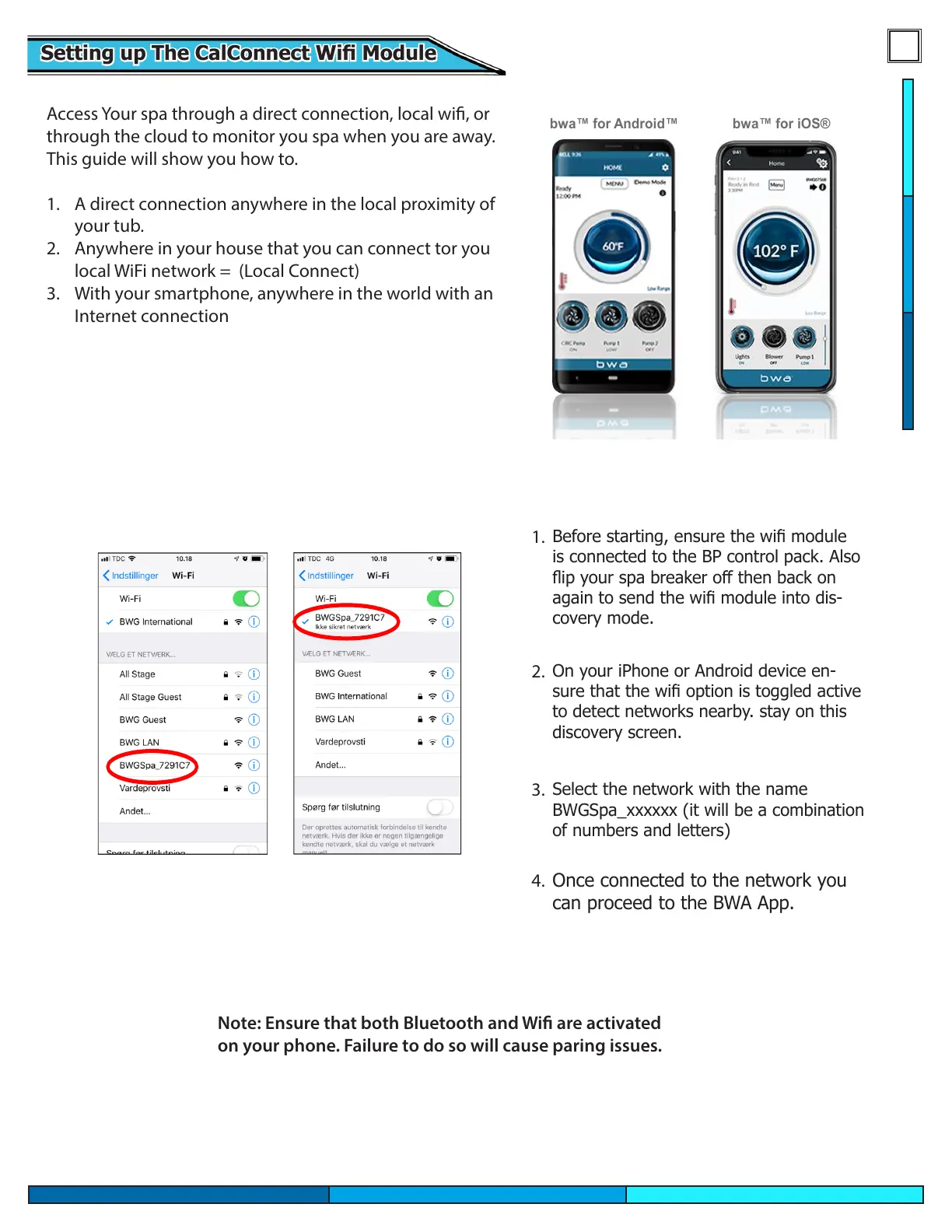
1. Before starting, make sure that the
WIFI module is connected to the
Balboa BP control box
2. Go to the WIFI settings of your
device.
3. Identify the BWA network
BWGSpa_xxxxxx
4. Connect to the BWA network
BWGSpa_xxxxxx
Before starting, ensure the wi module
is connected to the BP control pack. Also
ip your spa breaker o then back on
again to send the wi module into dis-
covery mode.
On your iPhone or Android device en-
sure that the wi option is toggled active
to detect networks nearby. stay on this
discovery screen.
Select the network with the name
BWGSpa_xxxxxx (it will be a combination
of numbers and letters)
Once connected to the network you
can proceed to the BWA App.
Access Your spa through a direct connection, local wi, or
through the cloud to monitor you spa when you are away.
This guide will show you how to.
1. A direct connection anywhere in the local proximity of
your tub.
2. Anywhere in your house that you can connect tor you
local WiFi network = (Local Connect)
3. With your smartphone, anywhere in the world with an
Internet connection
Setting up The CalConnect Wi ModuleSetting up The CalConnect Wi Module
1.
2.
3.
4.
Note: Ensure that both Bluetooth and Wi are activated
on your phone. Failure to do so will cause paring issues.




 To Next Page