74
BALBOA WATER GROUP BWA APP FOR IOS & ANDROID DEVICES
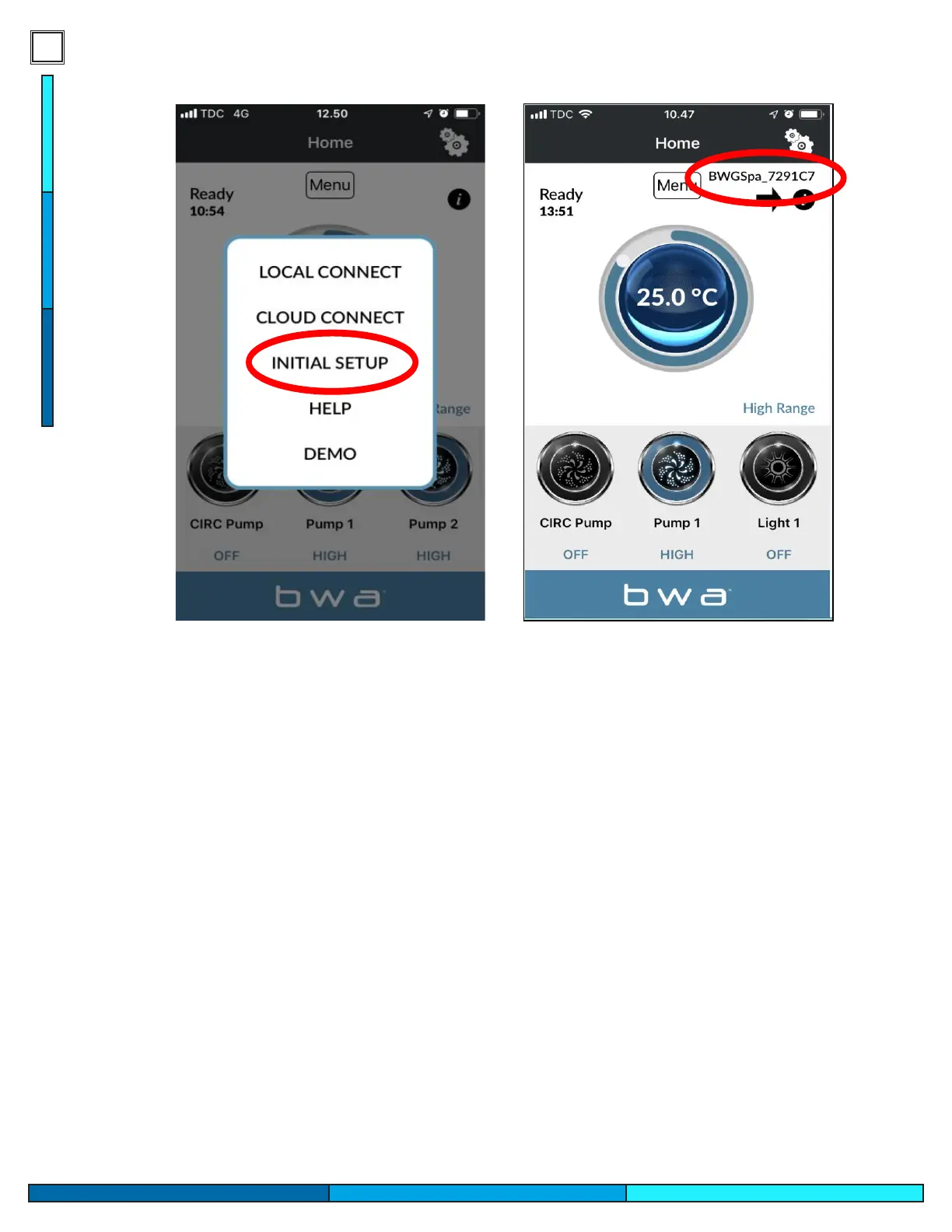
INITIAL SETUP
1. Open the BWA app.
2. Press INITIAL SETUP and follow
the instructions.
3. You are now directly connected
to your spa via the BWA
module.
4. The BWGSpa_xxxxxx network is
shown.
5. Test the connection by turning
ON/OFF the devices in your spa.
5- Launch the BWA app and select initial set up.
6- Once selected follow the steps presented to you within the app, it will attempt to communicate
with the module to establish its rst initial connection.
7- After following the steps presented in the app you will be greeted with the screen above, you will
now be able to control the spa using the modules local wi network.
8- Test the communication of the module with the app by turning on your pump or light option.
BALBOA WATER GROUP BWA APP FOR IOS & ANDROID DEVICES
INITIAL SETUP
1. Open the BWA app.
2. Press INITIAL SETUP and follow
the instructions.
3. You are now directly connected
to your spa via the BWA
module.
4. The BWGSpa_xxxxxx network is
shown.
5. Test the connection by turning
ON/OFF the devices in your spa.




 To Next Page