75
BALBOA WATER GROUP BWA APP FOR IOS & ANDROID DEVICES
LOCAL CONNECT
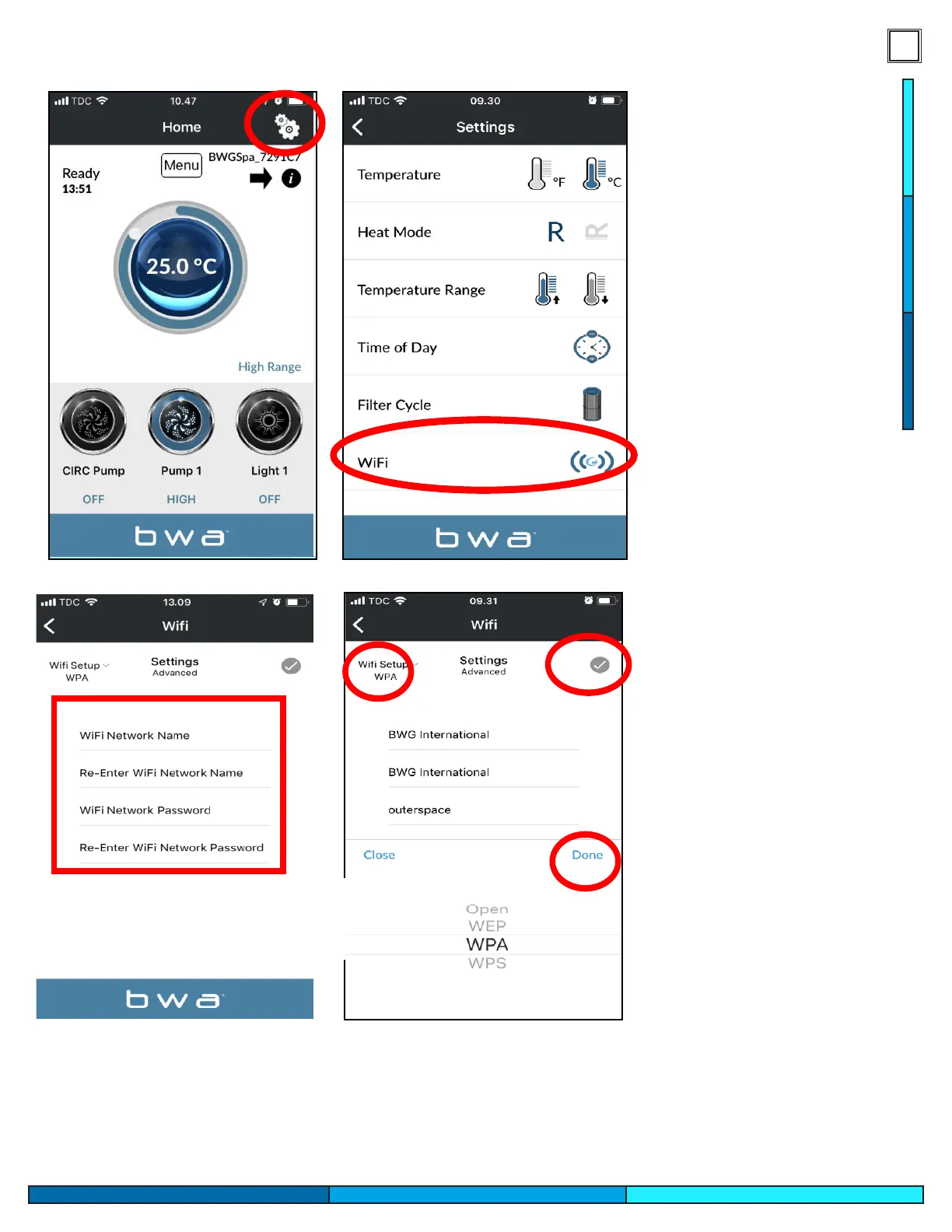
1. While still connected via INITIAL SETUP, access the settings menu via the settings wheel
2. Access the WIFI menu
3. Enter your WiFi Network Name and WiFi Network Password.
4. Choose your WiFi Network security (OPEN/WEP/WPA/WPS)
5. Press the checkmark and then“Done”
BALBOA WATER GROUP BWA APP FOR IOS & ANDROID DEVICES
LOCAL CONNECT
1. While still connected via INITIAL SETUP, access the settings menu via the settings wheel
2. Access the WIFI menu
3. Enter your WiFi Network Name and WiFi Network Password.
4. Choose your WiFi Network security (OPEN/WEP/WPA/WPS)
5. Press the checkmark and then“Done”
9- Once there is conrmation
that the app communicates
to the spa select the setting
icon in the top right corner.
10- Select under settings the
“Wi”option.
11- Enter your home wi’s
network information to begin
pairing the spa to the home
network.
12- Conrm the type of
network security used by
your home network and
press the gray check mark to
proceed.




 To Next Page