76
BALBOA WATER GROUP BWA APP FOR IOS & ANDROID DEVICES
LOCAL CONNECT (continue)
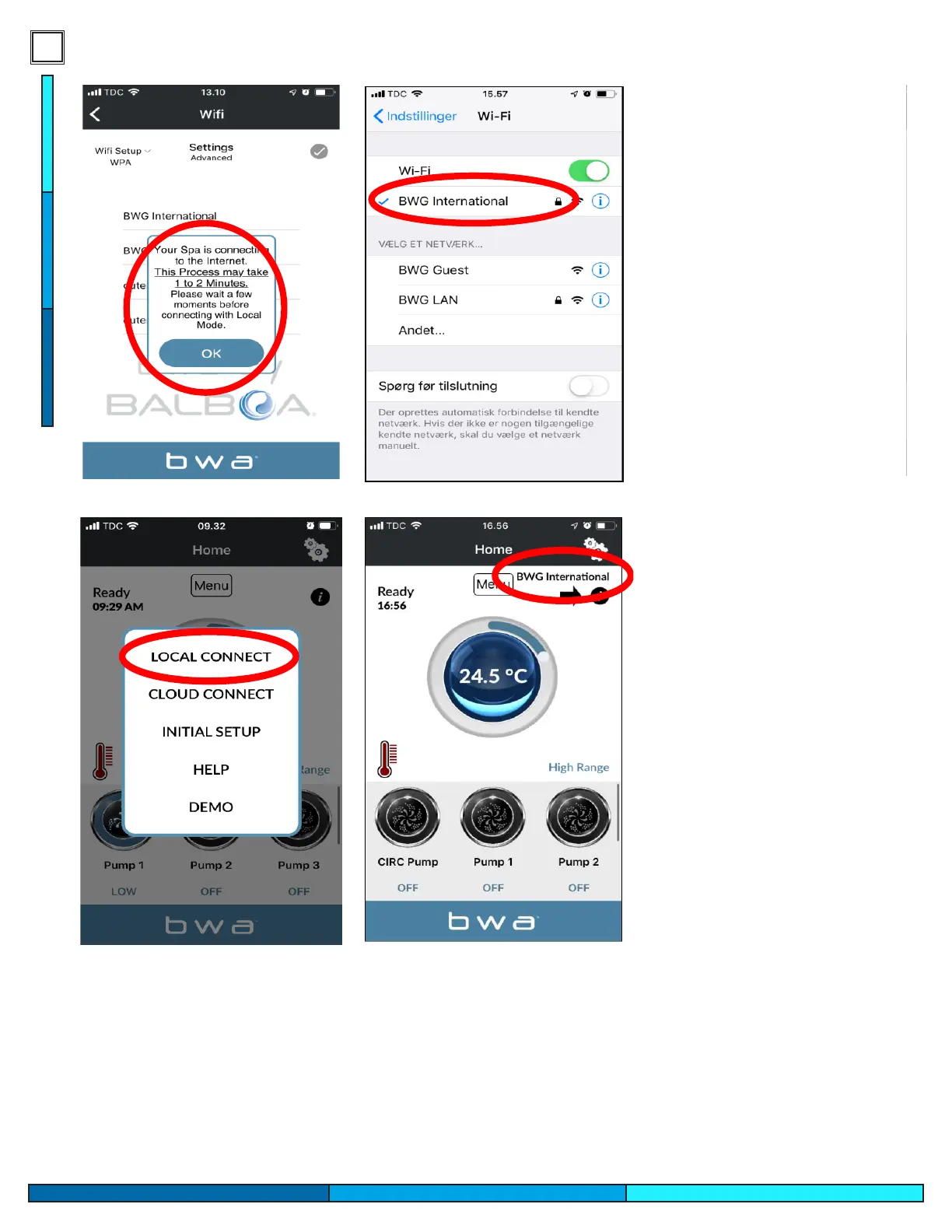
1. If you successfully entered your local network User name and Password. Press OK and wait 1 to 2 minutes.
2. Verify that your device is now connected to your local network. You will NO more see the BWGSpa_xxxxxx network.
3. Open the BWA app and press LOCAL CONNECT.
4. Connection to your local network is successful. Your local network is now visible on the app.
13- If you have successfully
entered your home wi network
information, you will get a prompt
to leave the device running for a
few minutes. The spas wi module
is now attempting to pair with your
home wi.
14- Check your mobile device net-
work settings again, and conrm
that your mobile device has now
paired back to your home wi net-
work, and it is no longer connect-
ed to the temporary wi network.
15- Switch back to the app and
select local connect. It will now
show your home wi network
name in the top corner.
You are now able to connect to
your spa via your home network.
As long as you are within range of
your wi network you will be able
to control the spa.
BALBOA WATER GROUP BWA APP FOR IOS & ANDROID DEVICES
LOCAL CONNECT
(continue)
1. If you successfully entered your local network User name and Password. Press OK and wait 1 to 2 minutes.
2. Verify that your device is now connected to your local network. You will NO more see the BWGSpa_xxxxxx network.
3. Open the BWA app and press LOCAL CONNECT.
4. Connection to your local network is successful. Your local network is now visible on the app.




 To Next Page