77
BALBOA WATER GROUP BWA APP FOR IOS & ANDROID DEVICES
CLOUD CONNECT
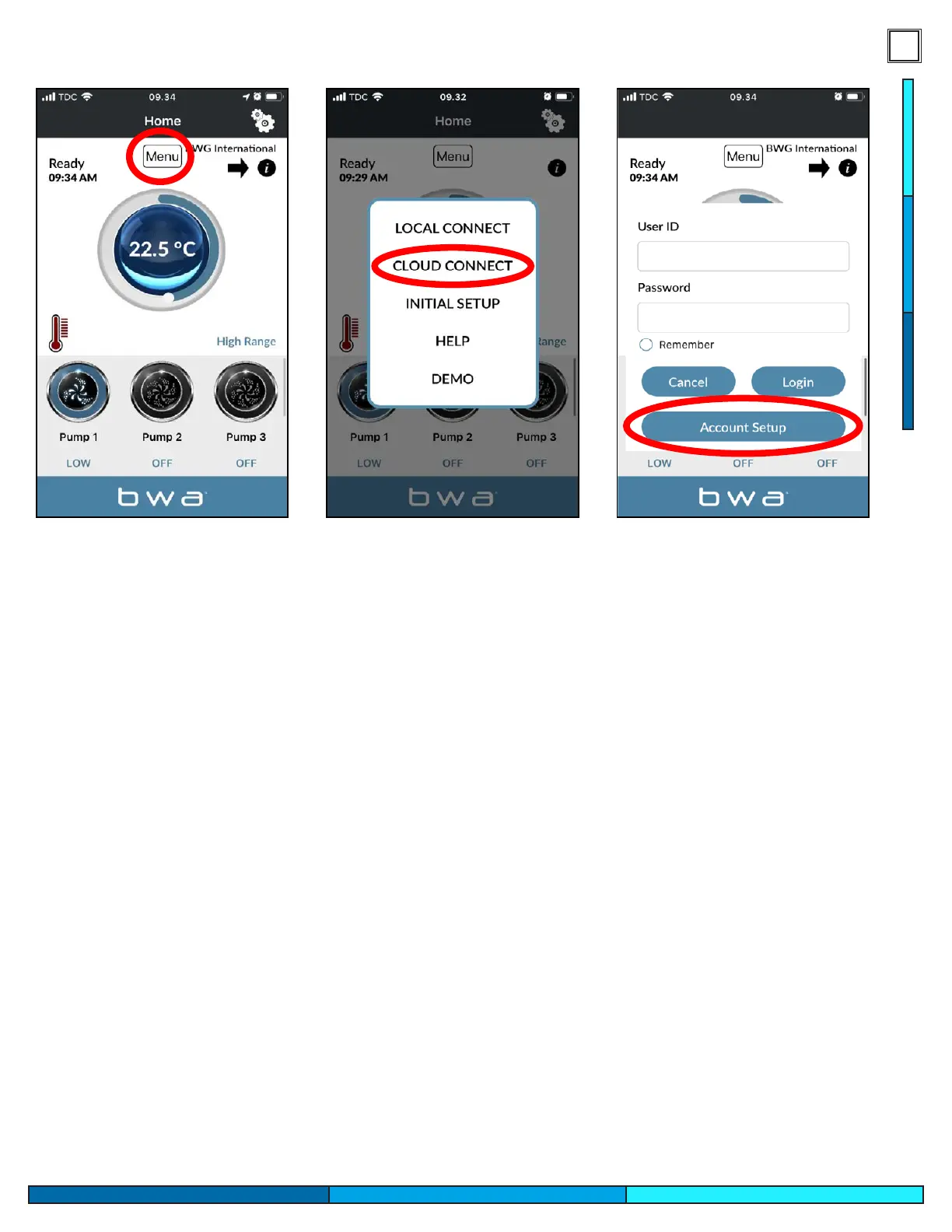
1. While in LOCAL CONNECT, press the MENU button and then “CLOUD CONNECT”
2. Press “Account Setup” and then “CREATE ACCOUNT”
3. Choose and enter a “User ID” and “Password”
1- Select the Menu option on the top center of the app.
2- Select Cloud Connect, the app will prompt you to a log in screen.
3- You will need to create an account to access your spa via cloud connection. Follow the
steps presented, which will include the creation of a username, password, and security
questions. We would suggest to write this log in on your manual for reference.
4- Once your account is created log in with your credentials, you have now unlocked the
ability to control your spa through your cellphone network or other wi networks when
not at home or near the spa.




 To Next Page