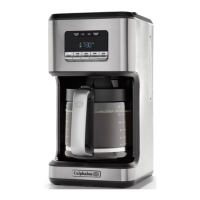
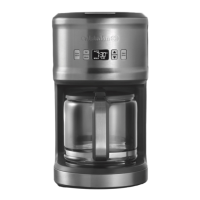
The Calphalon Special Brew Coffee Maker, model BVCLDCG1, is designed for household countertop use, offering a range of features for preparing and maintaining coffee. Its primary function is to brew coffee, with options for customizing strength and scheduling brew times.
Function Description:
The coffee maker is designed to brew up to 10 cups of coffee. It utilizes a precision brewing system that allows for fast brewing with tight temperature control, managing excess steam through vents on top of the coffeemaker. Users can select between a regular brew and a "STRONG BREW" option for a fuller and stronger cup of coffee. The appliance includes a warming plate that keeps coffee warm for up to 4 hours after brewing is complete, after which it automatically shuts off. A "Pause'N Serve" feature allows users to pour a cup of coffee before the brewing cycle is fully completed, temporarily stopping the coffee flow for 20 seconds when the carafe is removed.
Usage Features:
Before initial use, the coffee maker requires a cleaning cycle with water only, without coffee or a filter, to prepare it for brewing.
Setting the Clock and Delay Brew:
Upon plugging in the coffee maker, the LCD clock will flash, indicating it needs to be set. Users can adjust the hour and minute using dedicated HR and MIN buttons. Setting the clock is essential for utilizing the "Delay Brew" function.
Delay Brew Function:
The "BREW LATER" button allows users to program a desired delay brew time using the HR and MIN buttons. Once the delay brew time is set, pressing the "BREW LATER" button again activates the cycle. The programmed time can be checked on the LCD screen by pressing the "BREW LATER" button, and the screen can be switched back to the current time by pressing the "Brew/Off" button.
Adding Water and Coffee:
To add coffee, the brew basket swings open to the left. A disposable #4 cone-shaped filter is placed into the removable cone-style filter basket, followed by the desired amount of ground coffee. The brew basket then swings back to the right to secure it. Cold, fresh water is added to the water reservoir, with markings on both the glass carafe and the water window indicating the appropriate amount for the desired number of cups. It is crucial not to fill past the "10 cup line" to prevent overflow. The glass carafe must be properly placed on the warming plate before brewing to avoid overflow from the filter basket. The amount of brewed coffee will be slightly less than the water poured due to absorption by the coffee grounds.
Brewing Coffee:
After adding water and coffee and ensuring the glass carafe and filter basket are securely in place, the coffee maker is turned on by pressing the "BREW/OFF" button. An LED light illuminates to signal that brewing has started. During brewing, the LCD screen displays the time of day. Once brewing is complete, an audible alert sounds, and the LCD screen displays "DONE, WARMING" along with the time of day. To check how long ago the coffee was brewed, users can press the "HOUR" button to view the "Fresh Brew™" timer. Pressing the "HOUR" button again returns the display to real time. The coffee maker keeps coffee warm for 4 hours before automatically shutting off. To turn off the coffee maker manually, the "BREW/OFF" button is pressed once.
Strength and Flavor Adjustment:
For a stronger coffee, the "STRONG BREW" button can be pressed, which illuminates to indicate activation. Pressing it again de-selects the strong brew option. The manual advises against using the "STRONG" setting if brewing to the SCA guidelines for Golden Cup Standard. A suggested coffee measurement chart is provided, recommending specific tablespoon amounts of ground coffee per cup of water, with a note to use a level tablespoon for measurement and medium grind coffee for optimal results. Fine or decaf coffee may cause overflow.
Maintenance Features:
Cleaning and Decalcifying:
Regular cleaning and decalcifying are essential for maintaining the coffee maker's performance. The glass carafe, carafe lid, and removable cone-style filter basket should be washed with a mild detergent and water, then rinsed thoroughly. These parts are also dishwasher-safe (top rack only). Abrasive cleansers, steel wool pads, or other abrasive materials should not be used. The coffee maker itself should never be immersed in water or any other liquid.
Decalcifying:
Minerals from water can accumulate and affect performance. The decalcifying frequency depends on water hardness: every 80 brew cycles for soft water and every 40 brew cycles for hard water. The process involves filling the glass carafe with a solution of equal parts water and vinegar (10 cups total) and pouring it into the water reservoir. The carafe, with its lid closed, is then placed on the warming plate, and the "BREW/OFF" button is pressed to start a brew cycle. After this cycle, the carafe contents are discarded, and the carafe is rinsed. A second cycle is run with 10 cups of water only to rinse the machine. Finally, the carafe contents are discarded, and the carafe is cleaned as per the general cleaning instructions.
Troubleshooting:
The manual includes a troubleshooting section to address common issues such as the brew cycle not starting, delay brew not working, coffee not being hot, coffee being too strong or weak, bad-tasting coffee, and coffee overflowing from the basket or carafe. Solutions typically involve checking water levels, filter placement, clock settings, coffee-to-water ratio, and proper carafe insertion. For issues related to the clock display during warming, pressing the "HOUR" button is suggested.
The device has no user-serviceable parts beyond the described cleaning and maintenance; any further servicing should be performed by an authorized service representative.



 To Next Page

 General