SECTION 11: FLOWSENSE® (-FL) ®
making
since 1986
ater work
Capacity with pump: When a program irrigates by
use of pump the GPM limit set will not be exceeded.
Capacity without pump: When a program irrigates
without the use of a pump the GPM limit will not be
exceeded.
Note: Pump and non-pump programs will not run
simultaneously on the same controller / system.
5.
If you are using a pump and did not
select SET WHICH PROGRAMS TO
USE PUMP in the pump section of this
manual then press the SET WHICH
PROGRAMS TO USE THE PUMP
Menu key (Figure 11.7).
The WHICH PROGRAMS USE THE PUMP screen
is displayed (Figure 11.8).
PROG A . . . . . . . . . . . . . . . . . . . . YES
PROG D . . . . . . . . . . . . . . . . . . . . YES
PROG E . . . . . . . . . . . . . . . . . . . . YES
DRIP 1 . . . . . . . . . . . . . . . . . . . . YES
DRIP 2 . . . . . . . . . . . . . . . . . . . . YES
PROG B . . . . . . . . . . . . . . . . . . . . YES
PROG C . . . . . . . . . . . . . . . . . . . . YES
WHICH PROGRAMS USE THE PUMP
if you would like to use the pump
For each program, select YES
Figure 11.8
6.
Press the blue ARROW keys to move
the cursor to the program desired.
Note:
The default setting is set to YES on all
programs, which means that the controller’s pump
output will be activated whenever a station on any
program is activated.
Set the Pump Output Enabled setting to NO. If the
Pump Output Enabled setting is set to NO on a
program, the pump output will not activate when a
station on that program is activated.
7.
Press the PLUS or MINUS keys to
change any program setting.
11.B.2 Flow Checking
Flow checking allows you to have the controller
compare the flow of each station during irrigation to
the learned expected flow and alert you of any
problems.
Note:
You must have a flow meter turned on in the
controller, or in the chain / system.
Note:
This setting will have to be adjusted at the
Master Controller (The controller with the letter “A”
as the right most character in its communications
address). Once set, all of the controllers in the chain
will conform to this setting.
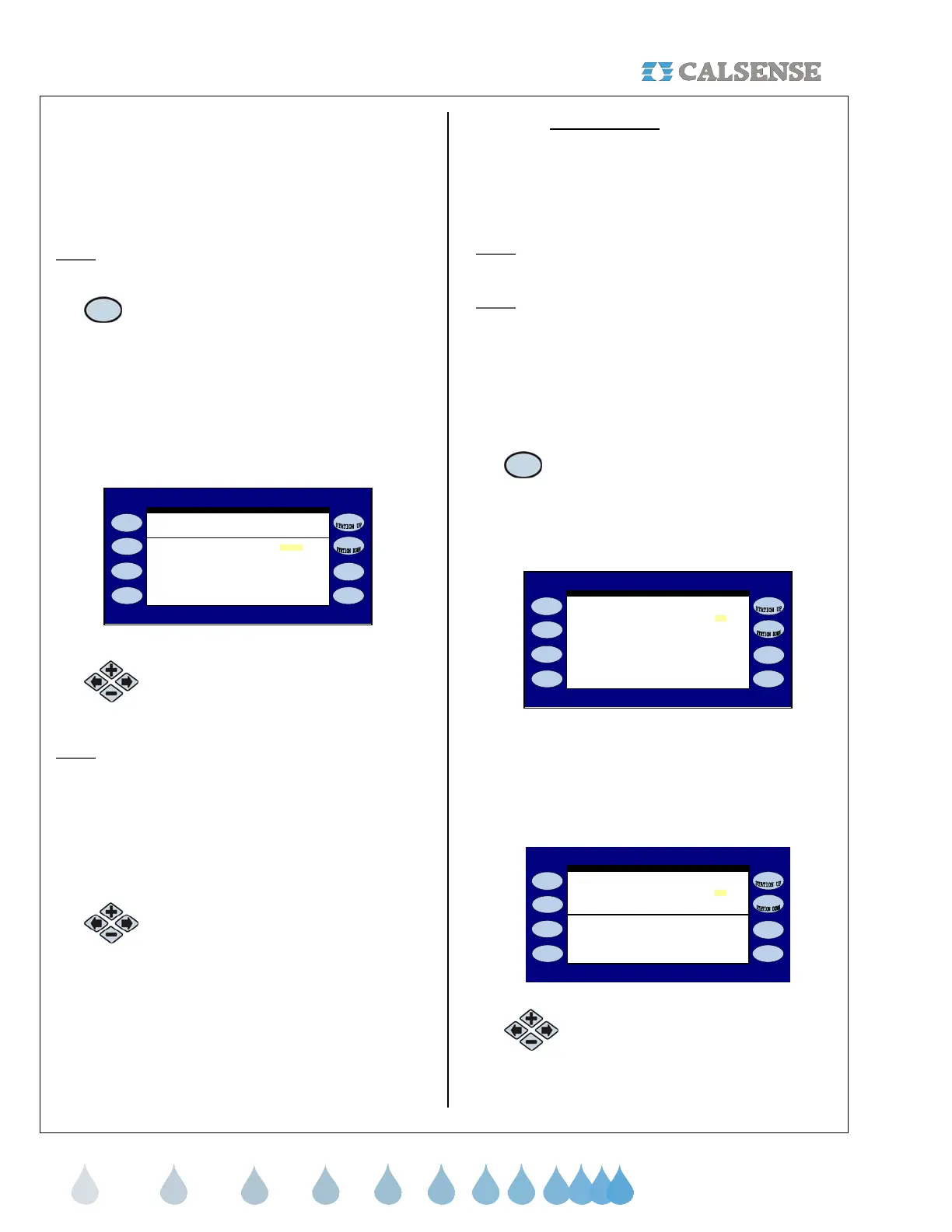
From the FLOW METER, MASTER VALVE & PUMP
screen.
1.
Press the FLOW CHECKING Menu
key.
The FLOW CHECKING screen is displayed
(Figure 11.9).
flow rate to the expected? No
FLOW CHECKING
When Irrigating COMPLARE the
Figure 11.9
This will open up the ALLOWABLE portion of the
screen if you select YES to the WHEN IRRIGATING
COMPARE THE FLOW TO THE EXPECTED ?
question (Figure 11.10).
flow rate to the expected? YES
FLOW CHECKING
When Irrigating COMPLARE the
ALLOWABLE
Below 30 gpm - 5 / + 5
From 65 gpm to 100 gpm - 10 / + 10
( - gpm / + gpm )
From 30 gpm to 65 gpm - 10 / + 10
Above 100 gpm - 15 / + 15
Figure 11.10
2. Press the blue ARROW keys to
change the Allowable settings.



 To Next Page