
 Need help?
Do you have a question about the Cambridge Audio AXA25 and is the answer not in the manual?
Controls power, standby, and Auto Power Down (APD) settings.
Controls the audio output level of the unit.
Selects the audio input source for playback.
Accepts 'line level' source equipment like CD players and streamers.
Connects speakers using bare wire or banana plugs.
Solutions for when the unit does not turn on.
Steps to resolve issues with no audio output.
Troubleshooting steps for distorted audio playback.
Advice on eliminating humming noises from speakers.
Tips to reduce or eliminate background noise and interference.
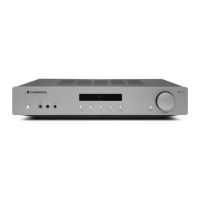
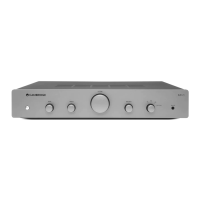
The AXA25 is an integrated amplifier designed to enhance your audio experience. It serves as the central hub for your home audio system, connecting various source components and driving your loudspeakers. This manual provides a comprehensive guide to setting up, operating, and maintaining your AXA25, ensuring optimal performance and longevity.
The primary function of the AXA25 is to amplify audio signals from various sources and deliver them to your loudspeakers. It acts as both a preamplifier and a power amplifier, offering a complete solution for your audio needs. The amplifier features multiple audio inputs, allowing you to connect a range of devices such as CD players, streaming devices, and even turntables (with an external phono preamplifier).
The AXA25 is equipped with a power button that switches the unit between Standby mode and On mode. In Standby mode, the power consumption is minimal, less than 0.5 Watts. The unit also includes an Auto Power Down (APD) feature, which automatically switches the product to Standby after 20 minutes of inactivity. This feature can be enabled or disabled by pressing and holding the Power button until the LED flashes a specific sequence. Five flashes indicate APD is disabled, while ten flashes indicate APD is enabled.
For sound customization, the AXA25 provides Bass and Treble controls. These controls allow for subtle adjustments to the tonal balance of the sound, enhancing your listening experience. When set to the central 12 o'clock position, these controls have no effect. It's important to note that these tone controls only modify the sound through your loudspeakers and do not affect the signals sent through the Rec Out connections. This allows you to compensate for poor recording quality or other factors affecting sound quality.
A central Volume control is present to increase or decrease the audio output level of the unit. This control, however, does not affect the level of the 'Rec Out' output, which maintains a fixed level. Additionally, a Balance control is available to adjust the relative output levels of the left and right channels. In its central 12 o'clock position, the output from each channel is equal. Similar to the tone controls, the Balance control only modifies the sound through your loudspeakers and does not affect the signals sent through the Rec Out connections.
The AXA25 features a Source selector switch (A1, A2, A3, A4/AUX) that allows you to choose the appropriate input source component you wish to listen to. The selected signal is also routed to the Rec Out sockets for recording purposes. It is recommended not to change the input while recording. A key indicator of proper input selection is the presence of sound; if no sound is heard, the correct input source may not be selected.
A convenient Aux In port is located on the front panel, enabling direct connection of portable audio devices like smartphones using a 3.5mm stereo Aux lead. Plugging a device into this input automatically selects it, although other inputs apart from A4 can still be chosen. The A4/AUX option on the front panel will specifically select this input when a stereo-jack is plugged in. It's worth noting that using the front panel Aux input overrides the A4 input; simply removing the jack from the front panel will automatically re-enable the A4 input.
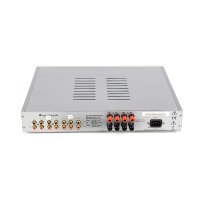
On the rear panel, the AXA25 offers several connectivity options. There are four Audio inputs (A1-A4) suitable for 'line level' source equipment such as CD players and streaming devices. A Rec Out connection allows you to connect to the recording input of a CD recorder, tape deck, or other compatible recording device. This output provides a constant high-level output, unaffected by the volume, balance, or tone controls of the main unit. This design means the AXA25 cannot be used solely as a preamplifier or with a subwoofer.
A USB power 5V 500mA port is also available on the rear panel. This connection is specifically designed for charging devices like smartphones that require 5V DC. It is important to understand that this is not an audio input, meaning you cannot play audio directly to the unit via this port. Furthermore, it is advised not to use this port for charging a device and using it as an audio source simultaneously, as this can create a ground loop and cause interference during playback.
The AXA25 includes Loudspeaker terminals for connecting your speakers. These terminals are designed to accommodate both bare wire connections and banana plugs. When using banana plugs, ensure the speaker terminals are completely tightened before inserting the plug. The red terminal signifies the positive output, and the black terminal indicates the negative output.
Setting up the AXA25 involves connecting your loudspeakers and source components. The amplifier is designed to work with speakers having an impedance of 8 Ohms. When connecting loudspeakers, it's crucial to maintain correct polarity: red terminals to positive (+) and black terminals to negative (-). Incorrect polarity can result in weak and phased sound with reduced bass.
For bare wire connections, prepare the speaker cords by stripping off approximately 10mm (3/8") or less of the outer insulation. Tightly twist the wires to prevent loose ends, then unscrew the speaker terminal, insert the cable, and tighten the terminal to secure it. All connections are made using standard loudspeaker cable.
If you prefer using banana plugs, securely connect the stripped and twisted wires to your banana plugs. Remove the dust cap from the end of the speaker terminal and push the plug in as far as possible without applying excessive force. Always ensure the speaker terminals are completely tightened before inserting the plug.
Connecting source equipment is straightforward. Any 'line level' source, such as a CD player, can be connected to the audio inputs (A1 to A4) on the amplifier. For turntables without a built-in phono stage, an external phono preamplifier is required to boost the signal to an audible level before connecting it to any of the AXA25's audio inputs.
Once all connections are complete, plug the AC power cable into an appropriate mains socket and turn the unit on. Always use the power lead supplied with the unit.
Maintaining your AXA25 involves ensuring secure connections and proper placement to prevent interference. If you encounter issues such as no power, no sound, distorted sound, or unwanted background noise, the troubleshooting section of the manual provides guidance.
If there is no power, check that the AC power cord is securely connected, the plug is fully inserted into the wall socket and switched on, the fuse in the mains plug or adaptor is intact, and the power button on the front of the unit is on.
For no sound, verify that the correct input is selected on the front panel of the amplifier and that the speakers are connected correctly.
If the sound is distorted, re-check all speaker connections.
A hum coming from the speaker often indicates insecure cable connections, so ensure all connections are tight.
To address unwanted background noise and interference, try moving the unit away from other electrical equipment that might be causing interference. Confirm that all cable connections are secure. Additionally, avoid charging a device via the USB port while simultaneously using it as an audio source, as this can create a ground loop and cause interference.
The USB port on the rear of the AXA25 is exclusively for charging devices and maintaining power to components like streaming devices; it is not an audio input. Therefore, inserting a Bluetooth adaptor into this port will not enable Bluetooth functionality.
The AXA25 is rated for use with 8 Ohm speakers. Using 4 or 6 Ohm speakers is not recommended as it could lead to the amplifier overheating and potentially damaging the unit in the long run. Adhering to these guidelines will help ensure the longevity and optimal performance of your AXA25 integrated amplifier.
 General
| Input Impedance | 47k ohms |
|---|---|
| Power Output | 25 watts (8 ohms) |
| Inputs | 4 x RCA |
| Signal to Noise Ratio | >90dB |
| Total Harmonic Distortion | <0.01% |
| Weight | 5.1kg (11.2lbs) |



 To Next Page
