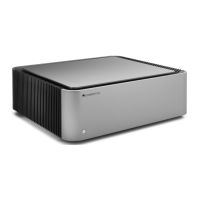
The EDGE W is a power amplifier designed for high-fidelity audio systems, offering robust performance and a range of connectivity options. It is engineered to deliver clean and powerful sound, suitable for driving a variety of loudspeakers.
Function Description:
The EDGE W serves as a power amplifier, taking a pre-amplified audio signal and boosting it to a level sufficient to drive loudspeakers. It features both balanced (XLR) and unbalanced (RCA) inputs, allowing for flexible integration into different audio setups. The amplifier incorporates advanced protection circuitry to safeguard itself and connected speakers from potential damage due to over temperature, DC faults, or over current conditions. It also includes an Auto Power Down (APD) function for energy efficiency, automatically switching to standby after 20 minutes of inactivity. Power syncing capabilities allow it to turn on/off in conjunction with other Cambridge Audio Edge series components.
Important Technical Specifications:
- Continuous Power Output:
- 100W RMS into 8 Ohms
- 200W RMS into 4 Ohms
- THD (unweighted):
- <0.002% 1kHz at rated power (8 Ohms)
- <0.02% 20Hz - 20kHz at rated power (8 Ohms)
- Frequency Response: <3Hz - >80kHz +/-1dB
- S/N Ratio (ref 1W into 8 Ohm): >93 dB
- Crosstalk @ 1kHz: < -100dB
- S/N Ratio (ref full power): >113 dB
- Input Sensitivity: Input A1-A2 (unbalanced) 1.09V RMS
- Input Impedances:
- Input A3 (balanced) 47k Ohm
- A1-A2 (unbalanced) 47k Ohm
- Inputs: Balanced (XLR), Unbalanced (RCA)
- Outputs: Speakers, Loop out (XLR and RCA)
- Max Power Consumption: 1000W
- Standby Power Consumption: <0.5W
- Dimensions: 150 x 460 x 405mm (5.9 x 18.1 x 15.9")
- Weight: 23.6kg (51.9lbs)
- Amplification Class: Class XA. This unique amplification class ensures that for low-level signals, the amplifier operates essentially as a Class A amplifier, with both sets of transistors always on. As the signal reaches a louder level, the transistors switch over. This design aims to mask crossover distortion within the signal, providing a cleaner sound.
Usage Features:
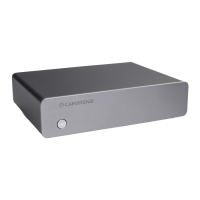
- Front Panel: Features a single STANDBY/ON button with an LED indicator (dim for standby, bright for on).
- Rear Panel Connections:
- Speaker Terminals: Robust terminals for connecting loudspeakers. Supports bare wire and banana plugs. Users are advised to ensure terminals are completely tightened for optimal sound quality and to prevent loose strands from shorting.
- LOOP OUT: XLR and RCA outputs for bi-amping, daisy-chaining, or connecting to an active subwoofer. The XLR output is balanced, and the RCA output is unbalanced.
- BALANCED/UNBALANCED SWITCH: Allows selection between balanced XLR or unbalanced RCA inputs, crucial for ensuring sound output.
- BALANCED/UNBALANCED INPUTS: XLR inputs are balanced, and RCA inputs are unbalanced.
- AUTO POWER DOWN (APD) SWITCH: Toggles the automatic standby function (after 20 minutes of inactivity) on or off.
- LINK: Used for power syncing with other Cambridge Audio Edge series components (e.g., EDGE NQ or EDGE A), allowing them to turn on/off simultaneously.
- TRIGGER IN: Accepts a 5V to 12V input from home automation equipment to control the power state of the EDGE W.
- AC POWER SOCKET: For connecting the mains power cord.
- VOLTAGE SELECTOR SWITCH: For service personnel only, to adjust voltage settings.
- Loudspeaker Compatibility: Compatible with speakers having an impedance between 4 and 8 Ohms.
- Bi-amping: The LOOP OUT feature facilitates bi-amping configurations, allowing separate power amps to drive high/mid and low frequencies of speakers for enhanced performance.
- Subwoofer Connection: A powered subwoofer can be connected via the unbalanced RCA Pre-Outputs.
- Analogue Outputs: The output connections remain active at all times, ensuring that any connected components or devices follow the volume commands of the preamplifier.
Maintenance Features:
- Protection Circuitry: The EDGE W includes comprehensive Amplifier Protection Circuitry to detect and respond to faults:
- Over Temperature: Monitors the heat generated by output transistors. If a high temperature is detected (e.g., due to high listening levels, low impedance speakers, or obstructed ventilation), the amplifier will switch to a fault mode (LED standby button turns red) to prevent damage.
- Remedy: Allow the unit to cool down for 15 minutes before resuming operation.
- DC Protection: Safeguards loudspeakers if the amplifier output goes to a high constant voltage due to an internal fault.
- Remedy: If triggered, contact your dealer or Cambridge Audio support.
- Over Current (V/I Protection): Constantly monitors output transistors to keep them within their Safe Operating Area (SOA). This provides a fast response to temporary overload conditions. If triggered, distortion may be heard, but the unit will continue to operate while protecting the transistors.
- Remedy: Reduce the volume. If distortion persists, check speaker connections and impedance ratings.
- Troubleshooting Guide: The manual provides solutions for common issues such as no power, no sound, sound on only one channel, weak bass/diffused stereo imaging, loud buzz/hum, and the LED standby button turning red (indicating a protection circuit activation). These steps guide users through checking connections, input selections, and cable integrity.

 Need help?
 General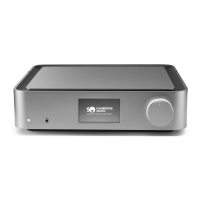

 To Next Page