EasyManua.ls Logo

Cambridge Audio StreamMagic 6 - 8. Manage Stream Magic Access in EyeConnect; 9. Stop EyeConnect for Content Management

Cambridge Audio StreamMagic 6
50 pages
Print Icon
To Next Page IconTo Next Page
To Previous Page IconTo Previous Page
Loading...
6
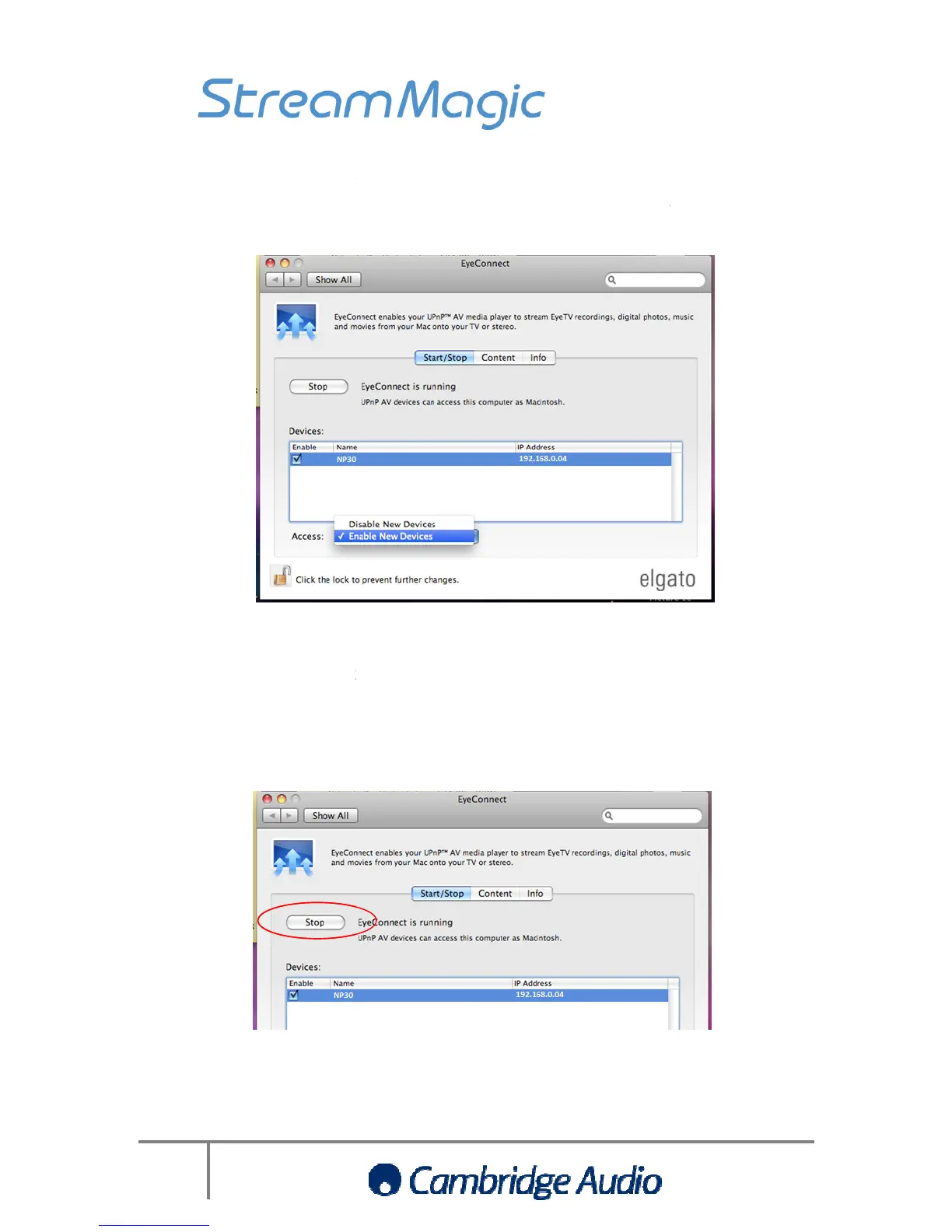
9. If
required, in the Start/Stop window
and click Enable or D
isable
product
from accessing the music on your Mac.
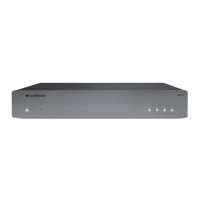
10.
If you don’t wish EyeConnect to automatically
over your network, you
be ser
ved over the network
Mac
required, in the Start/Stop window
, you can highligh
t the Stream Magic product
isable
. This will either enable or disable the
Stre
from accessing the music on your Mac.
If you dont wish EyeConnect to automatically
also
serve your video files o
over your network, you
can also choose what
content on your Mac that you wish to

ved over the network
. First ‘Stop’ EyeConnect
Set-up guide
Mac
UPnP
set
-
up guide
t the Stream Magic product
Stre
am Magic
serve your video files o
r photos
content on your Mac that you wish to

Related product manuals