h
P
C
24
20
30
32
34
36
C
C
24
20
30
32
34
36
C
C
24
20
C
24
20
R
h
P
R
°C
24
20
16
12
8
6
22
26
30
32
34
36
°C
C
24
20
16
12
8
6
23
22
21
20
19
18
1716
1514
13121110
9
8
7
65432
1
0
22
26
30
32
34
36
°C
°C
24
20
16
12
8
6
°C
24
20
16
12
8
6
h
P
R
°C
24
20
16
12
8
6
22
26
30
32
34
36
°C
C
24
20
16
12
8
6
23
22
21
20
19
18
1716
1514
13121110
9
8
7
65432
1
0
22
26
30
32
34
36
°C
°C
24
20
16
12
8
6
°C
24
20
16
12
8
6
C
B
D
h
P
C
24
20
30
32
34
36
C
C
24
20
30
32
34
36
C
C
24
20
C
24
20
R
A
p. 10 - Manual FB00802-EN v. 1- 07/2017 - © CAME S.p.A. - The contents of this manual may be changed, at any time, and without notice.
Automatic control
Press button until the wording
AUT appears on the display.
AUTOMATIC or MANUAL temperature control
Place cursor on the tempera-
ture you want.
Manual control
Press button until the word-
ing MAN appears on the display.
Use scales
and according to the system's operating mode.
Note. The programming can be changed at any time by simply moving the cursor to the
position required.
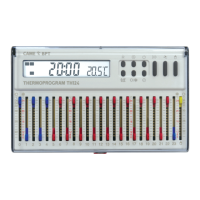
Move cursors 0 to 23 , placing
them on the wanted temperature,
for each hour of the day.
The display shows the cursor
number on which you are working
and the temperature that your
are setting.


 To Next Page