h
P
C
24
20
30
32
34
36
C
C
24
20
30
32
34
36
C
C
24
20
C
24
20
R
h
P
C
24
20
30
32
34
36
C
C
24
20
30
32
34
36
C
C
24
20
C
24
20
A
B
C
p. 16 - Manual FB00802-EN v. 1- 07/2017 - © CAME S.p.A. - The contents of this manual may be changed, at any time, and without notice.
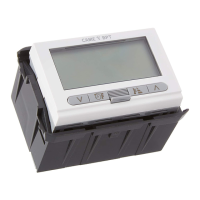
Press the button on the bottom and
open the device .
This procedure, done when the
battery-charge state icon is flash
-
ing, will make all wording on the
display disappear.
The time available for replacing
the batteries is about 2 minutes;
once that time has elapsed the
configured settings will be restored
to the factory settings.
ATTENTION: not replacing the batteries within the two-minute limit may damage the heat
-
ing system.
When the display shows
+
, the device is no longer
operational and the control over the
thermal zone has been disabled.
Replacing the batteries
When the icon is flashing on
the display it means the bat
-
teries need to be replaced within
about one month.


 To Next Page