h
P
C
24
20
30
32
34
36
C
C
24
20
30
32
34
36
C
C
24
20
C
24
20
h
P
C
24
20
30
32
34
36
C
C
24
20
30
32
34
36
C
C
24
20
C
24
20
R
A
B
h
P
C
24
20
30
32
34
36
C
C
24
20
30
32
34
36
C
C
24
20
C
24
20
R
A
p. 15 - Manual FB00802-EN v. 1- 07/2017 - © CAME S.p.A. - The contents of this manual may be changed, at any time, and without notice.
To zero out the counter, repeatedly press button and then button within 5 seconds .
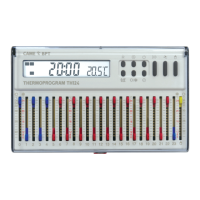
Press button
to view the set temperature, for other times of day, by the various cursors.
C25 represents the manual temperature cursor.
For example, if at 11:45 the C11
cursor is set to 20°C, the display
will show C11 20°C.
Press button
.
The display shows, for 5 seconds,
the set number of hours during
which either the cooling or heating
connected to the chronothermostat
will be in operation. .
Press button
.
The display shows, for 5 seconds,
the set temperature value cor
-
responding at a chosen time .
System activation time
View set temperatures


 To Next Page