I.
Before Using
1. Keys,
Switch
, and Display
4
1-1
Power
Switch
and Display ON,OFF and
Clear Keys
~
=
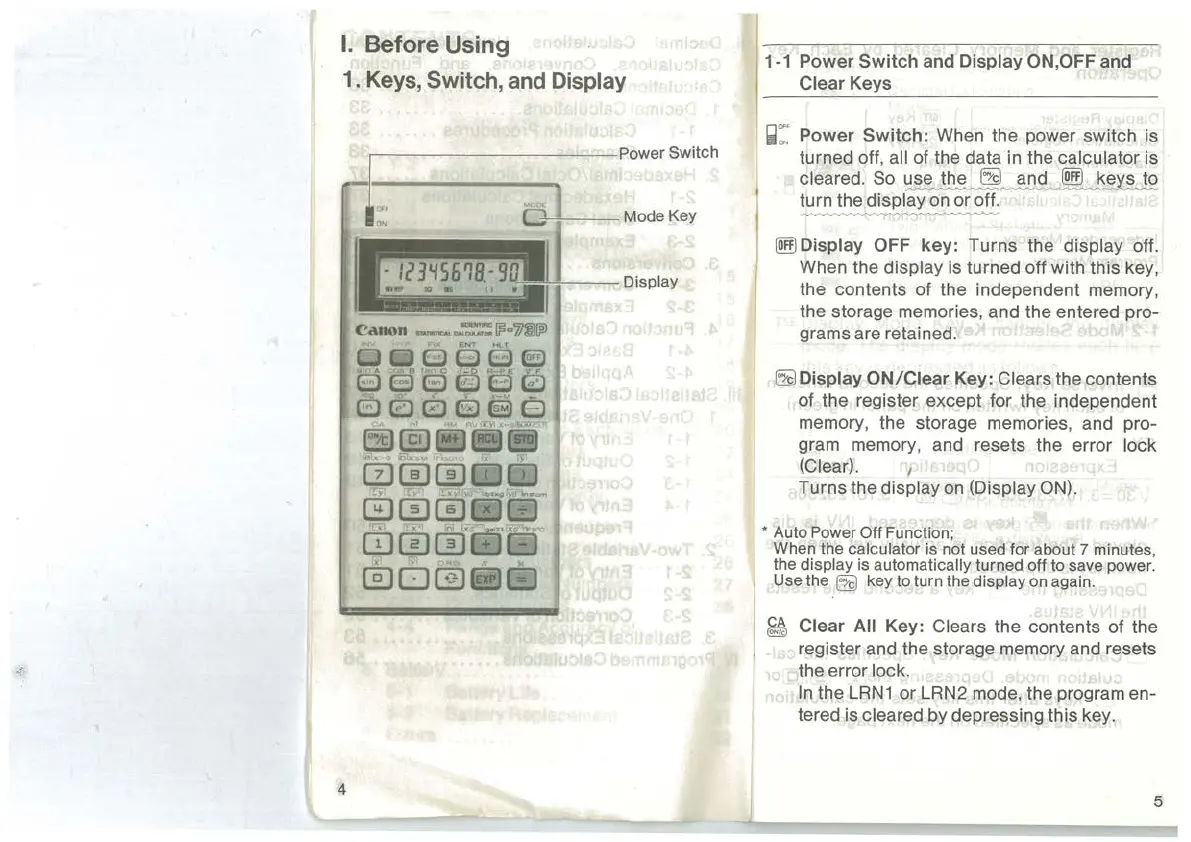
Power
Switch:
When the power switch is
turned off,
all of the data
in
the calculator is
cleared. So
~
~
~SL
--
~~~~
turn the display on or off.
~
~Display
OFF
key:
Turns the display off.
When the
display is turned off with this key,
the contents of the independent memory,
the storage memories, and the entered pro-
grams are retained.
frf)
Display
ON/Clear
Key: Clears the contents
of the register except for the independent
memory, the storage memories, and pro-
gram memory, and resets the error
lock
(Clear).
1
Turns the display
on
(Display ON).
* Auto Power Off Function;
When the
calculator is not used for about 7 minutes,
the
display is automatically turned off to save power.
Use the
frf)
key to turn the display on again.
~
Clear All Key: Clears the contents of the
register and the storage memory and resets
the error
lock.
In
the
LRN1
or LRN2 mode, the program en-
tered is
cleared by depressing this key.
5



 To Next Page