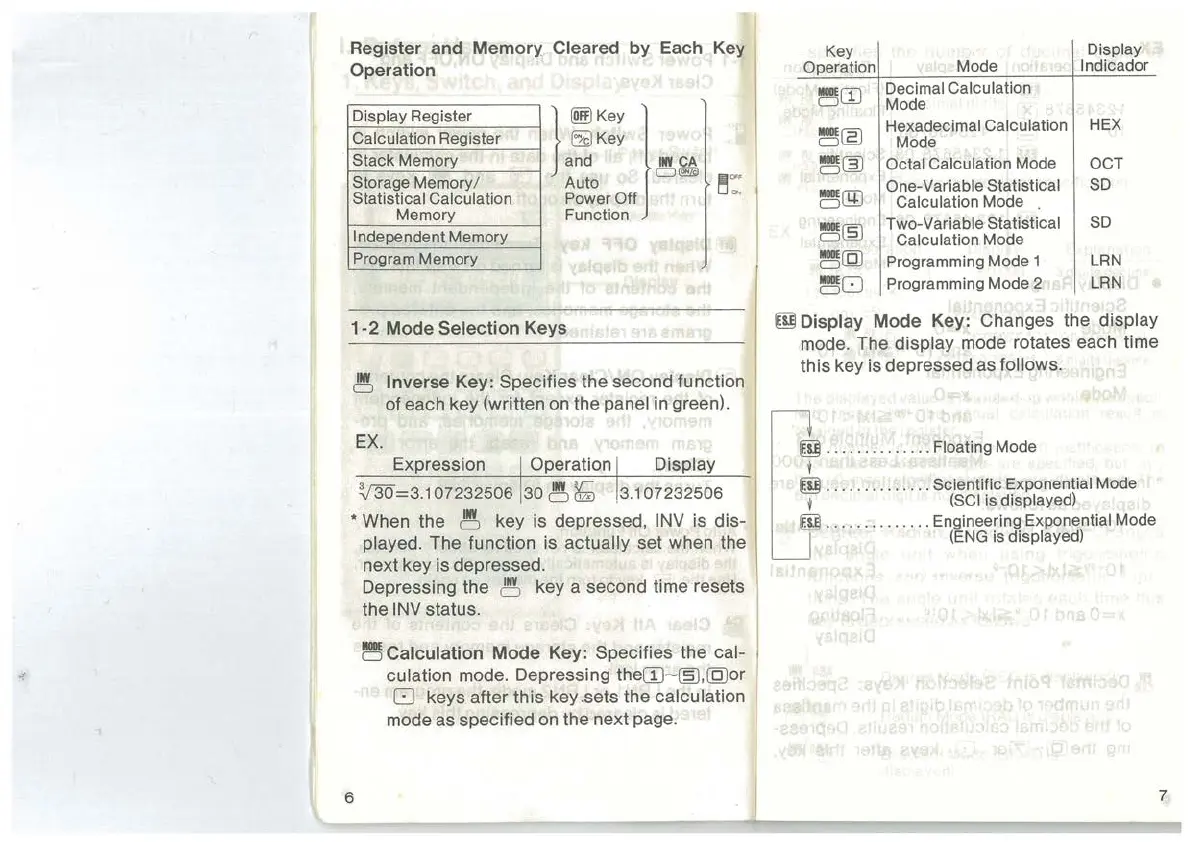
Register and Memory Cleared
by
Each
Key
Operation
Display Register
Calculation Register
Stack Memory
Storage Memory/
Statistical Calculation
Memory
}
~Key
)
Ef)
Key
and
Ill¥~
Auto
c:Joo
~
"''
PowerOff
"'
Function
Independent Memory
Program Memory
1-2
Mode Selection Keys
~
Inverse
Key:
Specifies the second function
of each key (written on the
panel in green).
EX.
~=3.1
07232506
30
~
~
3.107232506
• When the
~
key is depressed,
INV
is dis-
played. The function is actually set when the
next key is depressed.
Depressing the
~
key a second time resets
the
INV
status.
~Calculation
Mode
Key:
Specifies the cal-
.,
culation mode. Depressing
the[]J
~
~.(Q)or
0 keys after this key .sets the calculation
mode as specified
on
the next page.
Key
Display
Operation
Mode
lndicador
~
[]J
Decimal Calculation
Mode
~~
Hexadecimal Calculation
HEX
Mode
~~
Octal Calculation Mode OCT
~@
One-Variable Statistical
SD
Calculation Mode
~~
Two-Variable Statistical
SD
Calculation Mode
~(Q)
Programming Mode 1
LRN
~
0
Programming Mode 2
LRN
rnl
Display Mode
Key:
Changes the display
mode. The display mode rotates each time
this key is depressed as
follows.
ffi
..
......
..
.. ..
Floating Mode
i
rnJ
... ....
..
..
..
. Scientific Exponential Mode
l
(SCI
is displayed)
ffi
..
....
..
..... . Engineering Exponential Mode
(ENG
is displayed)
6 7



 To Next Page