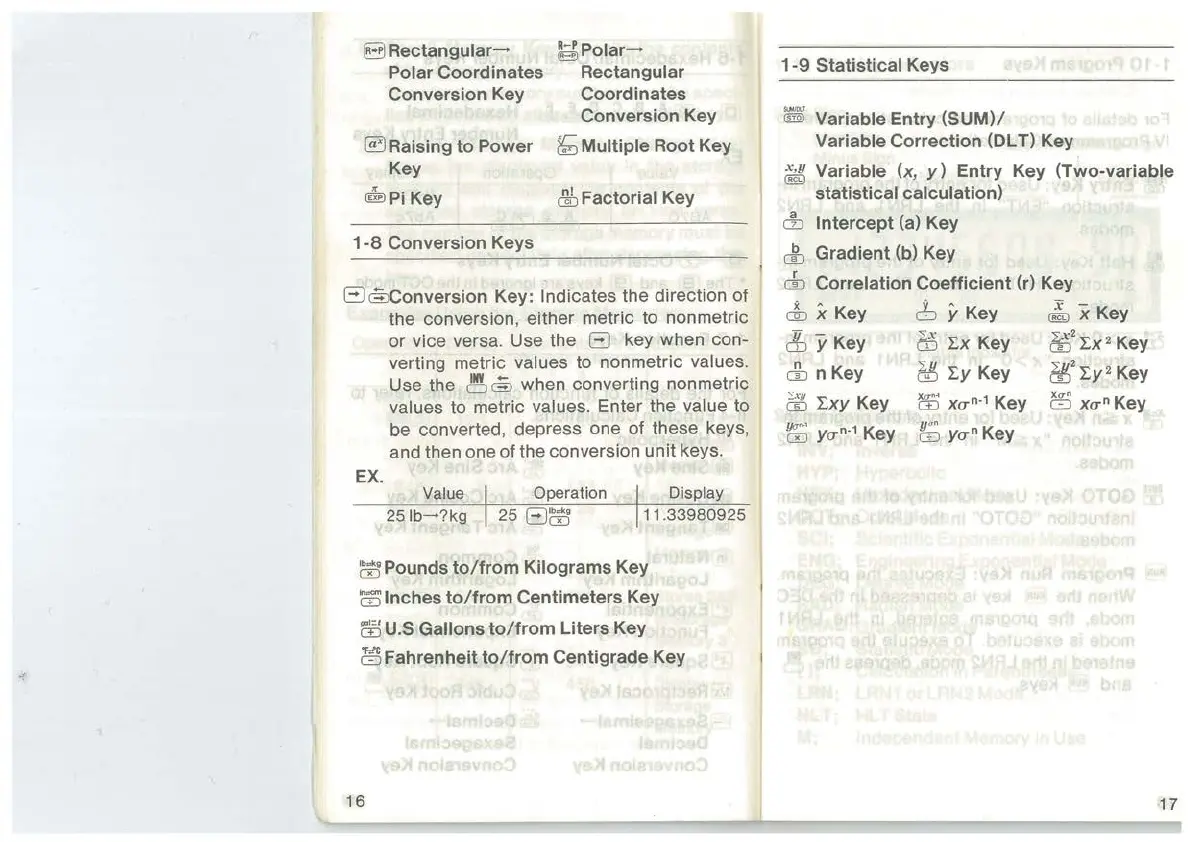
B Rectangular-+
Polar
Coordinates
Conversion
Key
~Raising
to
Power
Key
@Jpi Key
1-8
Conversion
Keys
~Polar-+
Rectangular
Coordinates
Conversion
Key
&;
Multiple
Root
Key
r!fu
Factorial
Key
ElcfuConversion
Key: Indicates the direction of
the conversion, either metric to nonmetric
or vice versa. Use the
El
key when con-
verting metric
values to nonmetric values.
Use the
~@
when converting non metric
values to metric values. Enter the value to
be converted, depress one of these keys,
and then one
of
the conversion unit keys.
EX.
Value Operation
Display
25
lb-?kg
25
El~
11
.33980925
~Pounds
to/from
Kilograms
Key
m
Inches
to/from
Centimeters
Key
co
U.S
Gallons
to/from
Liters
Key
~Fahrenheit
to/from
Centigrade
Key
16
1-9
Statistical
Keys
@l
Variable
Entry
(SUM)/
Variable
Correction
(DL T) Key
~
Variable (x,
y)
Entry
Key
(Two-variable
statistical
calculation)
&
Intercept
(a) Key
&
Gradient
(b) Key
r
m
Correlation
Coefficient
(r) Key
cfu
x Key 6 y Key
~
x Key
& y Key
bS
!x
Key
eE
2
I:x
2
Key
& n Key M
I:y
Key
ti!J
2
I:y
2
Key
?iJ
I:xy Key
ffi
xa"·
1
Key
ffi
xa"
Key
~
ya"·
1
Key tf;
ya"
Key
17



 To Next Page