• The relationship of units is:
2QQGRAD=18Qo=7TRAD
1-3
Numeric Entry Keys
(Q)
~
~
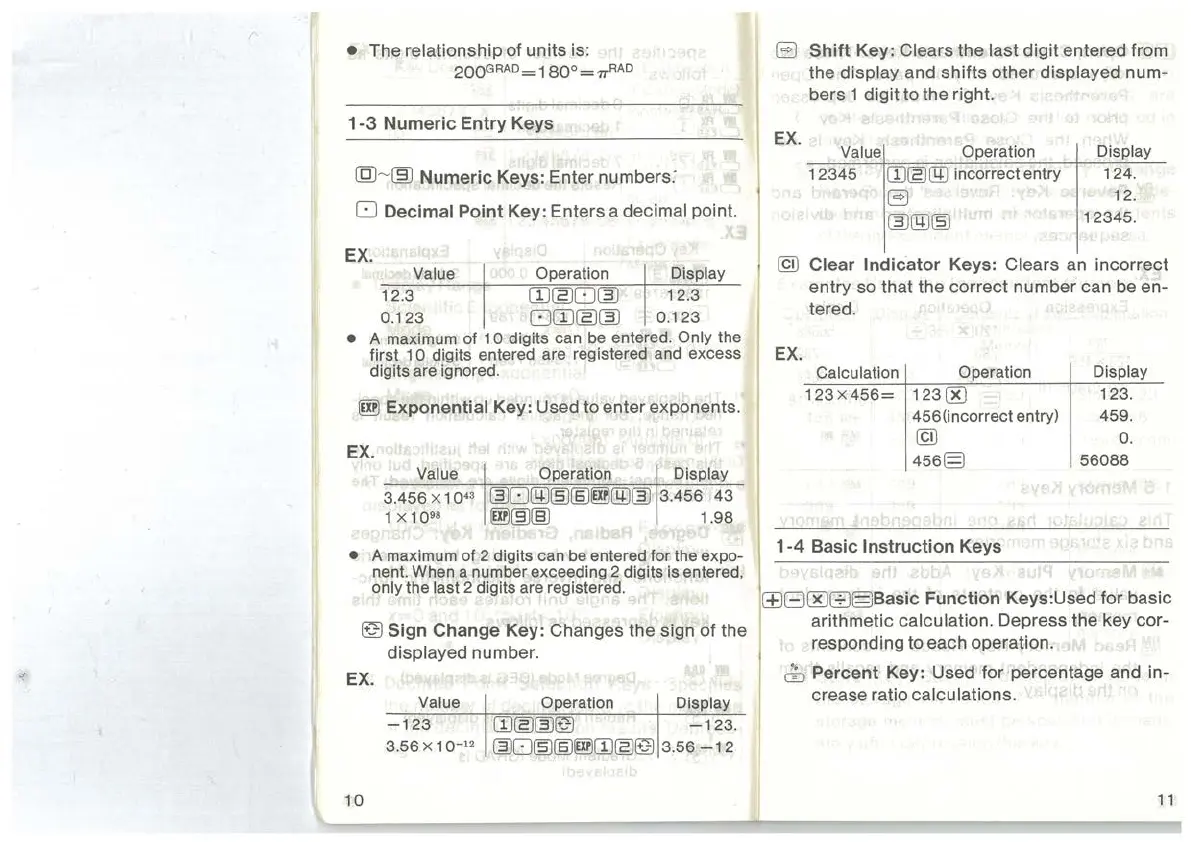
Numeric Keys: Enter numbers:
0 Decimal Point Key: Enters a decimal point.
EX.
Value
12.3
0.123
Operation
rn~o~
om~~
Display
12.3
0.123
•
A maximum of
10
digits can be entered. Only the
first 1
0 digits entered are registered and excess
digits are ignored.
lilll
Exponential Key: Used to enter exponents.
EX.
Value Operation Display
3.456
X 1 0
43
~0@~(§)~@~
3.456
43
1 X 1
098
~~(§)
1 .98
• A maximum of 2 digits can be entered for the expo-
nent. When a number exceeding 2 digits is entered,
only the last 2 digits are registered.
~Sign
Change Key: Changes the sign of the
displayed number.
EX.
Value
-123
3.56 X
10-
12
10
Operation Display
rn~~~
-123.
~O~(§J~UJ~~
3.56
-1
2
B
Shift
Key: Clears the last digit entered from
the
display and shifts other displayed num-
bers 1 digit to the right.
EX.
Value Operation
12345
rn~rm
incorrect entry
B
~@~
Display
124.
12.
12345
.
@)
Clear
Indicator
Keys: Clears
an
incorrect
entry so that the correct number can
be
en-
tered.
EX.
Calculation Operation
123X456=
123[K)
456(incorrect entry)
@)
456§
1-4
Basic Instruction Keys
Display
123.
459.
0.
56088
l±lBOOG§Basic
Function Keys:Used for basic
arithmetic calculation. Depress the key cor-
responding to each operation.
0 Percent Key: Used for percentage and in-
crease ratio
calculations.
11



 To Next Page