EX.
Key Operation
ern)
12345678
00
10
§
rn
Display
123456780
.
Explanation
(Floating
Mode)
Floating Mode
1
.2345678
08
Scientific
Exponential
Mode
rn
1
23.45678
06
Engineering
Exponential
Mode
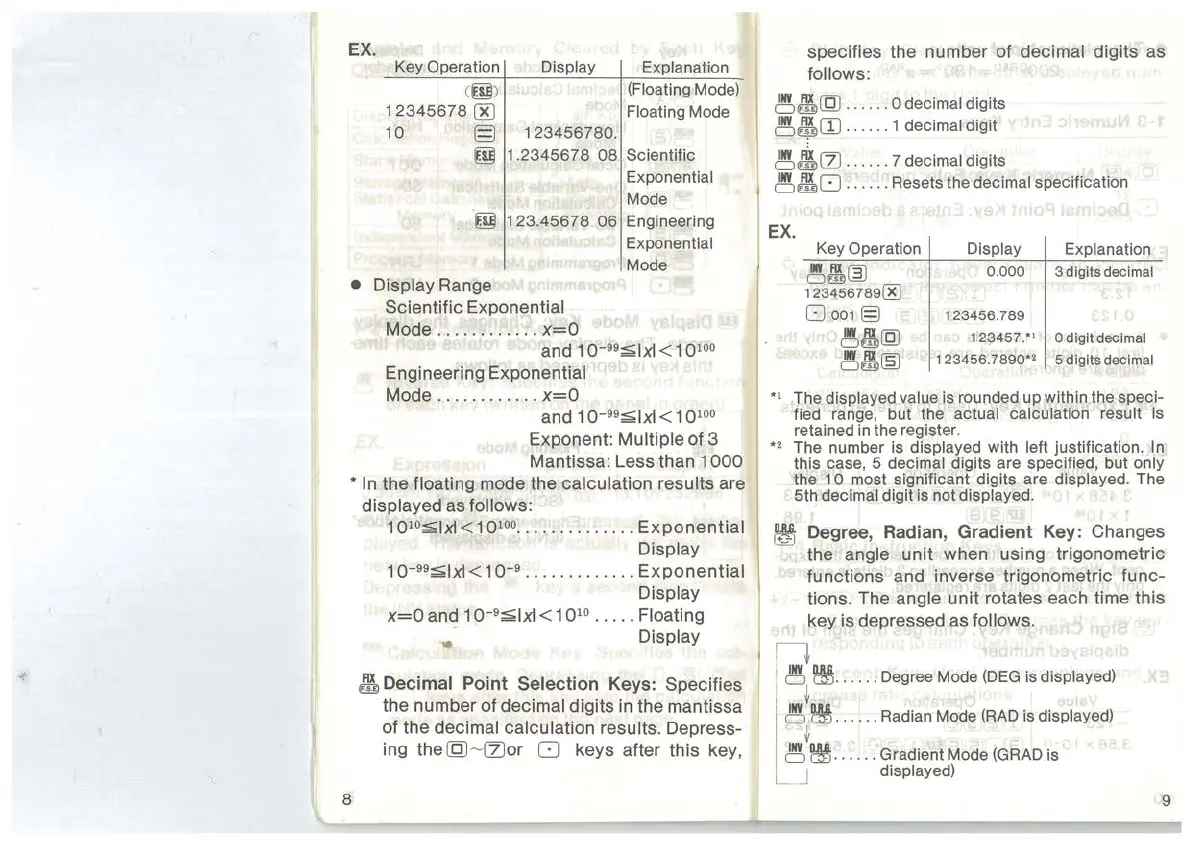
• Display Range
Scientific Exponential
Mode
............
x=O
and 1
0-
99
;;;;;1xl
<
10
100
Engineering Exponential
Mode
.......
..
. . .
x=O
and 1
o-
99
;;;;;1xl
<
10
100
Exponent: Multiple of 3
Mantissa: Less than
1000
*In
the floating mode the calculation results are
displayed as follows:
8
1 oto;;;;;lxl < 1
otoo
..........
.
...
Exponential
Display
1
o-99;;;;;1xl
< 1 o-9 . .
...
. . . .
.. ..
Exponential
Display
x=O
and 1
o-
9
;;;;;1xl
< 1 0
10
•
••
• . Floating
..
Display
~Decimal
Point
Selection
Keys: Specifies
the number of
decimal digits in the mantissa
of the
decimal calculation results. Depress-
ing
the(Q)
~
(Z)or
0 keys after this key,
specifies the number of decimal digits as
follows:
~~(Q)
.
...
.. 0 decimal digits
~&Cil
-
..
... 1 decimal digit
~~(2)
......
7 decimal digits
~~
[]
. .
....
Resets the decimal specification
EX.
Key Operation
Display
Explanation
~~~
0.000
3 digits decimal
12345678900
O
oo1§
123456.789
~~@
123457.*
1
0 digit decimal
~~~
123456
.
7890*
2
5 digits decimal
*
1
The displayed value is rounded up within the speci-
fied
range, but the actual calculation result is
retained in the register.
*
2
The number is displayed with left justification. In
this case, 5 decimal digits are specified, but only
the 1 0 most significant digits are displayed. The
5th
decimal digit
is
not displayed.
Degree, Radian,
Gradient
Key: Changes
the
angle
unit
when using trigonometric
functions and inverse trigonometric
func-
tions. The angle unit rotates each time this
key is depressed as follows.
n
!
~
~
-
. . . .. Degree Mode
(DEG
is
displayed)
j t
i
~
~
..
..
..
Radian Mode
(RAD
is
displayed)
I
~
j
~
~
..
.
...
Gradient Mode (GRAD is
L J displayed)
9



 To Next Page