CDCD
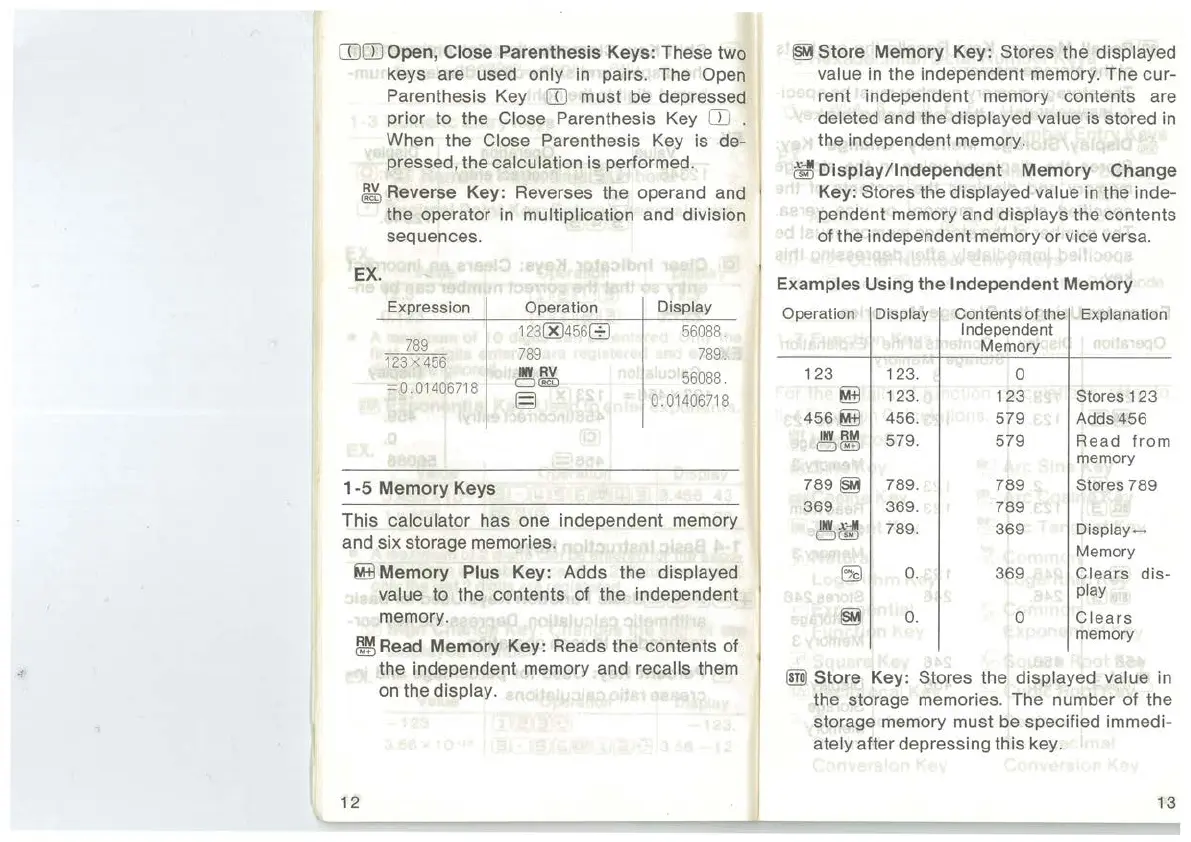
Open, Close Parenthesis Keys: These two
keys are used
only
in
pairs. The Open
Parenthesis Key
CD
must be depressed
prior to the
Close Parenthesis Key
CD
.
When the Close Parenthesis Key is de-
pressed, the
calculation is performed.
~Reverse
Key: Reverses the operand and
the operator
in
multiplication and division
sequences.
EX.
Expression Operation
Display
1
23
00
456
8
56088
.
789
789 789
123
X
456
II¥
RV
56088
.
=
0.
01
406718
D~
§
0.
01406718
1-5
Memory
Keys
This
calculator has one independent memory
and six storage memories.
~Memory
Plus Key: Adds the displayed
value
to the contents of the independent
memory.
~Read
Memory
Key: Reads the contents of
the independent memory and
recalls them
on
the display.
12
~Store
Memory
Key: Stores the displayed
value
in
the independent memory. The cur-
rent independent memory contents are
deleted and the displayed value is stored
in
the independent memory.
~Display/Independent
Memory
Change
Key:
Stores the displayed value
in
the inde-
pendent memory and
displays the contents
of the independent memory or vice versa.
Examples Using
the
Independent
Memory
Operation Display
123
123.
~
123.
456~
456.
INV
RM
579
.
0 ®
789
~
789.
369 369
.
INV
x-M
789
.
CJ@
~
0.
~
0.
Contents of the
Independent
Memory
0
123
579
579
789
789
369
369
0
Explanation
Stores
123
Adds
456
Read
from
memory
Stores
789
Display~
Memory
C I
ears
dis-
play
Clears
memory
®)
Store
Key: Stores the displayed value
in
the storage memories. The number of the
storage memory must be specified immedi-
ately after depressing this key.
13



 To Next Page