• x
>0,
x
~M
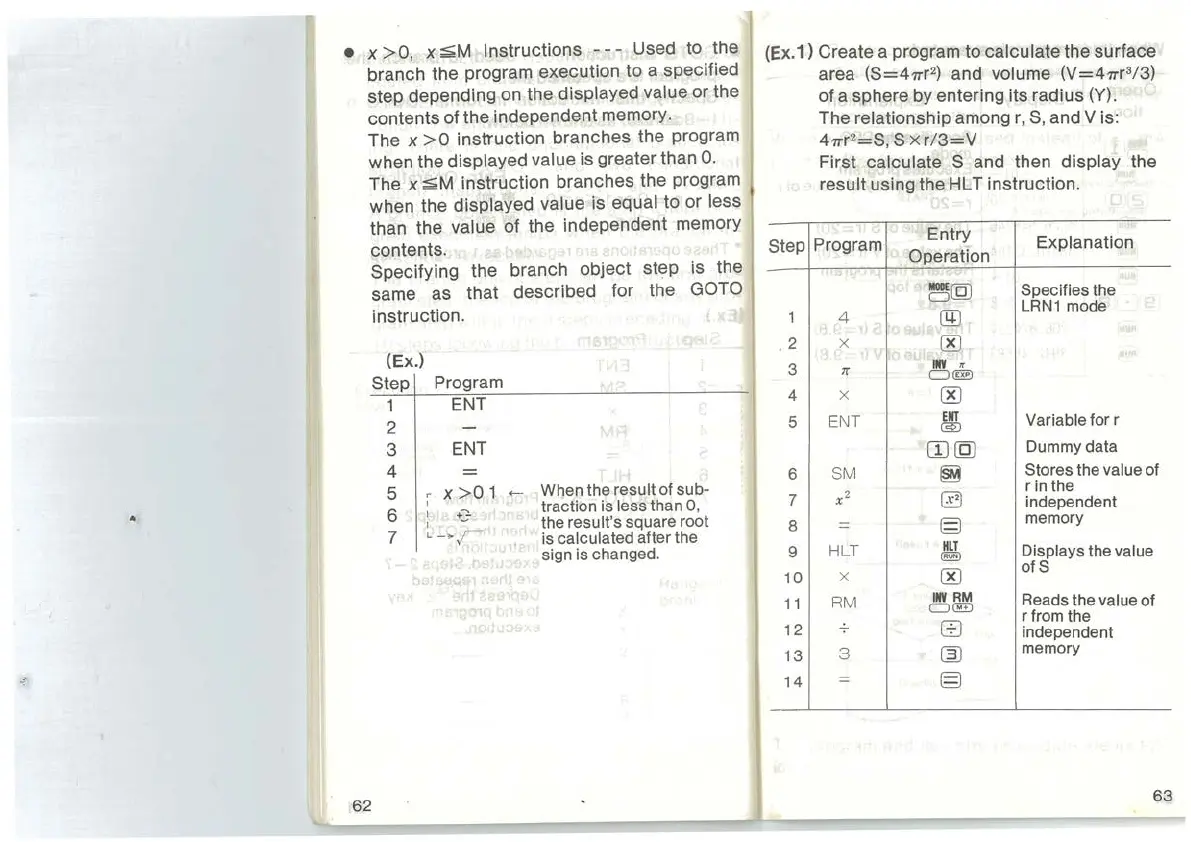
Instructions
---
Used to the
branch the program execution to a specified
step depending on the
displayed value or the
contents of the independent memory.
The
x
>0
instruction branches the program
when the
displayed value is greater than
0.
The x
~M
instruction branches the program
when the
displayed value is equal to or less
than the value of the independent memory
contents.
62
Specifying the branch object step is the
same as that described for the
GOTO
instruction.
(Ex.)
Step
1
2
3
4
5
6
7
Program
ENT
ENT
=
X
>0
1
'
I +:}
I
L-~r
.,
j
..._
When
the
result
of
sub-
traction
is
less
than
0,
·
the
result's
square
root
is
calculated after
the
sign
is
changed.
(Ex.1) Create a program to calculate the surface
area (S=47Tr
2
)
and volume (V=47Tr
3
/3)
of a sphere by entering its radius (Y).
Step
1
. 2
3
4
5
6
7
8
9
10
11
12
13
14
The relationship among
r,
S,
and
Vis:
47Tr
2
=S,
S x
r/3=V
First calculate S and then display the
result using the HL T instruction.
Program
Entry
Explanation
Operation
~(QJ
Specifies
the
LRN1
mode
4
l
'r
@
X
'
I
:~
00
INV
•
7r
c::J
tm:l
X
00
ENT
ENT
Variable
for
r
@)
CIJ(QJ
Dummy
data
SM
~
Stores
the
value
of
r
in
the
x2
0
independent
=
§
memory
HLT
HLT
Displays
the
value
@!!)
X
00
ofS
RM
INV
RM
Reads
the
value
of
CJ@
r
from
the
B
independent
3
~
memory
=
§
63



 To Next Page