91
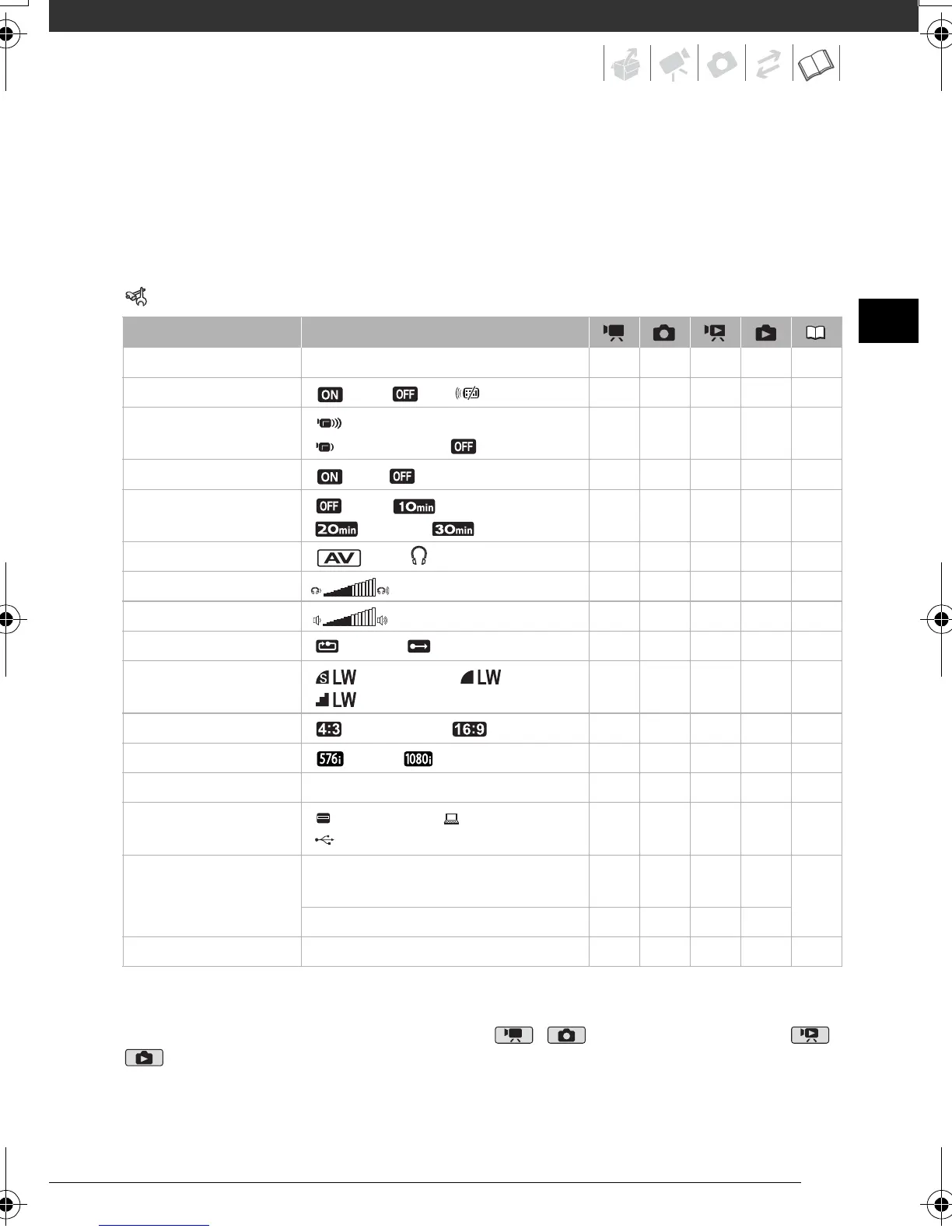
[DEMO MODE]: The demonstration mode displays the camcorder's main features. It
starts automatically when the camcorder is powered with the compact power adapter if
you leave it turned on for more than 5 minutes.
• To cancel the demo mode once it has started, press any button or turn off the
camcorder.
System Setup (Speaker Volume, Beep, etc.)
SYSTEM SETUP
* Option not available when the camcorder is connected to an HDTV using the HDMI cable.
[BATTERY INFO]: Displays a screen where you can verify the battery charge (as a
percentage) and the remaining recording time ( , mode) or playback time ( ,
mode).
Menu item Setting options
[BATTERY INFO] – zzzz –
[WL.REMOTE]
[ON], [ OFF ] zzzz –
[BEEP] [ HIGH VOLUME],
[ LOW VOLUME], [ OFF]
zzzz –
[POWER SAVE] [ON], [ OFF] zzzz –
[QUICK START] [ OFF], [ 10 min],
[ 20 min], [ 30 min]
zz –––
[AV/PHONES] [ AV], [ PHONES] z – z –49
[PHONES VOL.] z – z –49
[SPEAKER VOL.] – – z ––
[IMG NUMBERS] [ RESET], [ CONTINUOUS] zzzz –
[IMG QUALITY] [ SUPER FINE], [FINE],
[ NORMAL]
––z ––
[TV TYPE]* [ NORMAL TV], [ WIDE TV] ––z ––
[COMP.OUT]* [ 576i], [ 1080i] zzzz –
[HDMI STATUS] – zzzz –
[USB SETTING] [
DVD BURNER], [ PC/PRINTER],
[
CONNECT&SET]
––zz –
[ADD TO DISC] [ALL SCENES], [REM.SCENES],
[PLAYLIST]
––z –77
[ALL IMAGES], [TRANS.ORD] – – – z
[FIRMWARE] – – – – z –
D128_PAL_E.book Page 91 Thursday, March 6, 2008 7:53 PM










 To Next Page