3-9
Copying
The default values of the copy are the function which is
applied when [
] (Reset) is pressed or the power is turned
ON. You can change the default values to suit your needs.
You can register the following types of settings as the default
values.
• Quantity
• Density
• Original type
• 2-Sided
• Copy ratio
• N on 1
• Collating
• Sharpness
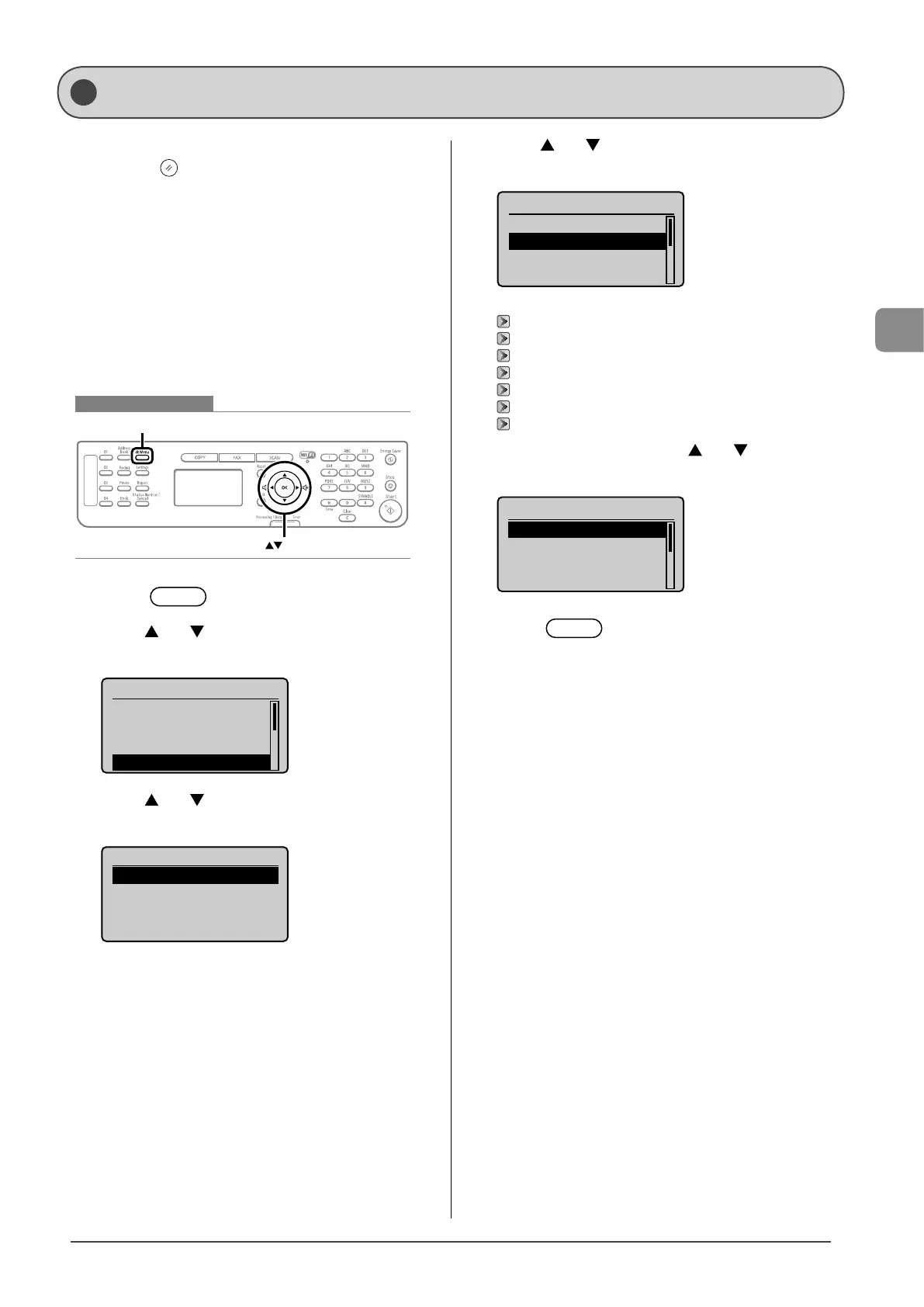
Keys to be used for this operation
Menu
OK
1 Press [ ] (Menu).
2 Press [ ] or [ ] to select <Copy Settings>, and
then press [OK].
Menu
Network Settings
Preferences
Timer Settings
Copy Settings
3 Press [ ] or [ ] to select <Change Defaults>, and
then press [OK].
Copy Settings
Change Defaults
Correct Density
4 Press [ ] or [ ] to select a setting item, and then
press [OK].
Change Defaults
<Apply>
No. of Copies: 01
Density: 0
Original Type: Text...
+
-
For details on the settings, see the following items.
“Adjusting the Density” (→P.3-4)
“Selecting Image Quality (Copy)” (→P.3-4)
“2-Sided Copying” (→P.3-5)
“Enlarging/Reducing Copies” (→P.3-6)
“Multiple Documents onto One Sheet (N on 1)” (→P.3-6)
“Collating Copies” (→P.3-7)
“Emphasize the Outline of an Image (Sharpness)” (→P.3-7)
5 After you are finished press [ ] or [ ] to select
<Apply>, and then press [OK].
Change Defaults
<Apply>
No. of Copies: 01
Density: 0
Original Type: Text...
+
-
6 Press [ ] (Menu) to close the menu
screen.
Changing the Default Values










 To Next Page