5-13
Registering Destinations in the Address Book
● Adding destinations to a group
(1) Click the number or name.
(2) Click [Edit].
(3) Click [Address Book].
(4) Click [One-Touch] or [Coded Dial] from the drop-down
list, select the check box for the number to be added in a
group, and then click [OK].
● Deleting a destination from a group
(1) Click the number or name.
(2) Click [Edit].
(3) Select the destination from [Members List] to be deleted,
and then click [Delete].
(4) Click [OK].
● Changing the name of a group
(1) Click the number or name.
(2) Click [Edit].
(3) Change a name of [Group Name], and then click [OK].
● Deleting a destination from a group
(1) Select the check box for which you want to delete the
number, and then click [Delete].
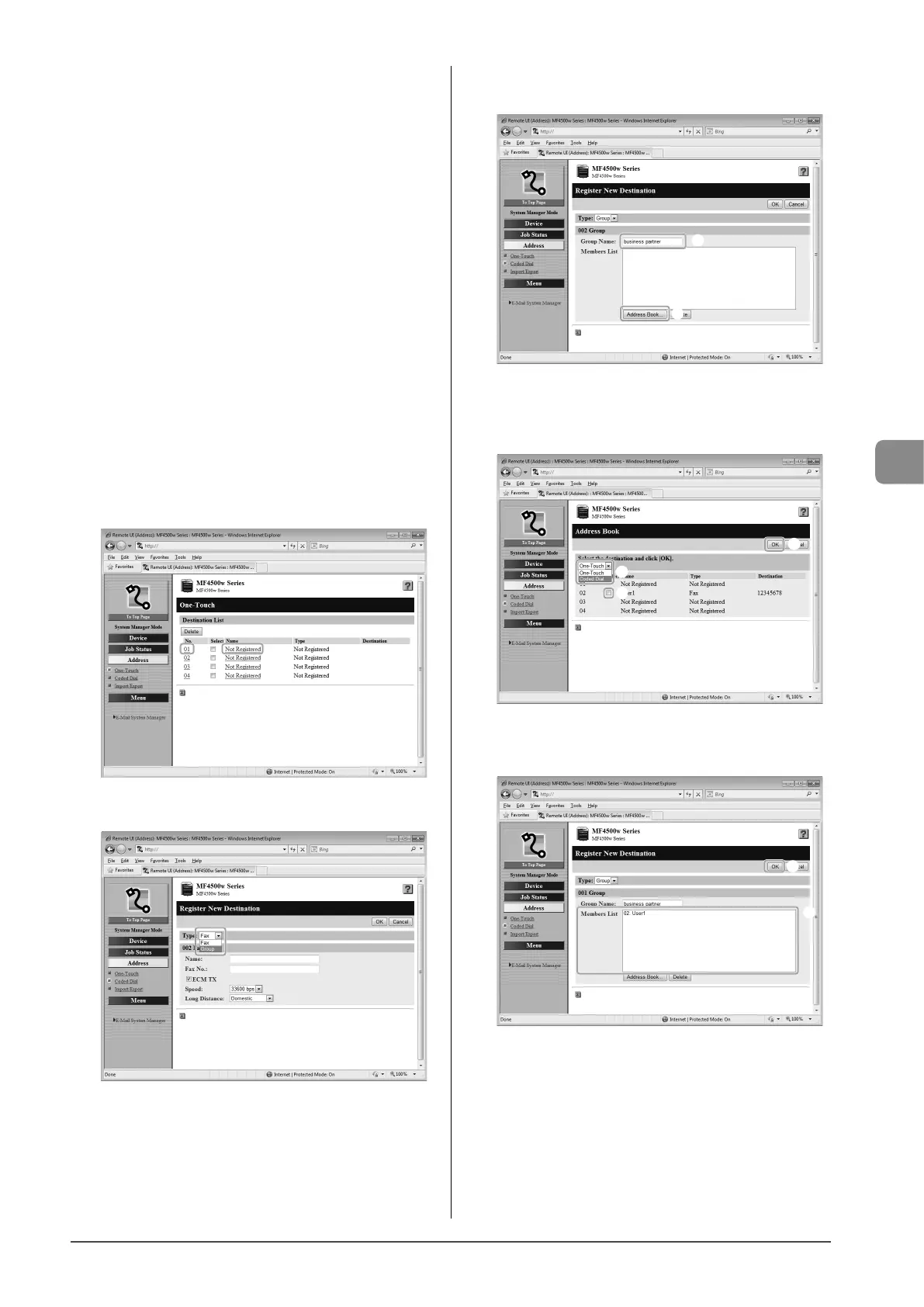
5 Click [Not Registered] or the number which is not
registered.
6 Select [Group] from the drop-down list.
7 Enter a name in [Group Name], and then click
[Address Book].
(1)
(2)
8 Click [One-Touch] or [Coded Dial] from the drop-
down list, select the check box for the number to
be registered in a group, and then click [OK].
(1)
(3)
(2)
9 Check if the registered destinations are displayed
in [Members List], and then click [OK].
(1)
(2)










 To Next Page