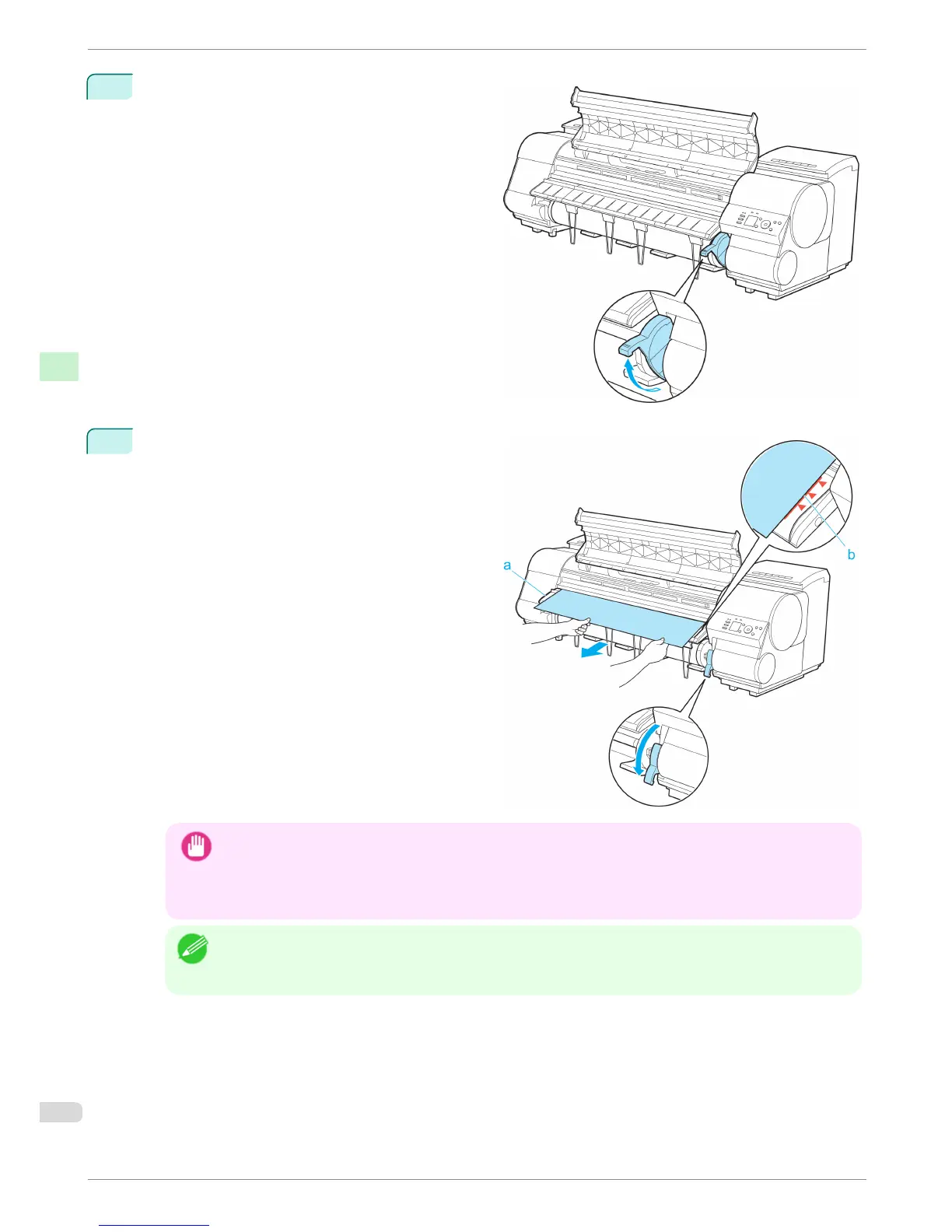
7
Holding the edge of the roll paper, lift the Release
Lever.
8
Hold the edge of the roll paper as you gently pull it
evenly with both hands to the position of the Ejec-
tion Guide (a). Align the right side of the roll paper
with the Paper Alignment Line (b), keeping this side
parallel to the line, and then lower the Release Lev-
er.
Important
• Do not omit steps 7 and 8. If paper cannot be advanced straight or if it wrinkles, it may jam or rub against the
Printhead.
• Do not force the roll paper into alignment with the paper alignment line (b). This may prevent the paper from
being advanced straight.
Note
• You can adjust the strength of suction holding paper against the Platen when the Release Lever is released. If
it is difficult to load paper, press the ▲ or ▼ button on the Control Panel to adjust the strength. Set suction
stronger by pressing the ▲ button or weaker with the ▼ button. Three settings are available.
Loading Rolls in the Printer
iPF8400
Basic Guide
Handling Paper Handling rolls
14














 To Next Page