Printer parts
Printer parts
Front ..................................................................................................................................................................................... 68
Back ...................................................................................................................................................................................... 70
Top Cover (Inside) .......................................................................................................................................................... 71
Carriage .............................................................................................................................................................................. 72
Ink Tank Cover (Inside) ................................................................................................................................................. 73
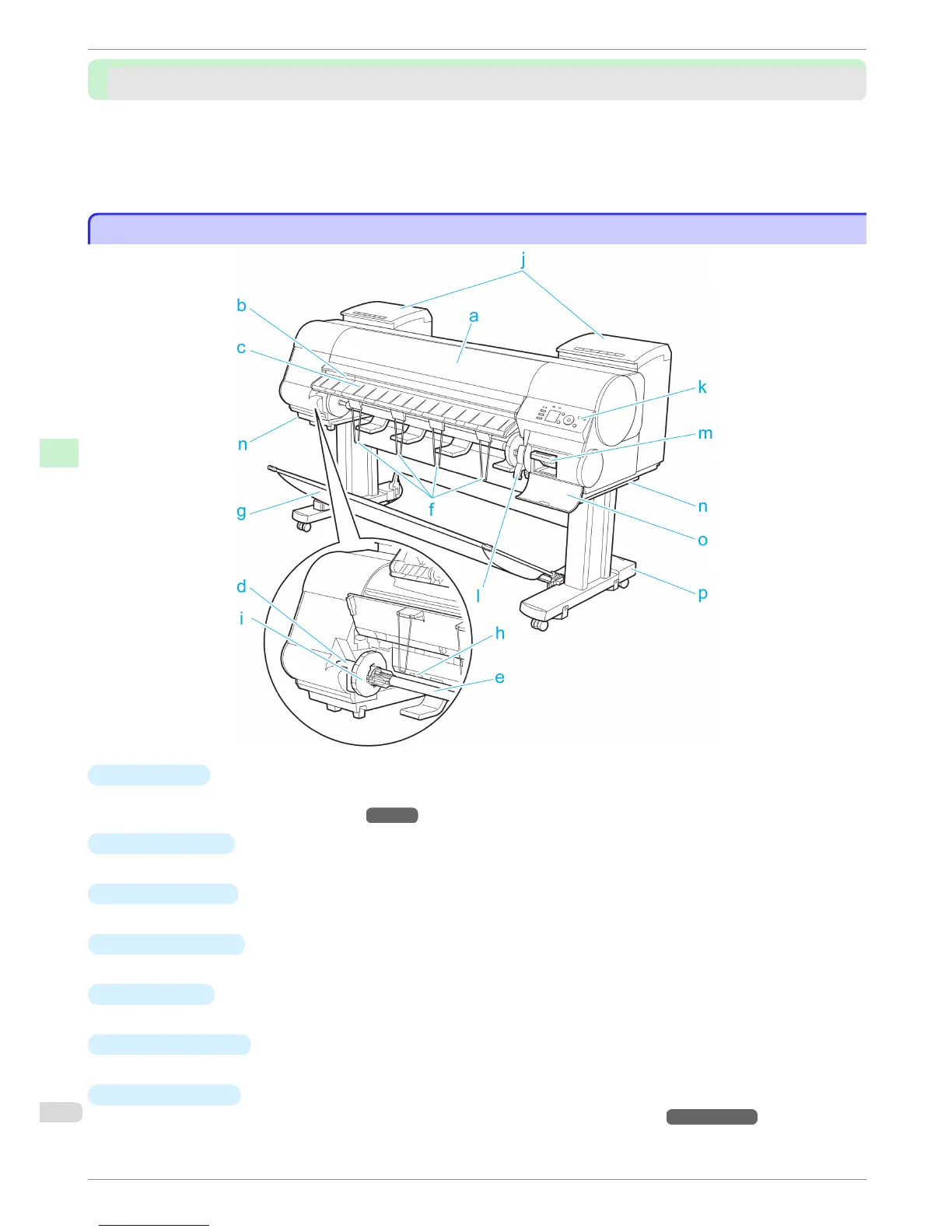
Front
Front
a
Top Cover
Open this cover to install the Printhead, load paper, and remove any jammed paper from inside the printer as
needed. (See "Top Cover (Inside).")
→
P.71
b
Cutter Groove
Paper is cut (using the cutter or manually with scissors) over this groove.
c
Ejection Guide
Guides printed documents as they are ejected. Raise the guide when loading a roll.
d
Roll Holder Slot
Slide the Roll Holder into this slot.
e
Roll Holder
Load the roll on this holder.
f
Ejection Support
Prevents printed documents from winding around the Roll Holder or being drawn into the Paper Feed Slot.
g
Output Stacker
A cloth tray that catches ejected documents. (See "Parts of the Output Stacker.")
→
User's Guide
Front
iPF8400
Basic Guide
Printer Parts Printer parts
68














 To Next Page