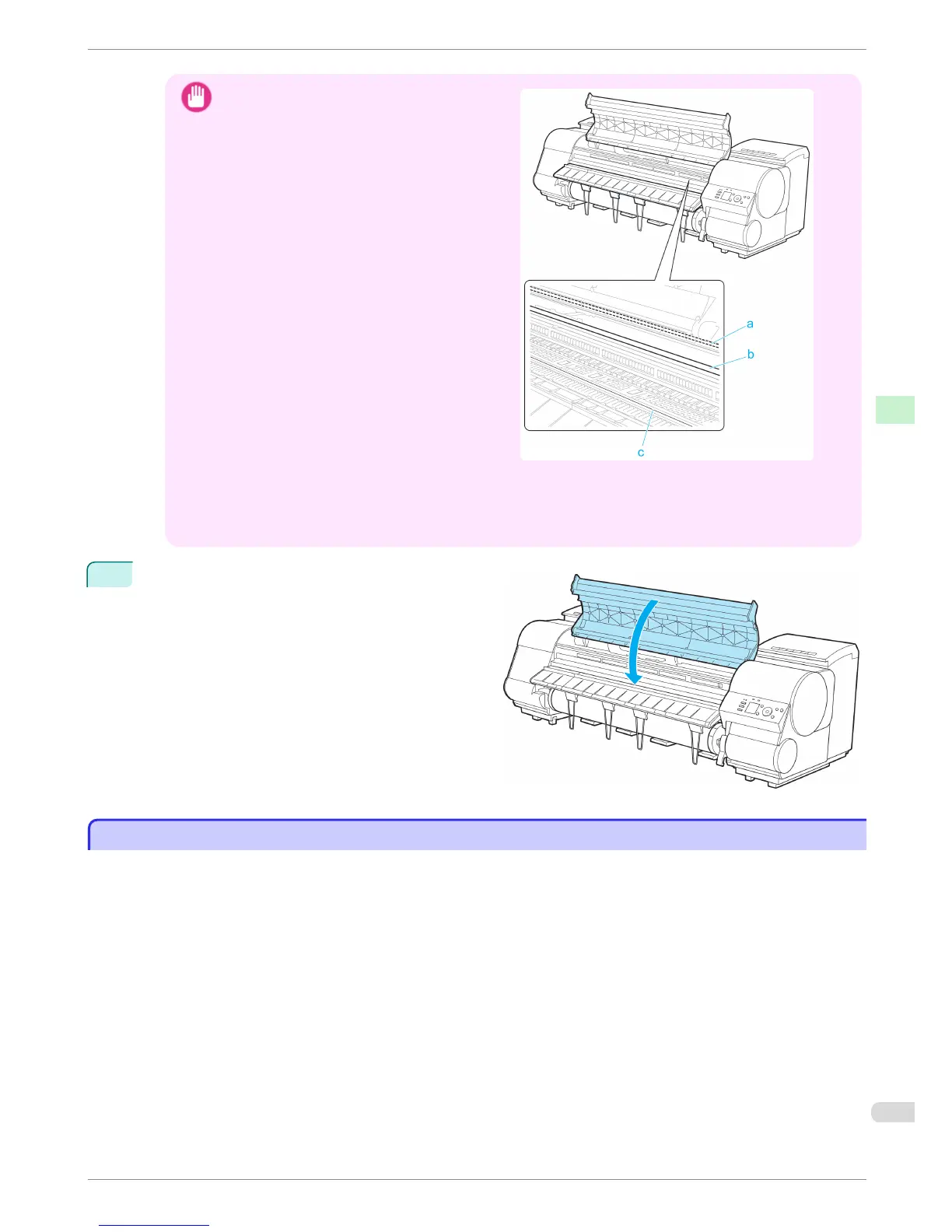
Important
•
Do not touch the Linear Scale (a), Carriage
Shaft (b), or Fixed Blade (c). This may stain your
hands and damage the printer.
•
Do not use a dry cloth to wipe inside the Top Cover. This may create a static charge, which may attract dust
and affect the printing quality.
• Do not touch the clear sheet on the side of the Top Cover Roller. This may damage the roller.
4
Close the Top Cover.
Cleaning the Printhead
Cleaning the Printhead
If printing is faint, cleaning the Printhead may improve results.
Choose one of two Printhead cleaning modes (Head Cleaning A or Head Cleaning B), depending on the problem
to resolve.
•
Head Cleaning A
Use this mode if printing is faint or contains foreign substances. This method of cleaning consumes the least
amount of ink.
It takes about four minutes to complete.
•
Head Cleaning B
Use this mode if no ink is ejected at all, or if Head Cleaning A does not solve the problem.
It takes about five minutes to complete.
iPF8400
Cleaning the Printhead
Basic Guide
Consumables and Maintenance Cleaning the Printer
55














 To Next Page