j
Linear Scale
The linear scale serves a key role in detecting the Carriage position. Be careful not to touch this part when
cleaning inside the Top Cover or clearing paper jams.
k
Switch
Set the switch to the side opposite ● if the edges of printed images are blurred. Set the switch to the ● side
before borderless printing. (See "Setting the Blue Switch on the Platen.")
→
P.118
Carriage
Carriage
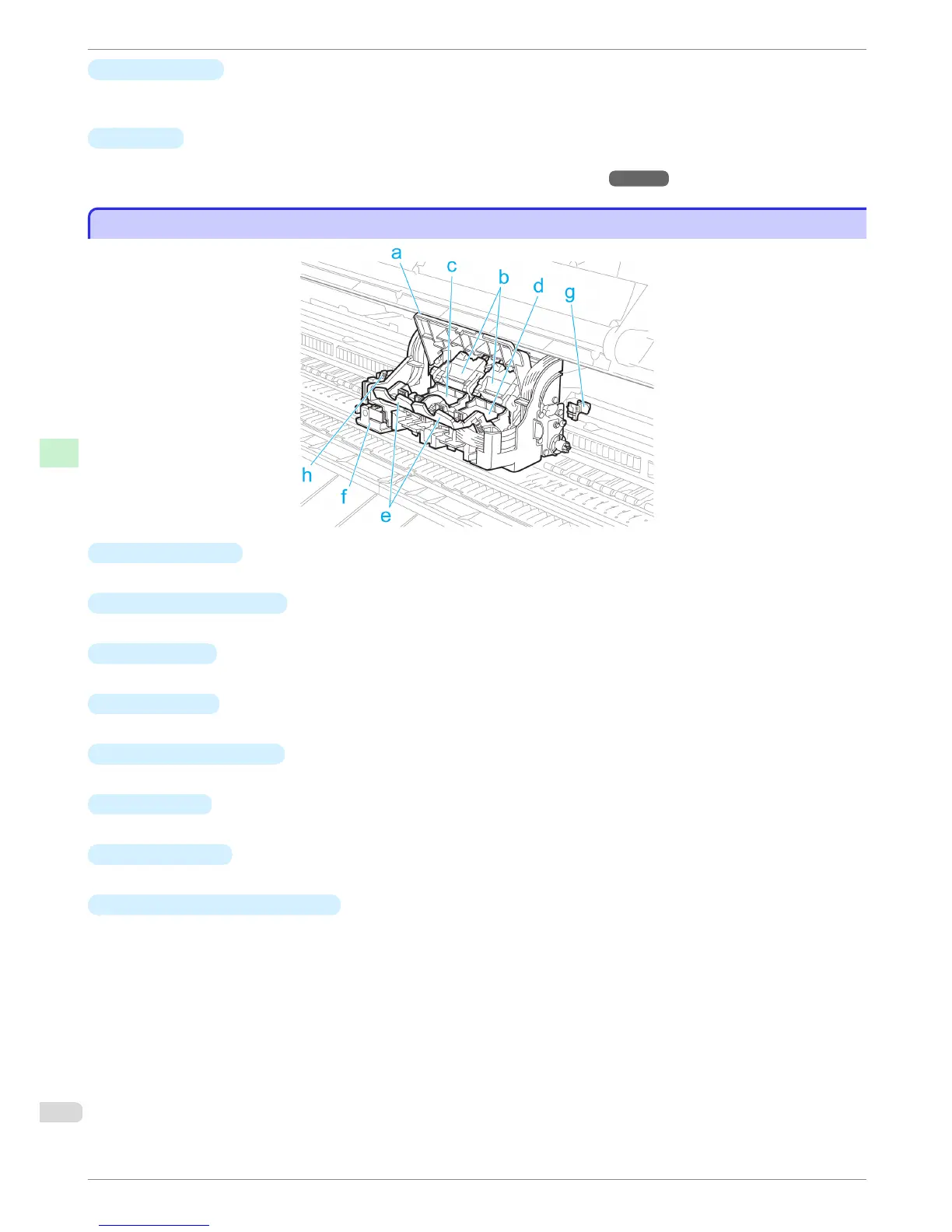
a
Carriage Cover
Protects the Carriage.
b
Printhead Fixer Cover
Holds the Printhead in place.
c
Printhead L
The printhead is equipped with ink nozzles. The carriage serves a key role in printing.
d
Printhead R
The printhead is equipped with ink nozzles. The carriage serves a key role in printing.
e
Printhead Fixer Lever
Locks the Printhead Fixer Cover.
f
Cutter Unit
A round-bladed cutter for automatic paper cutting. Retracted when not in use.
g
Shaft Cleaner
Prevents the Carriage Shaft from becoming dirty.
h
Cutter Unit Detachment Lever
Used when replacing the Cutter Unit.
Carriage
iPF8400
Basic Guide
Printer Parts Printer parts
72














 To Next Page