019A-075
This section describes the procedure for moving the toner cartridges to the replacement position by using the Printer Status
Window.
You cannot move the toner cartridges to the replacement position such as when the printer is busy printing, preparing
to print, or operating.
Move the toner cartridges to the replacement position when the printer stops operating.
NOTE
When moving the toner cartridges to the replacement position by using the [
] (Paper) key on
the printer
You can also move the toner cartridges by using the [
] (Paper) key on the printer.
"Moving Toner Cartridges by Using Paper Key on the Printer"
1
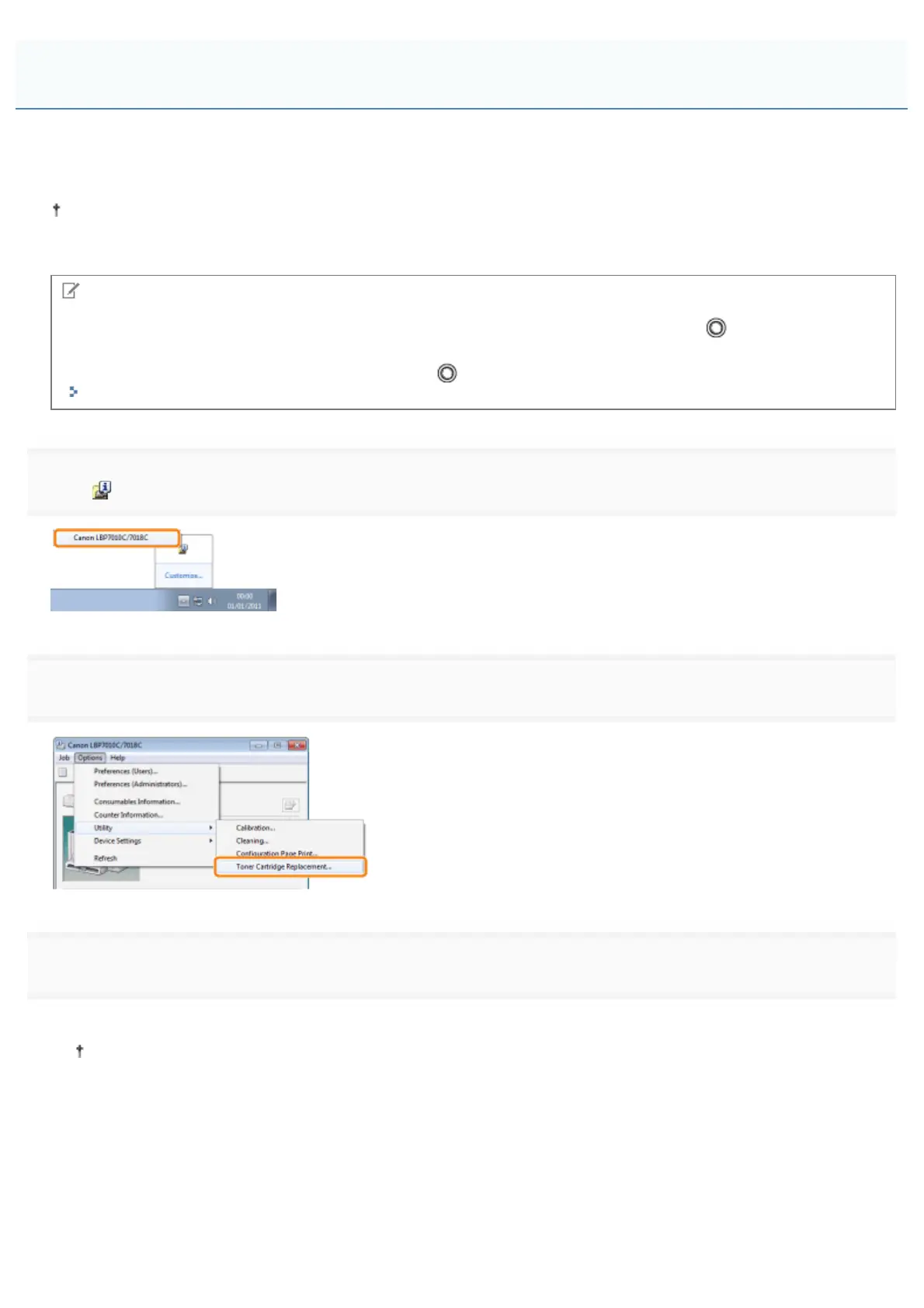
Click [ ] displayed in the task tray, and then select a printer name.
2
3
Click the button for the colors you want to move to the replacement position.
ĺ The toner cartridge of the color you clicked moves to the replacement position.
Do not open the top cover while the toner cartridges are moving.
Moving Toner Cartridges to Replacement Position Manually
㻢㻣㻌㻛㻌㻟㻠㻟












 To Next Page