
 Need help?
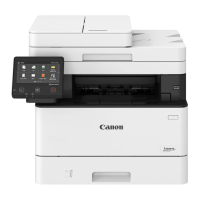
Do you have a question about the Canon MF453dw and is the answer not in the manual?
Verify all components are present before setup.
Instructions on safely removing protective packaging.
Guide on how to properly load paper into the machine.
Steps for installing optional components, such as the cassette feeding module.
How to connect the machine to a power source.
Configure initial language, region, and date/time.
Configure settings to prevent unauthorized access.
Setup for connecting the machine to a network (Wi-Fi/LAN).
Final steps and completion of the setup process.
Instructions for installing necessary software and drivers.
Configuration steps for the fax function.
 General
| Print Technology | Laser |
|---|---|
| Print Resolution | Up to 600 x 600 dpi |
| Duplex Printing | Yes |
| Monthly Duty Cycle | Up to 80, 000 pages |
| Display | 5-inch Color Touchscreen |
| Connectivity | USB, Ethernet, Wi-Fi |
| Scan Resolution | Up to 600 x 600 dpi |
| Duplex Scanning | Yes |
| Copy Resolution | Up to 600 x 600 dpi |
| Functions | Print, Copy, Scan, Fax |
| Operating System Compatibility | Windows, Mac OS, Linux |
| Print Speed | Up to 40 ppm |
| Maximum Paper Capacity | 900 sheets |
| Mobile Printing | Apple AirPrint, Google Cloud Print, Mopria Print Service, Canon PRINT Business |
| Scanner Type | ADF and Flatbed |
| Copier Speed | Up to 40 cpm |
| Fax Resolution | Up to 400 x 400 dpi |
| Standard Paper Capacity | 250 sheets |








 To Next Page