Do you have a question about the Canon mf4580dn and is the answer not in the manual?
Read this guide before operating the product and store for future reference.
Instructions for installing the telephone handset.
Read this manual first for machine installation, settings, and cautions.
Read this manual next for software installation procedures.
Read the desired chapter to suit your needs for detailed information.
How to select items and move the cursor within the menu.
Instructions for entering text, symbols, and numbers.
Specify fax number, unit name, and receive mode using the Fax Setup Guide.
Connect the telephone cable as shown when <Connect phone line> appears.
Details on connecting and configuring the network interface.
Steps for installing the necessary drivers and software.
Instructions for various copying functions like enlargement, reduction, and 2-sided copy.
Details on printing functions such as booklet printing and poster printing.
Guides for sending and receiving faxes, including PC Fax.
Steps for scanning documents using the machine's panel or computer.
Information on setting up network connectivity for the machine.
Instructions for accessing and managing the machine via a web browser.
Safety precautions for installing the machine.
Safety precautions for the power supply and cord.
Safety precautions when operating and moving the machine.
Recommended operating temperature and humidity ranges.
Guidelines to prevent condensation inside the machine.
Important notes before connecting the power cord.
Read this guide before operating the product and store for future reference.
Instructions for installing the telephone handset.
Read this manual first for machine installation, settings, and cautions.
Read this manual next for software installation procedures.
Read the desired chapter to suit your needs for detailed information.
How to select items and move the cursor within the menu.
Instructions for entering text, symbols, and numbers.
Specify fax number, unit name, and receive mode using the Fax Setup Guide.
Connect the telephone cable as shown when <Connect phone line> appears.
Details on connecting and configuring the network interface.
Steps for installing the necessary drivers and software.
Instructions for various copying functions like enlargement, reduction, and 2-sided copy.
Details on printing functions such as booklet printing and poster printing.
Guides for sending and receiving faxes, including PC Fax.
Steps for scanning documents using the machine's panel or computer.
Information on setting up network connectivity for the machine.
Instructions for accessing and managing the machine via a web browser.
Safety precautions for installing the machine.
Safety precautions for the power supply and cord.
Safety precautions when operating and moving the machine.
Recommended operating temperature and humidity ranges.
Guidelines to prevent condensation inside the machine.
Important notes before connecting the power cord.
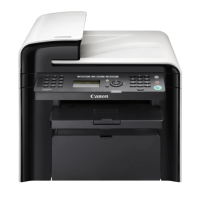
| Functions | Print, Copy, Scan, Fax |
|---|---|
| Print technology | Laser |
| Automatic Document Feeder (ADF) | Yes |
| ADF Capacity | 50 sheets |
| Scan Resolution | 600 x 600 dpi |
| Copy Resolution | 600 x 600 dpi |
| Fax Speed | 33.6 Kbps |
| Paper Input Capacity | 250 sheets |
| Paper Output Capacity | 100 sheets |
| Maximum Paper Size | Legal |
| Connectivity | USB 2.0, Ethernet |
| Network Ready | Yes |
| Display | LCD |
| Type | Multifunction |
| Duplex Printing | Yes |
| Scanner Type | Flatbed, ADF |
| Operating System Compatibility | Windows, Mac, Linux |
| Dimensions (W x D x H) | 15.4 x 14.6 x 12.5 inches |
| Weight | 11.4 kg (25.1 lbs) |


Loading...